
We did inform you about PwnageTool bundles which were released yesterday to jailbreak iPhone 3GS on iOS 4.0 (formerly iPhone OS 4), while preserving your baseband on the older 05.11.07 or 04.26.08 so that you can unlock it using ultrasn0w or blacksn0w. We got lots requests via twitter, facebook and email for full instructions on how to patch the existing version of PwnageTool so that it can work with iOS 4.0 GM release. And so here are the complete set of instructions for you to get it to work.
[Important Update: Final version of this guide for iPhone 3GS with PwnageTool is posted here. For iPhone 3G and iPod touch 2G, use Redsn0w guide posted here.]
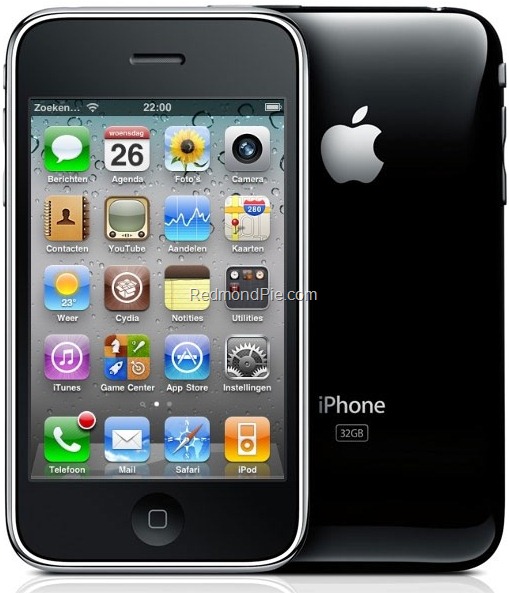
Warning / Note: Perform the following instructions at your own risk only. I am not responsible if you end up bricking or locking your phone. Only proceed if you are an advanced user, and know what you are doing. Otherwise, wait for the official tools which would be out soon.
Supported Device(s):
iPhone 3GS ONLY, with older bootrom which has at least been jailbroken once with either redsn0w, PwnageTool, Blackra1n or Sn0wbreeze. If your phone is one of those with newer bootrom, and has only been jailbroken with Spirit, this is not for you. You will end up getting 1600/1604 error when restoring the custom cooked firmware via iTunes.
What is working and what isn’t?
I have tested it and it worked for me. But since I don’t rely on an unlock, I couldn’t test the ultrasn0w or blacksn0w part. Of all the reports that I have got from various testers, I can confirm that this method will preserve your baseband, but ultrasn0w or blacksn0w unlock wont work now as they need an update for iOS 4. So if you rely on an unlock, I will suggest you stay away from this, but if you desperately want to jailbreak your device, you can do it now while preserving your baseband but you will only be able to unlock it once ultrasn0w update is released in approx. two weeks time.
Step 1: Download PwnageTool 3.1.5 from the download link given here.
Step 2: Download the latest version of PwnageTool Bundles from msft.guy here and then extract it to your desktop.
Step 3: Download iOS 4.0 for iPhone 3GS, and iTunes 9.2 Beta for Mac. You can get the official bits if you are a registered developer, or from different content sharing sites around the web. Please do not ask for the download links, a simple Google will do it all !
Step 4: Download the updated Cydia bits (data.tar file) from here.
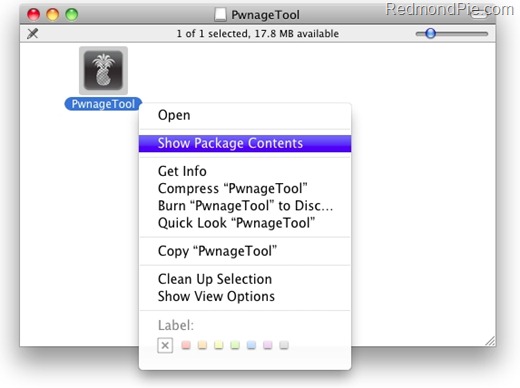
Step 5: Copy PwnageTool that you downloaded in Step 1 to your desktop. Right click, and then click on “Show Package Contents” as shown in the screenshot below.
Step 6: Navigate to Contents/Resources/FirmwareBundles/ and paste iPhone2,1_4.0_8A293_bundle.bundle file in this location and then simply close this folder.
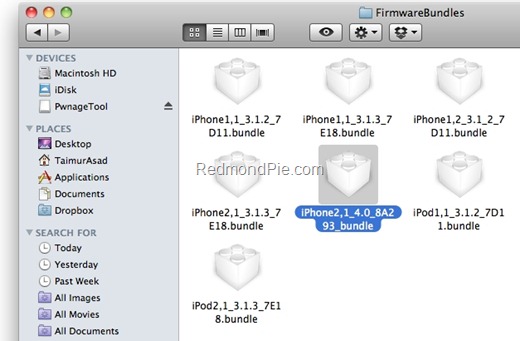
Step 7: Now navigate again to Contents/Resources/CustomPackages/CydiaInstaller.bundle/files/ and paste data.tar file (for Cydia) that you downloaded in Step 4.
Step 8: Start “Terminal” program on your Mac and run the following commands:
cd desktop
cd PwnageTool.app/Contents/Resources/CustomPackages/CydiaInstaller.bundle/files/
tar -xPvf data.tar
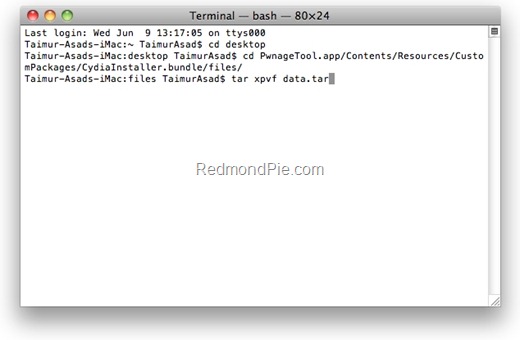
once you are done, close all the open windows.
Step 9: Now start this patched version of PwnageTool, Select iPhone 3GS as your device and you will now notice that PwnageTool will automatically detect iOS 4 firmware file as shown in the screenshot below.
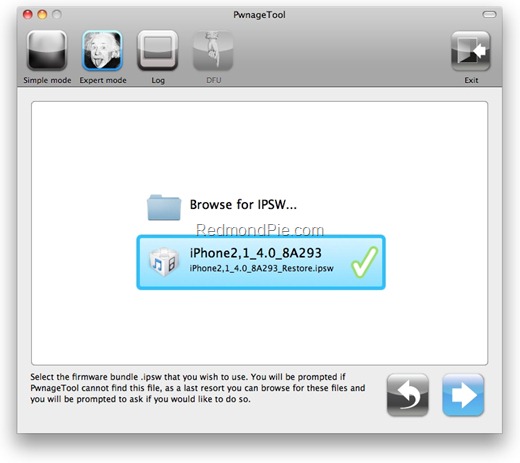
Step 10: Simply follow Step 5 to Step 7 posted here to create a custom-cooked iOS 4 firmware file which will preserve your old baseband.
Step 11: Once the .ipsw file has been created, you will now have to restore your iPhone to this custom firmware 4.0 that you just cooked using PwnageTool 3.1.5 for your iPhone 3GS. Start iTunes 9.2 Beta, Click on your phone icon from the sidebar in iTunes. Now press and hold left “alt” (option) button on the keyboard and then click on “Restore” (Not “Update” or “Check for Update”) button in the iTunes and then release this button.
This will make iTunes prompt you to select the location for your custom firmware 4.0. Select that custom .ipsw file and click on “Open”.
Step 12: Now sit back and enjoy as iTunes does the rest for you. This will involve a series of automated steps. Be patient at this stage and don’t do anything silly. Just wait while iTunes installs the new firmware 4.0 on your iPhone. Your iPhone screen at this point will be showing a progress bar indicating installation progress. After the installation is done, iPhone will restart automatically and you should now have a fully jailbroken iPhone 3GS running on iOS 4.0.
UPDATE 1: There were some errors in the post above which I have now fixed. Thanks to everyone for pointing it out in the comments.
You can follow me on twitter or join our facebook fanpage to keep yourself updated on all the latest iPhone jailbreaking and unlocking releases.


Windows 7
Windows Vista
Windows Server
Windows Live
Live Mesh
iPhone
iPad
Mac OS X


September 3rd, 2010
View Comments on "Jailbreak iOS 4.0 with PwnageTool – Complete How to Guide"
(#)
Would this work on iPhone 3gs 3.1.3 05.11.02?
(#)
how about iphone 3g baseband 05.12.01???????™
(#)
Is there a compatibility sheet started yet? Which JB apps work and which ones don't?
(#)
what about the Unlock for baseban 05.12.01
(#)
For me, the tar command on step 8 resulted in errors stating: “Cannot extract through symlink”. To fix it required a capitalized “P” option instead of “p”.
The command should read: tar -xvPf data.tar
(#)
its not activating :S
(#)
Last login: Wed Jun 9 21:40:55 on ttys000
anthony-gs-macbook:~ AG$ cd desktop
anthony-gs-macbook:desktop AG$ cd PwnageTool.app/Contents/Resources/CustomPackages/CydiaInstaller.bundle/files/
anthony-gs-macbook:files AG$ tar-xpvf data.tar
-bash: tar-xpvf: command not found
anthony-gs-macbook:files AG$ tar xpvf data.tar
tar: Error opening archive: Failed to open 'data.tar': No such file or directory
anthony-gs-macbook:files AG$ tar -xpvf data.tar
tar: Error opening archive: Failed to open 'data.tar': No such file or directory
anthony-gs-macbook:files AG$ tar xpvf data.tar
tar: Error opening archive: Failed to open 'data.tar': No such file or directory
anthony-gs-macbook:files AG$ tar-xpvf.tar
-bash: tar-xpvf.tar: command not found
anthony-gs-macbook:files AG$ tar xpvf data.tar
tar: Error opening archive: Failed to open 'data.tar': No such file or directory
anthony-gs-macbook:files AG$ tar xpvf data.tar
tar: Error opening archive: Failed to open 'data.tar': No such file or directory
anthony-gs-macbook:files AG$
(#)
Perfect, baseband preserved at 5.11.07. Works well. Cydia doesn't run though. Mine is factory unlocked so can't check on Blackra1n.
(#)
cydia crashes even before loading
..any suggestions?..i did extract the data.rar in the cydio directory
(#)
Cydia definitely doesn't work!
(#)
Step 7: Now navigate again to Contents/Resources/CustomPackages/CydiaInstaller.bundle/ and paste data.tar file (for Cydia) that you downloaded in Step 4.
Should be: “cd Contents/Resources/CustomPackages/CydiaInstaller.bundle/files/” and paste data.tar file (for Cydia) that you downloaded in Step 4.
(#)
I get a error 1600!!! can anyone please help me?? I followed everything correctly… I put the iPhone in DFU mode and it still does it!!
(#)
my 3gs 16gb was jb n unlocked ( 3.1.2 + 5.11.07 ) but i made mistake with applying Spirit again, now it cant be turn on.
I want to know if this method above can make my phone activated without att simcard + jb + unlock ( as it will stay on 5.11.07) ?
(#)
Please stop ask for unlock 3.1.3 bb05.12.01, wait until 21th June….
(#)
Baseband: 05.11.07
Bootloader: 6.4
Model: MB717
No joy, 1604 error.
(#)
any iOS 4.0 mobileinstall patch????…
(#)
It's NOT activated! Be aware!
(#)
we need a carrier unlock for the 3gs bb 05.12.01 pleaseee! when is this gunna be released?
(#)
hey my iphone 3gs was jailbroken with pwnagetool(3),blacksn0w(3.1) and now spirit(3.1.3)
so this works for me?
(#)
Cydia doesn't run, would be nice to mention that BEFORE going to JB iOS4
(#)
Cydia actually runs, I may have had network issue when I try first
(#)
step 7 and 8 are wrong
you have to put the data.tar in another map 'files' in cydiainstaller.bundle.
the screenshot is right though.
(#)
thanks for that comment… I think that's what's causing cydia to fail on launch… trying to redo all of it with proper location for data.tar…. hope it works, or I'll just wait until official release.
pal
(#)
Your right!
When typing in command prompt type
cd desktop
cd PwnageTool.app/Contents/Resources/CustomPackages/CydiaInstaller.bundle/files/
tar -xpvf data.tar
(#)
tar command fails because of the var symlink… any suggestions?
(#)
Thanks!!!
(#)
When I have upgraded to 4.0 GM from 3.1.3 jailbroken (pwn tool NOT spirit) and now I want to jailbreak it with this thing, do I need to downgrade to 3.x or can I do it right now?
(#)
FYI… after following this guide and finally running Cydia (for me) it pops the preference option for which packages to show. Cydia would repeately just crash. However, when I quickly tap one of the options as soon as it's presented, Cydia stopped crashing. Then you just let Cydia update itself and you're golden.
(#)
Also, I agree we need a list of working/non-working Jailbreak applications for iOS4 now too. I'm not getting far with any tweaks, but looks like most standalone apps are working alright.
Failing:
Winterboard – Installs, but crashes Mobile Substrate
SBSettings – Installs w/o error, but doesn't launch when triggered on status bar (I even tried the beta version)
Backgrounder – Package won't allow installation on 4.0
Music Controls – Installs w/o error, but says not supported when running apps
MyWi – Installs, but crashes Mobile Substrate
Running:
AppSync 4.0
GrooveShark
GV Mobile +
Installous
Respring 4 (Beta) [the non-beta doesn't appear to work]
Ringtones that don't require Winterboard
Not Sure:
Activator – Installs, but can't get anything that uses it to run
PDANet installs and looks to run, but I haven't tried actually using it yet.
(#)
Plz can some 1 tell me wat i can do.. I can't use my iPhone any more.. Because of the 1600 error.. Can I undo it or something like that? Plz let me know.
(#)
Now I get a 1015 error. Plz help .
(#)
use capital P for -xPvf
(#)
Note that this won't work if you're iPhone has the new bootrom hasn't been jailbroken before, I know i've tried it. You need to downgrade to 3.1.3, jailbreak it with whatever you want and then try this how to.
(#)
Hmm .. I followed the instructions and when in pwnage tool, there's no options for Custom Package Settings .. usually there's cydia there. What's wrong?
(#)
yikes too complicated, i'll just wait
(#)
If I'm on iPhone 3G with baseband 05.11.07 will I be able to preserve that and unlock?
(#)
To everyone getting the 1600 error. My 3G-S was on 3.1.3 firmware jailbroken with Spririt. I tried DFU, recovery mode, regular restore, nothing worked. Then I downgraded to 3.1.2 stock firmware because I noticed somewhere it said pwnagetool doesn’t support 3.1.3 non-jailbroken (and since Spirit is a userland jailbreak, basically the firmware itself is still stock).
Once I was on 3.1.2 I tried DFU, recover, regular again and still nothing worked. Finally I tried jailbreaking the 3.1.2 with redsnow (which is a full jailbreak) which worked, then did a regular restore in iTunes (i.e. just plugged in phone and option-clicked restore) to install the pwned 4.0 GM.. AND IT WORKED! I’m looking at my jailbroken 4.0 GM 3G-S right now
Hope this helps some people, I was trying for hours!”
Could someone please test this on a 3GS with newer Bootrom?
Thx
(#)
Where is the iphone1,2_4.0_8A293_bundle for the iPhone 3g? I can jailbreak the iPhone 3g with 4.0 GM using redsn0w but it will upgrade the base band to 05.13 and become unlockable (at the moment). Is there a iPhone 3g bundle coming or do we just have to wait? Where's the love for iPhone 3g users?
(#)
Hey Thanks but..i have a huge problem. i have tried to restore with customize IPSW with pwnagetool as the tutorial describes. but now i cannot activate the iphone is writing ENTER CORECT SIM CARD but i have no at&t sim..
what happend? does the baseband upgraded!? i used only the customize file as here..what now? thanks!
(#)
I can't paste into the FirmwareBundles map in Step 6? Can somebody help me?
(#)
Copy to icon to desktop then show package.
(#)
I am also having this problem, can anyone tell us the solution
thank you
(#)
You have to drag the PwnageTool.app to the desktop first.
(#)
Hi Edgar,
Just wondering if you have solved your problem coz am also facing the same problem, anyone suggested any solutions yet?
(#)
i can't do this either. anyone have any suggestions on fixing this problem.
(#)
cd desktop
cd PwnageTool.app/Contents/Resources/CustomPackages/CydiaInstaller.bundle
tar -xpvf data.tar
this is wrong
ITscd desktop
cd PwnageTool.app/Contents/Resources/CustomPackages/CydiaInstaller.bundle/files/
tar xpvf data.tar
(#)
Copy the PwnageTool.app to your desktop first
(#)
I restored to non JB 3.1.3 then did a restore to JB package with pwnagetool. WORKED. If you attempt to restore to a 4.0 phone that was upgraded to 4.0 from a spirit jb'd 3.1.3 funky things will happen.
(#)
same problem here, I noticed the the instructions and the terminal photo don't match
(#)
I end in the Emergency call screen. I have an iPhone 3GS 5.11.x (i hope so), old bootrom.
the terminal photo and the instructions mismatch. any how I did the tar -xPvf inside de .bundle/file.
any suggestions?
(#)
does this also allow you to keep 5.12.01 baseband from 3.1.3? because an unlock will be out for it next week or so, and i want to know if it also applies to it
(#)
junkfoodinc, youre the master!!! your trick worked for me too!! thanks..
(#)
didnt work for me
(#)
Fail. Followed instructions to the T, twice, and I just get left at the “Emergency Calls Only” screen.
(#)
im new in this, but this is only works with MAC?..where can i found pwnagetool for windows that works whit this firm
(#)
iOS4 is running fine, but cydia immediately crashes on launch even though i updated the installer bundle. Anyone have an idea as to what the problem could be? Re-tried the restore several times, and still the same result.
(#)
pownage tool wont automatically detect iOS 4 firmware file. when i browse file it says wroung firmware bundle selected. any suggetions
(#)
to get into bundles you must have a pc…. it acts as a folder, and you just place the file inside the bundles folder. MAC OSX reads .bundle as a stand alone file which doesn't let you place anything inside
(#)
I am trying to go through the terminal process but when i gat to adding
tar -xpvf data.tar i get a no such file error. can anyone help please
(#)
anybody know if this will leave me with a jailbroken and unlocked 3gs running ios 4 or just jailbroken
(#)
same here…
(#)
hello i need some help i updated to gm ios 4 and i have the new baseband 5.13.04 i have a 3gs 16gb i then downgraded and jailbroke again and that was successful still with same baseband. now when i make the custom firmware successfully with p tools and restore with itunes it just stays on the (prepairing iphone for restore).
help me please has anybody put os 4 (jailbroken) after upgrading there baseband to the above number
(#)
You can navigate into .bundle with terminal. Then, juste mv your package.
(#)
I get the “Emergency Calls ONLY” screen…
(#)
macs are the biggest pile of shite! I have spent the last 2 hours trying to work out how to paste the bundle file as described above and it just cant be done. How complicated can it be. On a PC my son can do it. He is 3.
(#)
you can just right click and view package contents…
(#)
I had that same problem. I found an AT&T sim card and used it for a minute to get iTunes to continue the restore.
The problem I have now is Cydia crashes immediately upon launch. I must of done something wrong while adding the bundles. Who should I follow the instructions from? The post or the comments?
(#)
Jailbroken only, but I believe the devteam just released a jailbreak for baseband version 04.26.08 in 4.0. Make sure you click 'NO' to the question in Pwnage about having an official phone. You may need an SIM from the carrier you are locked to to activate. Personally, I'd just stick with what you have for now. Folders and a custom background are the only things I'm using now and I was able to do those with Jailbreak for awhile.
(#)
Where is the windows tutorial??
(#)
I have a 3G with an older baseband (4.26.08) am I able to do something similar to get onto 4.0GM without upgrading my baseband? I need to preserve my unlock ability. Thanks
(#)
I copied the files into the pwnagetool as described, but pwnagetool doesnt recognize the ios4 firmware… any ideas??
(#)
How do you activate? I am stuck at the activation after doing this.
(#)
Getting the same error as TrevorK (Wrong firmware bundle selected) followed all steps outlined above. This is on a 3GS already jailbroken, running 3.1.2., OSX 10.6.4.
Anyone find a workaround?
(#)
Same here. Using the GM version although this is the same as final release apparently.
(#)
“Wrong firmware bundle selected” for me too.
Is the file that's copied to Contents/Resources/FirmwareBundles/ supposed to be named 'iPhone2,1_4.0_8A293_bundle' (as shown in the image in the how to), 'iPhone2,1_4.0_8A293_bundle.bundle' (as referred to in the text above the image in the how to) or 'iPhone2,1_4.0_8A293.bundle' (which would be consistent with the files already in that location?
(#)
Salut Andrei ai reusit?SI eu tot pe acolo sunt…
(#)
Running 3GS iOS4 (Never Jailbroken or Unlocked).
I am running Modem Firmware 05.13.04
Is this combination able to be jail broken yet, if so where do I start? A lot of these say they only work if it has been previously jail broken.
(#)
Wrong firmware bundle every time this fails does not work at all…
(#)
I'm getting the same error “Wrong firmware bundle selected,” followed the instructions to the T. I also have a jailbroken 3GS at 3.1.2 and am running OS X 10.6.4. Anyone have any insight as to why this is happening?
(#)
After doing all instructions, itunes gives me the 1600 error!
Any Suggestions?
(#)
This only works with Golden Master iOS 4.0…it doesn't work with the 'Official' iOS4 that was released today…
(#)
Me too! The same error…
(#)
any guide for windows users?
(#)
after trying to restore, i got the 1604 error. can anyone help me, tell me what to do? i did precisely everything from the list, but i dont know how i got this error…
thanks
(#)
same problem as TrevorK and B_A_R!!
(#)
I have been struggling with the wroung firmware bundle selected for the past 2h … anyone has found a fix for this??? all is fine till there.
Thank you for all that made this possible!!! but we still need some more help or guidance.
(#)
I have the same problem.I googled it like crazy.No answer.I downloaded the firmware for ios 4 from 3 diff places.Nothing…
(#)
I have the same problem.I googled it like crazy.No answer.I downloaded the firmware for ios 4 from 3 diff places.Nothing…
(#)
when i try to restore it to the newly created pwnage tool file, its gives me 1604 error and then i have to restore it to ios 4. ANYONE?
(#)
any solution for the wrong firmware bundle selected error?
this is the log file output:
2010-06-21 18:47:08 – Loaded .ipsw file from '/Users/[me]/Library/iTunes/iPhone Software Updates/iPhone2,1_4.0_8A293_Restore.ipsw'.
2010-06-21 18:47:10 – Can't recognize .ipsw file.
(#)
Yea im in the same boat. I tried the rename suggestion to .bundle and also noticed the comment below that this is for the Golden Master release.
(#)
I guess i have found the answer to my question below on “VolanteDB9″ post.
i guess the dev did not test this properly before releasing. ALL the instructions are supposed to work ONLY with the Gold Master release (i personally don't have the GM and i was not able to confirm this)
Please keep us posted once this issues has been fixed!
Thank you ALL
(#)
Hi.. PwnageTool for windows?
(#)
Ok Guys, I Figured out the problem with it not finding the iOS4 Firmware!!! Finally… Ok, basically they left a step out in the guide. You have to open up the iPhone OS 4…dmg file. (The GM Seed). That file has the IPSW file you need inside of it. You can copy that out, or just select “Browse for IPSW…” when pwnage tool gets to that point and then just browse to the file inside the dmg. After you do that, just proceed as described. I did this and can confirm it does work!
(#)
my pwnage tool wont recognize the firmware :-S, i downloaded the official os 4.o from apple today
(#)
lol love how no one responds to the windows users
(#)
TrevorK do you have the direct link for the GM dmg file by any chance? i downloaded OS 4 directly from apple today and i am not sure i even know what the GM file is
cheers
(#)
I have iOS4 gold master but i also get the 1604 error. I have tried both the expert mode and the simple mode in Pwnagetool but could not get past the 1604 error. In the past (iPhone OS 3.1), when i have the 1604 error, all i had to do was to redo the restore and it would work. Not this time.
(#)
hey guys so this only works for the golden master (GM) version of iOS4, and NOT the official apple version. how can we get this firmware? can anyone provide a link please?
(#)
Does anyone know if it has to be the iTunes 9.2 beta, or can it be the official release?
(#)
check on the file iphone2,1_4.0_8A293_bundle
see if the “.bundle” file extension is in it.
(#)
… trying if it works with a iPod Touch 2g mc model…
(#)
did you update your iTunes 9.2?
If so you got an error, but let's try on iTunes 9.2 beta
tell me if it works
(#)
What about Ipod touch MC-Models? If it is possible to jailbreak the 3gs, is it possible for the MC iTouch?
(#)
I have a 3gs that at one point was JB'd with Blackra1n. I accidentally upgraded to 3.1.3. I was out of luck until Spirit was released. I am unclear if I can use PwnageTool to JB my device on iOS4. Anyone have insight?
(#)
because of your baseband. to install back 3.1.3 you much restore your idevice then run blackra1n
(#)
seems like im having the same probs as lots of people, p tool just dosnt recognize the ipsw. dose anyone have a clue what were doing wrong??
(#)
PwnageTool didn't react at the “search for ipsw”. If i would Browse for it, it doesn't work (it doesn't matter if the Pwnagetool is patched or not).
I am running Mac OS X 10.6.4 whats wrong? After This i need to kill the process oO
(#)
Hi. I can't write to the .dmg file when I browse the contents. I've opened “Get more Info” clicked the padlock and it is still greyed out. While it says custom permissions and even “Read & Write” I'm unable to add files to the folders. Any hints would be appreciated. I'm running 10.6.4
(#)
how do you open the cydiauinstaller.bundle to put the data.tar inside?
(#)
Hi,
After you jailbreak and unlock it, Can that be used in other countries, say in India by removing the AT&T sim-card and replacing it by some other sim-card?
(#)
help, did everything as described, when I select the custom 4.0 file for my 3gs iTunes says “Preparing iPhone for restore” forever and then gets an error 1604.. Anyone knows what I'm doing wrong?
(#)
Hi, Just wondering about Jailbreaking
Will it affect:
Music
Current Apps
Contacts
SMS Messages
Settings
And what are the pros? I've heard you can get apps for free which is the main reason I may jailbreak
Oh and what happens when a new software comes out? Same question applied to when new app updates come out?
Thanks
(#)
Can we also have a windows friendly guide please
(#)
click right and show package
(#)
you have to get out of dmg
(#)
WINDOWS??????????
(#)
when likely officially jailbreak be release
(#)
Right click >show packages
(#)
have you jailbreaken before this? if not then it clearly says you will get an error message under the “supported devices” section
(#)
yes
(#)
“If your phone is one of those with newer bootrom, and has only been jailbroken with Spirit, this is not for you. You will end up getting 1600/1604 error when restoring the custom cooked firmware via iTunes.”
(#)
what basebands does it work on
(#)
Why does it fail to mention in the instructions that you need an authorized SIM card to activate?
(#)
I updgraded to iOS4 on my 3GS and have never jailbroken before. What should I do first to be able to jailbreak it?
(#)
im using a macbook pro. and i cannot seem to do step 6. it wont let me drag the bundle into the firmware bundle folder.
Can anyone please reply back with a solution. Thanks!
(#)
Guys Pwnage tool 4.01 is released. Use that! It will work on the officially released IPSW (not GM). Also, no need to do the tweaks to get Cydia working. It worked great with my 3GS (old bootrom). No activation needed.
As always, read all the details and warnings carefully before trying. Good luck!
(#)
so what can i do in that case? how can i jailbreak my iphone 3gs
(#)
Hey,
I'm using a 3GS 3.1.2 Jailbroken with a MC131B and 05.12.01 Baseband. I followd all the steps but choosing the new 4.0 Firmware it prompts “wrong firmware bundle”. Is it jailbreakable or it is not?
Thanks in advance
(#)
What bootrom versions are considered 'new' or 'old'? The bootrom version is clearly a key ingredient in getting this working, but I don't see any info on the 'old' or 'new' version ranges so users can determine if this method would be feasible for them.
(#)
error 1604, i need help!!!
(#)
HI, I've got a 3GS 3.1.3 (12.05.01), should I first upgrade to iOS 4 and after that try to jailbreak and after that try to unlock? Should I try jailbreak before upgrade to iOS 4? Can anyone help me?
(#)
Im trying to jailbreak iphone 3gs ios 4 with firmware 05.13.04 for windows, but i am having no luck. My phone was jailbroken before without using spirit, how do i get this jailbreak done using windows?
(#)
I'd like someone to help me out.
My shsh blobs are stored @ saurik server for 3.1.2 & 3.1.3 and i'm on a Mac (but tried on Windows too :S)
I've tried the following
1st) Was at 3.1.2 (fake 3.1.3 with app) jb'ied with resn0w. Put the phone in recovery (not dfu) hit the option button selected the pwnagetool custom ipsw. Started the whole thing. iPhone is stuck at recovery (or 0% completion) and iTunes says Preparing etc. No luck there..
2nd) Tried iOS 4 on it, and went well (on mac & windows) but stock ipsw, no custom one.
3rd) Changed hosts for saurik and went for 3.1.2 so i can jailfree it with redsn0w again. Couldn't complete with the Mac, error 1603 etc. Done it with iTunes 9.1.1 (32bit) on Windows 7. Got error 150x, put it on the Mac, wake it up from recovery with iRecovery (setenv autoboot etc.) got my self a SpringBoard, jailbroke it with redsn0w, all well!
4rd) tried from there to go straight to Pwnaged iOS4 with only option click, same as 1st, did the “whole” thing again to get me down to 3.1.2 and tried with iPhone in recovery mode, still the same..
I've got to wait for a proper resn0w jb on iOS 4 cause, custom, can't put it in, or there is hope? Thank you
(#)
Right click and “Show Contents”
(#)
got through all steps but cydia though present on iphone crashes on startup and none of the jailbroken apps were installed ? any suggestions ?
(#)
Those of you that are in the same boat as me with 3gs and a new bootrom (MC model) there is no jailbreak available for 3.1.3 or OS4. You probably have the emergency call screen and pulling your hair out.
Ok to get your phone back working you need to go back to 3.1.2 and then jailbreak and then unlock.
To do this firstly download 3.1.2 firmware (7D11) make sure you download the 3gs version.
Then put phone in recovery mode (switch off and hold power and menu button down for 10 seconds until you get the recovery mode screen).
Then open itunes (9.2 works so update to latest version) and (windows users) hold shift and click restore. Select the downloaded 3.1.2 firmware and restore. You will probably get a 1015 error. Now run the restore as above once again. Now reboot phone and you will probably get stuck in recovery mode. To get out of this use irecovery. You will need xp as windows and vista won't run the libusb program without bluescreening etc. Google this and run the command lines to get phone out of recovery mode.
You will probably now have the emergency screen once again but will have 3.1.2 OS.
Now download redsn0w and once again use the downloaded 3.1.2 firmware and select Cydia to be added.
This should run and you will get the ramdisk screen then the running pineapple.
Reboot and viola you have a jailbroken activated phone. You can now unlock in cydia using ultrasn0w 0.93 (now unlocks all modem firmwares including 05.13.04 which is what 0s4 updated my phone to). All available on redmond pie. Taimur it is probably worth documenting this to get all the people with new bootroms out of trouble until dev team work out how to jailbreak new bootroms for 0s4.
(#)
I do everything correctly (with no problems) until I'm supposed to use PwnageTool to open up my iPhone2,1_4.0xxxxxx.ispw firmware bundle. It says wrong firmware. Why? HELP!
(#)
Does it support 3GS on the new bootrom 5.13?
(#)
1st upgrade it to 3.1.2 then install the 4.0
Thanx
(#)
1604 I need solution!!
I had already installed OS 4 before I wanted to jailbreak it and now I am trying to jailbreak it
any ideas??!
(#)
My previous iphone is 3GS, V3.1.3 was JB by spirit and Now i upgraded to 3GS,V4. I tried JB with Spirit again but it did not support. ” I wanna JB it. Pl's Share me a Link to Jail Break it”. Is it pwnage is suitable and able to JB to 3Gs,V4……?
(#)
I have Iphone 3gs, 88927XXXXXX, 05.13.04, 6.4, MB716, 4.0
Can this phone be jailbreaked and unlocked?
(#)
did you fiend eny think??
(#)
I need a MAC to run pwnage tool
(#)
hi, can anybody help me to jailbreak and unlock my iphone 3gs with ios 4.0 (new bootrom) please
(#)
I try to copy the bundle file into the content, but that doesn't work.
Any tips?
(#)
plz help getting 3194 error
(#)
I am very new to this jailbreak and unlock environment. I read a lot of articles online about modem firmware, bootrom and iOS version. I have an iPhone 3Gs with iOS4 installed with modem firmware 05.13.04. I checked the bootrom and it's 359.3 (old version I suppose).
In my case, can I jailbreak my iPhone 3Gs? If yes, how? Also, can I unlock my phone?
Thanks for the help.
(#)
hi i think you forgot to mentioned one thing that it can only be downgraded to 3.1.2 only if you have shsh blobs on cydia … and if you have done this without shsh on cydia than you are one damn lucky person. cuz without having your shsh blobs on cidya no way to downgrade the iphone 3gs back to 3.1.2 from ios 4
(#)
Help. I need my 3GS OS4 unlocked so i can use it overseas…..whithin 4 days! and I only have a windows machine to use to do it I dont have a mac. its baseband 05.13.04. I dont know bootrom it is. Can it be done??? Ive spent hours and hours looking and researching and i just cant seem to find a way that works. Anyone help me? Stimps90@hotmail.com
(#)
the same here
did u get any replies how to copy the bundle in to the firmware contents
if so can u pls mail me at subaviv@gmail.com pls
(#)
Did you get this question answered? Do you have to have a MAC to run this tool?
(#)
x ./
x ./usr/
x ./usr/libexec/
x ./usr/libexec/cydia/
x ./usr/libexec/cydia/space.sh
x ./usr/libexec/cydia/firmware.sh
x ./usr/libexec/cydia/finish.sh
x ./usr/libexec/cydia/startup
x ./usr/libexec/cydia/free.sh
x ./usr/libexec/cydia/move.sh
x ./usr/libexec/cydia/asuser
x ./usr/libexec/cydia/du
x ./Applications/
x ./Applications/Cydia.app/
x ./Applications/Cydia.app/commercial.png
x ./Applications/Cydia.app/Modes/
x ./Applications/Cydia.app/Modes/REMOVE.png
x ./Applications/Cydia.app/Modes/INSTALL.png
x ./Applications/Cydia.app/Modes/PURGE.png
x ./Applications/Cydia.app/Modes/UPGRADE.png
x ./Applications/Cydia.app/Modes/REINSTALL.png
x ./Applications/Cydia.app/Modes/DOWNGRADE.png
x ./Applications/Cydia.app/manage-up.png
x ./Applications/Cydia.app/installed.png
x ./Applications/Cydia.app/confirm.html
x ./Applications/Cydia.app/Test
x ./Applications/Cydia.app/configure.png
x ./Applications/Cydia.app/package.html
x ./Applications/Cydia.app/Info.plist
x ./Applications/Cydia.app/expanded.png
x ./Applications/Cydia.app/folder.png
x ./Applications/Cydia.app/reload.png
x ./Applications/Cydia.app/home-dn.png
x ./Applications/Cydia.app/signature.html
x ./Applications/Cydia.app/German.lproj/
x ./Applications/Cydia.app/German.lproj/Sections.strings
x ./Applications/Cydia.app/German.lproj/Localizable.strings
x ./Applications/Cydia.app/Default.png
x ./Applications/Cydia.app/web.png
x ./Applications/Cydia.app/Icon-Small.png
x ./Applications/Cydia.app/Cydia_
x ./Applications/Cydia.app/unknown.html
x ./Applications/Cydia.app/console.png
x ./Applications/Cydia.app/filesystem.png
x ./Applications/Cydia.app/installing.png
x ./Applications/Cydia.app/unknown.png
x ./Applications/Cydia.app/damaged.png
x ./Applications/Cydia.app/changes-up.png
x ./Applications/Cydia.app/Sections.plist
x ./Applications/Cydia.app/trusted.png
x ./Applications/Cydia.app/sources.png
x ./Applications/Cydia.app/Sections/
x ./Applications/Cydia.app/Sections/Multimedia.png
x ./Applications/Cydia.app/Sections/Security.png
x ./Applications/Cydia.app/Sections/X Window.png
x ./Applications/Cydia.app/Sections/Packaging.png
x ./Applications/Cydia.app/Sections/Carrier Bundles.png
x ./Applications/Cydia.app/Sections/Scripting.png
x ./Applications/Cydia.app/Sections/Health and Fitness.png
x ./Applications/Cydia.app/Sections/Networking.png
x ./Applications/Cydia.app/Sections/Ringtones.png
x ./Applications/Cydia.app/Sections/Planet-iPhones Mods.png
x ./Applications/Cydia.app/Sections/Productivity.png
x ./Applications/Cydia.app/Sections/Tweaks.png
x ./Applications/Cydia.app/Sections/Dictionaries.png
x ./Applications/Cydia.app/Sections/Data Storage.png
x ./Applications/Cydia.app/Sections/Social.png
x ./Applications/Cydia.app/Sections/SBSettings Addons.png
x ./Applications/Cydia.app/Sections/WebClips.png
x ./Applications/Cydia.app/Sections/Communication.png
x ./Applications/Cydia.app/Sections/Blanks.png
x ./Applications/Cydia.app/Sections/Education.png
x ./Applications/Cydia.app/Sections/Utilities.png
x ./Applications/Cydia.app/Sections/Games.png
x ./Applications/Cydia.app/Sections/Entertainment.png
x ./Applications/Cydia.app/Sections/Messaging.png
x ./Applications/Cydia.app/Sections/Repositories.png
x ./Applications/Cydia.app/Sections/Navigation.png
x ./Applications/Cydia.app/Sections/Widgets.png
x ./Applications/Cydia.app/Sections/Toys.png
x ./Applications/Cydia.app/Sections/System.png
x ./Applications/Cydia.app/Sections/Development.png
x ./Applications/Cydia.app/Sections/Archiving.png
x ./Applications/Cydia.app/Sections/Wallpaper.png
x ./Applications/Cydia.app/Sections/App Addons.png
x ./Applications/Cydia.app/Sections/Keyboards.png
x ./Applications/Cydia.app/Sections/Text Editors.png
x ./Applications/Cydia.app/Sections/Imaging.png
x ./Applications/Cydia.app/Sections/Localization.png
x ./Applications/Cydia.app/Sections/eBooks.png
x ./Applications/Cydia.app/Sections/Java.png
x ./Applications/Cydia.app/Sections/Themes.png
x ./Applications/Cydia.app/Sections/Administration.png
x ./Applications/Cydia.app/Sections/Terminal Support.png
x ./Applications/Cydia.app/changes-dn.png
x ./Applications/Cydia.app/Purposes/
x ./Applications/Cydia.app/Purposes/commercial.png
x ./Applications/Cydia.app/Purposes/extension.png
x ./Applications/Cydia.app/Purposes/library.png
x ./Applications/Cydia.app/Purposes/console.png
x ./Applications/Cydia.app/Purposes/daemon.png
x ./Applications/Cydia.app/Purposes/uikit.png
x ./Applications/Cydia.app/Purposes/x.png
x ./Applications/Cydia.app/storage.html
x ./Applications/Cydia.app/Cydia
x ./Applications/Cydia.app/green-dn.png
x ./Applications/Cydia.app/storage.png
x ./Applications/Cydia.app/Sources/
x ./Applications/Cydia.app/Sources/cy.sosiphone.com.png
x ./Applications/Cydia.app/Sources/www.zodttd.com.png
x ./Applications/Cydia.app/Sources/iphone.hackndev.org.png
x ./Applications/Cydia.app/Sources/iphonehe.com.png
x ./Applications/Cydia.app/Sources/urbanfanatics.com.png
x ./Applications/Cydia.app/home-up.png
x ./Applications/Cydia.app/version.png
x ./Applications/Cydia.app/packages.png
x ./Applications/Cydia.app/green-up.png
x ./Applications/Cydia.app/manage.html
x ./Applications/Cydia.app/French.lproj/
x ./Applications/Cydia.app/French.lproj/Sections.strings
x ./Applications/Cydia.app/French.lproj/Localizable.strings
x ./Applications/Cydia.app/icon-72.png
x ./Applications/Cydia.app/menes/
x ./Applications/Cydia.app/menes/style.css
x ./Applications/Cydia.app/menes/chevron.png
x ./Applications/Cydia.app/menes/indicator-c7ced5-4d4d70.gif
x ./Applications/Cydia.app/menes/menes.js
x ./Applications/Cydia.app/package.js
x ./Applications/Cydia.app/install-up.png
x ./Applications/Cydia.app/storage.js
x ./Applications/Cydia.app/settings.png
x ./Applications/Cydia.app/email.png
x ./Applications/Cydia.app/Default-Portrait.png
x ./Applications/Cydia.app/confirm.js
x ./Applications/Cydia.app/star.png
x ./Applications/Cydia.app/manage-dn.png
x ./Applications/Cydia.app/English.lproj/
x ./Applications/Cydia.app/English.lproj/Sections_.strings
x ./Applications/Cydia.app/English.lproj/Localizable.strings
x ./Applications/Cydia.app/error.html
x ./Applications/Cydia.app/compose.png
x ./Applications/Cydia.app/advanced.png
x ./Applications/Cydia.app/loading.html
x ./Applications/Cydia.app/localize.js
x ./Applications/Cydia.app/removing.png
x ./Applications/Cydia.app/id.png
x ./Applications/Cydia.app/search-dn.png
x ./Applications/Cydia.app/install-dn.png
x ./Applications/Cydia.app/warning.png
x ./Applications/Cydia.app/search-up.png
x ./Applications/Cydia.app/icon.png
x ./var/
x ./var/lib/: Cannot extract through symlink var
x ./var/lib/cydia/: Cannot extract through symlink var
x ./System/
x ./System/Library/
x ./System/Library/LaunchDaemons/
x ./System/Library/LaunchDaemons/com.saurik.Cydia.Startup.plist
x ./System/Library/PreferenceBundles/
x ./System/Library/PreferenceBundles/CydiaSettings.bundle/
x ./System/Library/PreferenceBundles/CydiaSettings.bundle/icon.png
x ./Applications/Cydia.app/Modes/NEW_INSTALL.png
tar: Error exit delayed from previous errors.
what's wrong?
I followed every command in terminal exactly..
(#)
I have the same problem. With the data.tar too…if you know how to copy and move these files, please let me know. Thanks so much!
(#)
you guys have to send the pwnagetool to application and then click show content in there or else it will be read only
(#)
i have the same issue as Renze_rr any idea yet
(#)
I only have a windows based pc and need to know if there is a jailbreak for my iPhone 3g iOS 4, 05.13.04. Can anyone help?
(#)
snap
(#)
./Applications/Cydia.app/Sections/App Addons.png
no spaces
(#)
Hey,how can i unlock my iPhone 4's internet.I have AT&T and i only have 2G but my brother told me i can unlock the internet so i can use it without being charged.Anyone know how?
(#)
thanks!! really helpful..
(#)
thanks!! really helpful..
(#)
hi there, i have 3gs iphone i accidently updated it with 3.1.3 and now i get emergency screen on my iphone, i give whole detail hoping any good guys will come forward to help me
IPHONE -3GS
VERSION – 4.0.1
BASEBAND – 05.13.04
BOOTLOADER – 6.4
MODEL – MC131
PLZ PLZ GUYS HELP ME ANY HELP FROM YOUR SIDE WILL BE GREATFULL
THANKS
ANIL
(#)
hi there, i have 3gs iphone i accidently updated it with 3.1.3 and now i get emergency screen on my iphone, i give whole detail hoping any good guys will come forward to help me
IPHONE -3GS
VERSION – 4.0.1
BASEBAND – 05.13.04
BOOTLOADER – 6.4
MODEL – MC131
PLZ PLZ GUYS HELP ME ANY HELP FROM YOUR SIDE WILL BE GREATFULL
THANKS
ANIL
(#)
hi there, i have 3gs iphone i accidently updated it with 3.1.3 and now i get emergency screen on my iphone, i give whole detail hoping any good guys will come forward to help me
IPHONE -3GS
VERSION – 4.0.1
BASEBAND – 05.13.04
BOOTLOADER – 6.4
MODEL – MC131
PLZ PLZ GUYS HELP ME ANY HELP FROM YOUR SIDE WILL BE GREATFULL
THANKS
ANIL
(#)
Can someone please provide window users with a custom fw that works. thank you
Comment Now!