
Yes! I have got iMovie, which is an iPhone 4 exclusive app running almost perfectly on my iPhone 3GS. I did this video just to show that iPhone 3GS is fast, and capable enough to run iMovie. It is just that Apple wants us all to purchase the new iPhone 4 by saying that iPhone 3GS’ hardware is not good enough for this stuff.
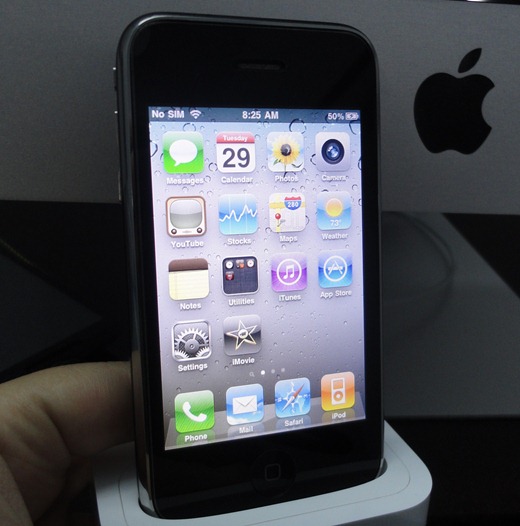
Thanks to David Romhan Torres who first posted about this on Redmond Pie’s Facebook page here.
David Romhan Torres I just make iMovie for iphone 4 run on an iphone 3GS, it’s very simple just download it from iTunes, modify info.plist file and change the Minimum system version to 3.0.0 and front-facing-camera to false
Changing the string for front facing camera to false will make the app run on any jailbroken iPhone and iPod touch as long as it is running iOS 4. Now according to the source above, you can also run it on non-iOS 4 devices i.e. devices running the old 3.1.3 or 3.1.2 firmware by changing the minimum system version string. I tried this step to run iMovie on my iPad but with no success. If any of you manage to get this thing run on any non-iOS 4 device, then please do let me know in the comments section below.
And so without any further delay, here is the video demonstration of iMovie running on iPhone 3GS.
UPDATE 1: Ok guys, I just realized that modifying .ipa files breaks Apple’s DRM. So to comply with that, I have removed the installation instructions.
Make sure you subscribe to our Youtube Channel here for more videos in future. Also make sure you check out our iPhone Apps Gallery and iPad Apps Gallery to explore more apps for your iPhone and iPad.
You may also like to check out:
- Pages from iWork for iPad Ported to iPhone 4 (iOS 4)
- All iOS 4 Ready Apps with Multitasking Capabilities in One Place
- How to Unlock iOS 4 with Ultrasn0w and Blacksn0w on 05.13.04 Baseband [Guide]
- How to Jailbreak iOS 4.0 on iPhone 3GS, iPhone 3G and iPod touch 2G using Redsn0w, PwnageTool 4.0 (Windows)
You can follow me on twitter or join our facebook fanpage to keep yourself updated on all the latest from Microsoft, Google and Apple.


Windows 7
Windows Vista
Windows Server
Windows Live
Live Mesh
iPhone
iPad
Mac OS X


September 6th, 2010
55 Comments/Trackbacks on "iMovie Ported to iPhone 3GS, iOS 4 [Video] !!"
(#)
I assume to run it on an iPad, you would need to search for anything involving a camera, since the iPad has no cameras whatsoever. Look for any restrictions on what you need to run iMovie, and make it fit the iPad. That's all you really need to do. (Note: I don't really know anything about iOS apps, so I may be wrong)
(#)
hey, can I sync it with my iPhone 3GS without the installous (if I bought the iMovie) ?
(#)
good stuff….going to upgrade to the 3gs soooon……great blog man
(#)
works like a charm, must use installous though
(#)
Wont work on Iphone OS 3.1.3; tried several times! May be only iOS4 specific!
(#)
How to open the info.plist file on Windows? I tried Notepad++ but the plist file seemed to be encrypted.
(#)
This is genuis. Works perfect.
(#)
So can this work on a non-jailbroken iPhone 3gs iOS 4?
(#)
I assume not because you need to edit the plist. Only problem is I have a fairly new 3gs with the newer bootrom, so I cannot jailbreak my iPhone
(#)
i change the string, both front facing camera and minimum system. during installation, it goes very smooth! but when i want to open the application, it automatically exit! do i miss something?
installed on iPod touch 3g 3.1.3
(#)
where can we get the full tutorial?
(#)
great work bro/…
(#)
thats probably because the camera only shoots in vga resolution on the 3gs
(#)
I tried on my 3G and it did not work. Should I change other parameter?
(#)
I try but it's not work for my 3.1.2 device.
You also inspire me to do the same thing on iBooks.ipa …
Unfortunately, it cannot start neither. I think I still need to upgrade to iOS4 finally.
Thanks!
(#)
hey
Can you please send me an instroction how i can do that, beacouse it's really cool ???
Please
(#)
just to clarify. you didnt port anything to iphone 3gs…this app was meant to work on this iphone but it doesnt have the right setup on the file.
porting means you need to modify its source code so you can use it on a different device (ie. android on iphone)
(#)
odd I've been running iMovie on my 3gs for the past 2 days. Didn't know it wasnt supposed to be compatible.
(#)
Where can i find new instructions?
(#)
Okay, I have just tried installing on iOS3.1.3. Application starts, showing the initial brown screen, then crashes. I think the reason why it doesn't work is that it could rely on iOS4 APIs. That's why it probably doesn't run on iPad either.
However, it would be cool if someone proved me wrong.
(#)
i have 3gs and imovie installed from installous, works…..
(#)
Hey, thanks for this awesome find! I had a question abotu it. I modified the plist to work on 3.0, and set the front facing camera to false, but once i do that, do i just take the iMovie.app file and drag it to my applications folder via ssh? That dosnt seem to be working. Neither does draging back the modified ipa file into itunes. How did you manage to get this on your device?
Thanks!
(#)
I'd far rather see iWork for iPad running on iPhone 4. I wonder if that would be this easy?
(#)
Mine 3GS 3.1.3 didn't work, it dont install in iphone. I tested changing other values from 4.0 to 3.0 than discribed in tutorial too, but didn't work. My new bootrom iphone is oficial unlocked, but i heard i souldn't update to 4.0 yet.
(#)
What? You don't have to resign? I remember for Pages you did.
(#)
iMovie isn't for 3GS because it's not as useful (as you can imagine) for low-quality recording.
(#)
If you have the last updated version of Installous.app (free app from Cydia) released this last days, you can from there get iMovie, and from installous.app will also can install it, and believe me, it will work without any manual change. I tested on my jailbroke iphone 3GS 32GB. Working perfectly!
(#)
dont worry its been modifired and uploaded to your favorite ipa site… just look for the cracker called 3GS-needs-ios4
(#)
i guess ure the first in the world whose done this….gizmodo and mashable also wrote about ur website in their articles…..good job!!
(#)
app crashes on startup… anyone get around this?
(#)
It's ur 3GS OS4,model MC because my iPhone model is MC how to jailbreaky iPhone 3GS os4 mc model pls can anyone tell me thx!
(#)
Off-topic… what app/theme is he running? At about the :40 mark he double clicked the home button and revealed a horizontally scrolling dock – cool as hell. What is that?
(#)
I actually just installed it on my 3GS through Installous 3.x w/o changing anything and it installed fine and runs fine. Only problem is you're negated to saving to 360p and nothing else.
(#)
I got it on my 3GS and it works.
(#)
thanks
(#)
I tried to export my project in 360p.. but it just keeps on quiting the iMovie app. Any idea what might cause this on a jailbreak 3Gs running OS4?
(#)
Errr… My contract needs to hurry up and be upgrade-ready! iMovie!!! Another reason I want to upgrade my 3g!
(#)
It looks like a Cydia app -infinidock. Works great. I love it.
(#)
MC is only relevant for iPods. In 3Gs the built in Bootrom changed around week 40 in 2009. Only few exeptions. If the 4th and 5th number in your serialnumber is 40 or above, it's probaply the new one. For 3Gs/iOS4/newBR is currently no JB available, yet.
(#)
its multitasking that comes with iOS4.
(#)
queer!
(#)
iMovie is a simple, easy to use video editing program that comes free with the Apple operating system (it has no Windows PC version). Despite its simplicity, iMovie offers many of the same features – dropping clips on a time line, cropping them, adding transitions between clips, etc. – as more advanced video editing programs like ifunia or aneesoft.
(#)
Please can u give me a copy of imovie…..please…
This is my email abu_a7@yahoo.com
(#)
He could at least speak in English… Bloody Indian
(#)
why don't the themes work on 3gs i have tried atleast 10 versions
(#)
i did everything but it dosn't work
(#)
rascist dont be a coward tell ur idetity i f u dare
(#)
HOW DO YOU DO THIS ON WINDOWS VISTA!!!
(#)
HOW DO YOU DO THIS ON WINDOWS VISTA!!!
(#)
they do work, you are not doing it properly.
(#)
that, is the multitasking bar with iOS 4, even w/o jailbreak
(#)
that, is the multitasking bar with iOS 4, even w/o jailbreak
(#)
is there anyway possible to run this on an iphone4?
(#)
is there anyway possible to run this on an iphone4?
(#)
I have the $4.99 paid version – purchased on accident from my kids’ playing around – and it’s incompatible with my 3Gs (j/b, OS 4.0.1). How’d you get this to work? The instructions have been removed, it says. I’d love to be able to use this, since it’s paid for!
Comment Now!