
Sn0wbreeze 1.8 has been released. This is by the same developer who is behind other popular iPhone jailbreak tools such as sn0wbreeze 1.6 and 1.7 for iOS 4, sn0wbreeze for iPhone 3.1.3, f0recast and BlackBreeze. Just like the PwnageTool for Mac, Sn0wbreeze 1.8 can jailbreak iPhone 3GS (old bootrom, and already pwned on iOS 4.x), iPod touch 2G (non MC model) and iPod touch 3G on iOS 4.1 Beta. iPhone 3G users will have to jailbreak using Redsn0w, guide for which is posted here.
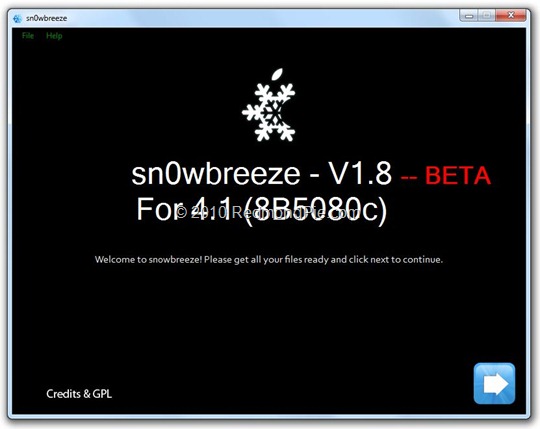
So if you have a Windows machine, you can use Sn0wbreeze 1.8 to create custom firmware files without the upgraded baseband. Again, only the following devices are supported.
- iPhone 3GS (old bootrom and already jailbroken on iOS 4.x)
- iPod touch 2G (non MC model)
- iPod touch 3G
Warning: If you rely on an unlock, DO NOT update to iOS 4.1.
Instructions are as follows.
Step 1: Download and install the latest version of iTunes.
Step 2: Now start iTunes and sync your iPhone with your PC so that it backs-up all your important data including settings, apps, music, contacts and photos.
Step 3: Download Sn0wbreeze and the original iOS 4.1 firmware file for your version of iPhone or iPod touch. Move all these files to your desktop.
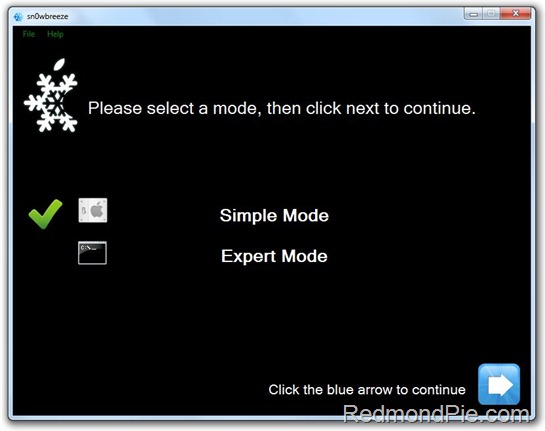
Step 4: Start Sn0wbreeze and select “Simple Mode”.
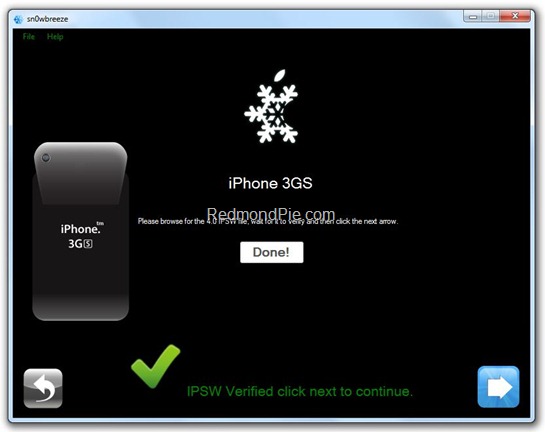
Step 5: Sn0wbreeze will now ask you to browse for your .ipsw file. Select the correct iOS 4.1 firmware .ipsw file by clicking the “Browse” button. Sn0wbreeze will verify the selected file and then will present you with following screen.
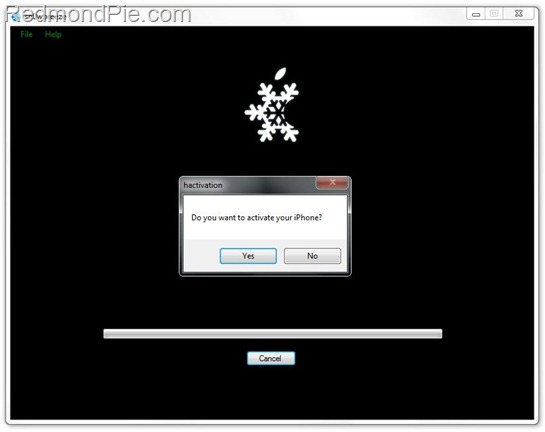
Step 6: Click on "Yes" when Sn0wbreeze asks you “Do you want to activate your iPhone?” for hacktivation. Click on “No” only if you are on an officially supported carrier like AT&T.
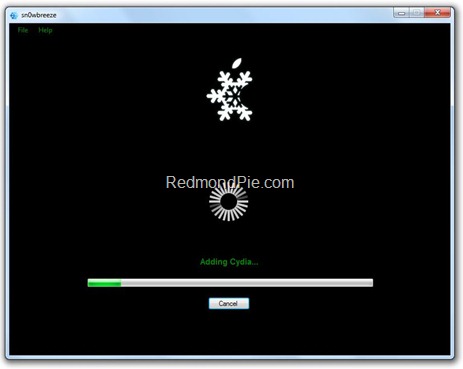
Step 7: Sn0wbreeze will now create the custom .ipsw file for your iPhone which will be jailbroken.
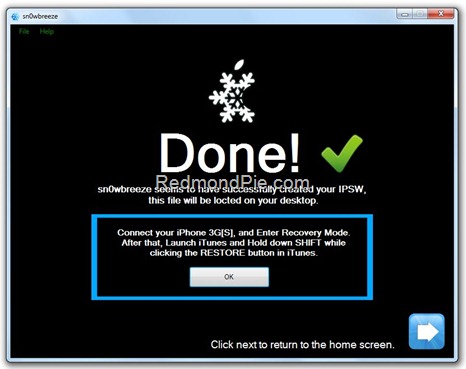
Step 8: Now you will have to restore your iPhone to this custom firmware 4.1 that you just cooked using Sn0wbreeze for your iPhone. Click on your phone from the sidebar in iTunes and then press and hold left “Shift” button on the keyboard and then click on “Restore” (Not “Update” or “Check for Update”) button in the iTunes and then release the “Shift” button.
This will make iTunes prompt you to select the location for your custom firmware 4.1. Select that custom .ipsw file and click on “Open”.
Step 9: Now sit back and enjoy as iTunes does the rest for you. This will involve a series of automated steps. Be patient at this stage and don’t do anything silly. Just wait while iTunes installs the new iOS 4.1 on your iPhone. Your iPhone screen at this point will be showing a progress bar indicating installation progress. After the installation is done, iPhone will restart automatically and you should now have a fully jailbroken iPhone running on iOS 4.1.
Step 10: Once you are done with the jailbreak process. You can now restore all your settings, apps, music, contacts and photos to the newly installed iOS 4.1 by restoring the backup that you made in Step 2 from iTunes.
Feel free to ask me any question here should you run into any problem during the jailbreak process.
Download iTunes 9.2 for Windows and Mac OS X
Download iOS 4.1 for iPhone 3GS, iPhone 3G and iPod touch
Download .NET Framework 3.5 (required to run Sn0wbreeze)
Download Sn0wbreeze 1.8 (Windows Only) [Fast Mirror link]
Disclaimer: This guide is for testing & educational purposes only. Follow it on your own risk. I’m not responsible for any loss of important data or malfunctioning of your iPhone.
You may also like to check out:
- The iPhone 4 has been Unlocked ! [Video]
- How to Jailbreak and Unlock iOS 4.0.1 on iPhone 3GS, iPhone 3G with Redsn0w
- How to Unlock iOS 4 with Ultrasn0w and Blacksn0w on 05.13.04 Baseband [Guide]
- Jailbreak iOS 4 on iPhone 3GS (New Bootrom) with SHSH Blobs [How to Guide] – Mac version here
- How to Jailbreak iOS 4.0 on iPhone 3GS, iPhone 3G and iPod touch 2G using Redsn0w, PwnageTool 4.0 (Windows)
You can follow me on twitter or join our facebook fanpage to keep yourself updated on all the latest jailbreaking and unlocking releases.


Windows 7
Windows Vista
Windows Server
Windows Live
Live Mesh
iPhone
iPad
Mac OS X


September 6th, 2010
60 Comments/Trackbacks on "Jailbreak iOS 4.1 with Sn0wbreeze [Custom Firmware Windows]"
(#)
Is this a joke? Seriously. There is no download.
(#)
Can I use ultrasn0w to unlock it?
thx
(#)
what do you mean when you say 3GS already pwned on i0s 4.1? thanks
(#)
is it working on 3gs 4.0 old bootrom wich stuck on emergency call page ??
(#)
Why does iPhone 3GS need to be jailbroken on iOS 4.x in order to this jb?
(#)
Please alot of people want to JB the 3gs on IOS 4 with new bootrom. IS THERE ANY NEWS!?!?!?!
(#)
what should i do if i have an iphone 3gs 3.1.3 new bootrom , there is no jailbreak wich can unlock it ? because there is no unlocking with spirit ….:((
(#)
DOes any one know if it works?
(#)
I wish they'd release a jailbreak for a 3GS old bootrom bought running on iOS4 :'( I have no way of downgrading.
Is there a way to find out if the previous iphone owner happened to save the SHSH blobs ?
(#)
I have 3gs 4.0 old bootrom 5.13.04 firmware and it was NEVER jailbroken before. I bought it from Att store . I ve been reading all the new posts and Im a lil confused. Am I still waiting for a jailbreak for my particular situation? should I upgrade to 4.1?? what should I do? if somebody knows please let me know thx
(#)
So if I'm on a jailbroken 3.1.3 3GS (old boot) can I do this?
(#)
untethered?
thx
(#)
Hi, does this method update the baseband?
(#)
thanks to developer for new release. what should the bricked 3gs users on ios 4.0 do? can 3gs be updated to 4.1 and then get it restored to snowbreez 4.0 ipsw?
(#)
This doesnt help us 3gs users with new bootrom and never before jailbroken iphone that is stuck in ios4. Every released Jailbreak tools is all the same no matter
what version or name. Please give us some update regarding Iphone 3GS with new bootrom (mc model) none jailbroken in IOS 4.
(#)
If it came from at&t with 4.0 then you have the newboot rom
(#)
My Brain, My Brain it hurts. iPhone 4 sitting in box.
Unlock and jailbreak to set it free…And save my head from exploding.
Help us Dev Team, Help us!
(#)
sure there is … it's the beta… so stay away if you need unlock
(#)
Ohh Yehh … I`m realy need the seme… i bought a iphone AT&T in Miami and i am from Brazil and here don't have this carrier and my iphone now is the same an ipod touch but with camera. Please look for 3GS nem bootrom!!!!
(#)
I am in exactly the same condition Sebnorad.
(#)
How about for 3gs(new bootrom)? Eta?
(#)
I have a new iPod Touch 2G MC model running on iOS 4.0. Any clue what jailbreak there is for this (and would be untethered)? I have searched everywhere! If there isn't one yet, any ideas when one would become available?
(#)
the Sn0wBreeze link is only to v1.7
i cant find 1.8 anywhere
(#)
where is the download, is this a joke???
(#)
Totally fully indeedo agree!! Give us some break hello!!
(#)
the link is Snowbreeze v1.7 not 1.8
(#)
my mistake top right for new version
(#)
Doesn't work with me, it says ” Not a valid 4.1 IPSW ” and I'm really using a 4.1 IPSW file -> “ios_4.1_beta_iphone_3g_8b5080c_restore.ipsw”
(#)
The answer is YES for the Jailbreak if you make the update from 3.1.2/3.1.3 using jailbreak and have at hand SHSH blobs (important step) and saved at cydia.
The answer is NO, if you have a stock/out of the box 3GS or iOS 4 with stock iOS4 or if you update your iPhone with the Oficial update from iTunes. In this case you will need to wait more, maybe a week, maybe 2, 3, 4 or until they realese the iOS 4.1 (around september maybe october).
An take a line, is way toooo loooong.
The point here is…NEVER MAKE AN UPGRADE IN IPHONE IF THE DEV TEAM, GEO or anyone else DON'T HAVE RELEASED AN OFFICIAL JAILBREAK….NO MATTER WHAT!
(#)
Warning: If you rely on an unlock, DO NOT update to iOS 4.1.
does ios 4.0.1 upgrade baseband or not didint get it????
i have 3gs ios4 jailbroken with sn0wbreeze 1.6.2
(#)
4.0+ JB IS NOT RELEASED YET!!
The article is stating (PEOPLE WHO HAVE 3.1.3 SHSH, can use these programs to trick 3.1.3 to 4.0-4.01 patch and still be hacked.
IF YOU ARE ALREADY ON 4.0 NONE JAILBROKEN.. NO YOU CANNOT JAILBREAK…
Comex and dev team will release 4.0 JB soon enough. untill then stfu and STOP ASKING IF 4.0 IS POSSIBLE!
(#)
theres no hacktivation warning window while making custom file.why?
(#)
please where will be jailbreak for itouch MC model released?? im waiting like month for it….
(#)
Hello every body if you have a 3GS with old bootrom you can jailbreak your iphone. Search the internet and you'll find what your looking for. There is alot of redundant posts about this. For user with 3GS new bootrom never been jail broken. No 3.1.2 ShSH blobs saved. You must wait till the new jailbreak tools come out.
The kind of article like the current one are kinda useless in mine opinion. Alot of people have a late model iphone 3GS with new bootrom. These articles that keep coming out does not provide a solution for this or any news on the mather. And all the titles are misleading. Since the article does not help the majority of iphone users that are stuck. And I have to say that iOS 4.1 or for that mather 4.0 or 3.1.3 is NOT pwned for 3GS late new bootrom models. In my opinion if it has been pwned it should be for every situation out there.
(#)
you guys are worthless… seriously, how hard is to release unlock/jailbreak for 3GS that hasn't previously been jailbroken (old or new bootrom).
What we have so far goes something like this: “here's the newest super duper jailbreak for new OS on any phone (unless you've never been jailbroken before)”. What a pile of s***. How about a clean jailbreak for people that never messed with their phones before? Let me know when the article named “stock 4.0 os jailbroken” comes out. Thanks.
(#)
error 1604 while restoring
plz help me
(#)
Whats going on you end up with version 1.7 not 1.8?
(#)
I can't believe it's taking so long to get this unlock and jailbreak. I mean come on we are entering Month number 2 soon. I will be going insane soon. So please help!
(#)
These jailbreakers are a joke, they are always sitting on their thumbs when they are the one's who commited themselves to millions of itouch/Iphone users…
(#)
error 1604!
What's it?
(#)
What about 3GS new bootrom and locked on iOS4 please ?
(#)
This is pointless since only developers can download the 4.1 os.
(#)
tat not wrkinh
(#)
it says not a valid 4.1 ipsw.
help please
(#)
it says not a valid 4.1 ipsw
help please!!!
(#)
Help please to jailbreak 3GS new bootrom, why are they talking about all tools for Iphones 4 when they are not finish with 3gs, please help us to jailbreak.
(#)
The best part is – there is no answer on all questions posted here… I've tried to follow the previous posted for iPhone 3GS on 3.1.2 baseband 05.11.07 by Sn0wbreeze 1.7, and then it crushed my iPhone totally at the last step, my iPhone never boot-up – which made me to restore all back to 3.1.2 OS, luckily the Blackra1n JB n Unlock was still in place after restoring…….. so my advice, do your homework before trying!
(#)
i updated my 3Gs to iOS 4.0 yesterday. the process get bit tricky when the restore finished. The phone was stuck in the recovery loop. i did lots of research and found out either irecovery or blackra1n can take the mobile out of recovery loop. i used blackra1n and it worked. Then i used ultrasnow to unlock it and it also worked. the only problem that i am facing right now is: my phone restarts every 5-10 minutes specially during the calls. Does this new updated 4.1 fix this issues? What i have done wrong? Please anyone.
(#)
Hi Archie1810,
Can you please tell the procedure to downgrade iphone 3gs 4.0.1 to 3.2.1 without shsh files. I had updated to 4.0.1 and stuckked to jailbreak and unlock and i want to downgrade to 3.2.1
Please mail me at subbaraonaik@gmail.com
Thankyou in advance
Subbarao
(#)
hi… i am new to JB… So, how can I start if my 3GS with 4.0 IOS has never been jailbreak? No hope?
(#)
I installed the 4.1 firmware on my ipod touch 2nd gen. Now when i plug it into itunes there is no way to access it at all!! i cant even downgrade. Help anyone, i will do anything to fix this
(#)
Beijing has a fix
(#)
can som1 post the 4.1 os on btjukie or something
(#)
Any news for your problem ? I got the same shit here !
(#)
Hey guys.
Couldnt find anything on fixing this and didnt get much help anywhere :/. However i was in Aberdeen the other day and took my ipod into the Itunes store and was helped by someone who tried it on their machine and it didnt work…But they took it into the back and a technician managed to restore it there on the spot. So i walked away very happy and its all working again now
and will be veryyyy carefull when it comes to trying new software
(#)
if you have trouble finding the firmware for the iPhone, iPod touch and ipad in this place you can download them all.
Source: http://blackra1n.biz/download
(#)
if you have trouble finding the firmware for the iPhone, iPod touch and ipad in this place you can download them all.
Source: http://blackra1n.biz/download
(#)
Anyone actually have this worked?
(#)
just change your phone’s battery . it shud be ok. i hav done this. im a iphone hardware repairer. i hav fixed few of these problems before. u need to buy original battery and get it replaced. it solves
(#)
just change your phone’s battery . it shud be ok. i hav done this. im a iphone hardware repairer. i hav fixed few of these problems before. u need to buy original battery and get it replaced. it solves
Comment Now!