Only yesterday, we learned that Google Maps for iOS and Android would be the subject of a significant update, featuring, among other improvements, the all-new Material Design that the Big G is rolling out with Android 5.0 Lollipop. At the time of the announcement, Google stated that the new Maps would begin to trickle out within days, and as promptly as ever, the iOS portion of the update is now ready for download over at the App Store. So, if you want to enjoy a truly enhanced navigation experience, check out the details and download link after the break.
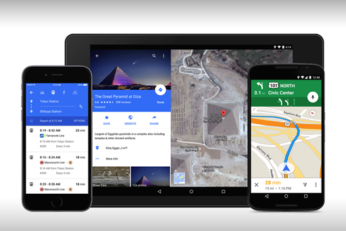
Google's Maps service is about as popular as its search engine these days, and as well as the Web service, the Big G has made a concerted effort to improve navigation for mobile users. Those rocking an Android nearly always get the better end of the updates as far is Google is concerned, but in recognizing that iOS users are still an important demographic as far as reach is taken into account, the Android maker has just announced a rather sizeable update for those on iPhone and iPad as well as users running its own mobile OS.
Saving offline maps using Google's famed Maps app has always been slightly tricky and tedious for those on iOS and Android, but thanks to a recent update, things just got a whole lot easier. Below, we'll take you through each of the steps required for you to save offline maps using the freshly-bumped Google Maps 3.0 for iOS and 8.0 for Android.
Google Maps is widely regarded as the authority in its field, even compared with the navigational prowess of TomTom, Garmin and the like. When the iOS 6 fiasco went down with Apple Maps, for for example, scores of ardent Apple fans were only too relieved to see the search giant's famed utility re-enter as a third-party App Store app. Today, said app has been treated to a healthy update for both iOS and Android, and you can catch the full details and download info right after the break!
Apple may have gotten its act together in improving the general performance of its home-baked Maps app, but well over a year on from the disastrous launch of Cupertino's first navigation app for iOS, many users still swear by the third-party Google offering that used to take pride of place as a native feature. Despite the obvious limitation of being developed as an App Store entity, Google Maps remains the real deal, and if you were wondering how to go about saving map segments and routes for offline use, here's a little step-by-step guide on how you can achieve your goals.
Google Street View is an invaluable resource in certain situations. If you're dashing out to meet a client, or visiting the new home of a friend or family member then Street View is fantastic for getting a real-world look of the address that you're heading to before actually setting off. Even if you're just the inquisitive type who is sitting in the comfort of your own home looking eagerly at streets in your local area then you can easily lose countless hours to the wonder that is Street View. If you're bored of looking at terraced streets or local parks then maybe you should cast your eyes over the internals of the HMS Ocelot, which is now fully documented thanks to the power of Google Street View.
It was just a few days back when Google Maps 7.0 APK for Android was released, and the same day, the Big G also promised that the iPad version of their famed Maps offering was on its way. Having stayed true to their word, version 2.0 of Google Maps for iOS has been released. We have all the details and the download link right after the jump.
As we discovered just a short while ago, the Google Maps for Android app has been afforded a tidy update bringing with it a plethora of new and exciting features, but although we're impressed with the work Google has put into this overhaul of the Android app, you may have noticed that the feature allowing you to save maps for offline use is strangely missing. Luckily, there's a quick workaround to the issue, and in following the steps below, your shiny new Google Maps for Android will be storing maps for offline caching like there's no tomorrow.
Google not only vends the Android operating system, but also a lot of quality apps for smartphones and tablets running the said OS. Time to time, Google keeps bringing a much-anticipated and completely radical update to one of its apps that usually prove to be a game changer in most cases. This time around, the app to receive such an update is the famous Google Maps, pushing the version number to 7.0 and gradually rolling out globally for Android (iOS update still to follow).
Google Street View is quite possibly one of the company's best innovations to date, besides cataloguing the entire World Wide Web, that is. Being able to take a virtual walk down a very real street is something that would have seemed almost impossible not too long ago, but Google made it happen. And today, Google is stepping things up a notch.