
It wont be long before some newer apps from the iTunes App Store will require you to have the latest iPhone 3.1.3 firmware in order to install a particular app. Earlier this month, Apple released the new iPhone OS 3.1.3 for iPhone and iPod touch which upgraded the baseband to 05.12.01 for iPhone 3G and iPhone 3GS, hence making it impossible to unlock them on the latest firmware with the newer baseband.
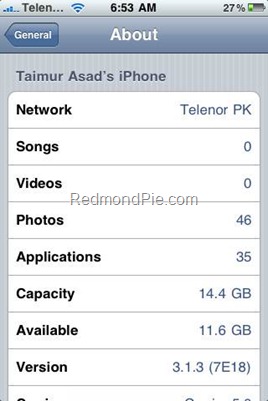
If for some reason you have decided to hold off from upgrading to this minor update until the new iPhone OS 3.2 or iPhone 4.0 is available, you can fake your firmware to iPhone 3.1.3 which will make iTunes believe you have the latest firmware installed, hence allowing you to download and install all the apps from the App Store.
Simply follow the steps below to fake your firmware to iPhone 3.1.3. This wont in any way effect your baseband/unlock or anything in real. All it does is change the version number from iPhone 3.1.2 to iPhone 3.1.3.
Step 1: You will need to have a jailbroken iPhone or iPod touch on iPhone 3.1.2 in order to get this to work. Follow our complete step by step guide posted here to jailbreak your iPhone with iPhone 3.1.2 firmware.
Step 2: “Fake 3.1.3” app is available in Cydia on http://cy.sosiphone.com/ repository. Make sure you have added http://cy.sosiphone.com/ repo in Cydia.
Step 3: Now simply search for “Fake 3.1.3” in Cydia and install it. You must restart your iPhone for the changes to take effect.
Step 4: After reboot, navigate to Settings –> General –> About. You should now have “3.1.3 (7E18)” listed beside “Version”.
You can also follow our complete jailbreaking guide for iPhone 3.1.3 firmware for iPhone 2G, 3G, 3GS and iPod touch 1G/2G using redsn0w 0.9.3, redsn0w 0.9.4, sn0wbreeze, PwnageTool 3.1.5. Unlocking can be done using ultrasn0w or blacksn0w.
For iPhone 3.1.2 firmware, you can use blackra1n, PwnageTool, redsn0w, sn0wbreeze, ultrasn0w and blacksn0w to jailbreak and unlock your iPhone and iPod touch.
You may also like to check out:
- How to Downgrade iPhone 3.1.3 Baseband 05.12.01
- Fix 1604 Error During iPhone 3.1.3 IPSW Custom Restore
- How-to: Find all the info on Jailbreaking and Unlocking Your iPhone and iPod touch using f0recast
Check out our iPhone Apps Gallery to explore more apps for your iPhone or iPod touch.
You can follow me on twitter or join our facebook fanpage to keep yourself updated on all the latest iPhone jailbreaking and unlocking releases.


Windows 7
Windows Vista
Windows Server
Windows Live
Live Mesh
iPhone
iPad
Mac OS X


September 3rd, 2010
View Comments on "Make iTunes Believe You Have iPhone OS 3.1.3 Installed"
(#)
Thanks. This will give me a peace of mind not to accidentally upgrade to 3.1.3
(#)
After doing this,i couldnt reboot my iphone using blankra1n anymore.
(((
(#)
after doing this i couldnt reboot my iphone using blankra1n anymore.the boy face shown and it stuck there 4ever
((
(#)
iphone cant do reboot after uve done this
lost my jailbreak coz this piece of crap work.
(#)
hello..i have iphone 3g with version 3.1.2 and i update its to version 3.1.3 now my phone is locked and phone sim is deactivated plz help me to resolve this problem thanks
(#)
it is very nice phone
(#)
So this wont affect current apps from cydia that are not working with 3.1.3? If the phone thinks you have the new o.s. wont that cause conflict with cydia apps?
(#)
Can anyone tell me if having applied this 3.1.3 spoof, I can now do a “Restore” in iTunes safely, or will this simply load 3.1.3 onto my phone and bust my jailbreak?
(#)
blackra1n will NOT work with USB 1.0. Make sure that you hook up the cable to a USB 2.0 so that the boy face shown can go away and finish what it needs to do. I happened to me once and i got it fixed. Hope this helps.
(#)
shut ur fone off, hold home and plug it in while holding home, once u get the connect to itunes logo, let the home button go and run black rain, this will only work with spoofed 3.1.3, not the actual 3.1.3 firmware on 3gs only
(#)
Couldn't reboot my phone with blackra1n after using this. Stuck in recovery mode. iPhone bricked. Thanks for the advice Redmond Poo.
(#)
hello.sir, .i have iphone 3g with version 3.1.2 and i update its to version 3.1.3 now my phone is locked and phone sim is deactivated plz help me to resolve this problem thanks
(#)
it does work, but once your iphone is bricked u can't restore to 3.1.2 but only to 3.1.3. wich ruins your jailbreak and unlock.
Thanks ffs
you bricked my 1 year old 3gs
(#)
i am also stock in the 3.1.3 boot 6.04 but i am found a solution 1: the iphone 3gs network only unlock for tmobile so been the fact i lose my unlock i am able to use AT&T prepaid in my phone wich is sheapper than tmobile
(#)
Thank A LOT!!!!!!!
It helped me to recover my blackra1n-jailbroken iPhone 3GS 3.1.2 after applying this Firmware 3.1.3 App
I did exactly as described in your post – it takes a while but finally I was able to boot my iPone using blackra1n.
THANK YOU!!!!!!
(#)
To recover your blackra1n-jailbroken iPhone 3GS with 3.1.2 after applying Firmware 3.1.3 app after it stops booting using blackra1n:
1) turn your iPhone OFF completely
run Firmware 3.1.3.app again and chose to spoof back to 3.1.2 – DO NOT UNINSTALL IT AT THIS STAGE
2) while iPhone is OFF – hold the HOME button and connect it to your computer using standard cable while keep holding the HOME button
3) keep holding HOME button and wait till your iPhone switched back ON and till you get the “connect to iTunes” logo
4) release the HOME button
5) QUIT the iTunes if it was running or just started after it recognized you iPhone and offer to restore it
6) run and apply “blackra1n” as usual
7) be patient and WAIT till it reboots you iPhone
9) REBOOT using blakra1n as usual
DONE! Your now should be fine using your blackrain-jailbroken iPhone 3GS on 3.1.2 firmware as before applying above described “trick” using Firmware 3.1.3 app
this will only work with spoofed 3.1.3, not the actual 3.1.3 firmware on iPhone 3GS ONLY
Comment Now!