• December 21, 2025
  • Apple
    Apple

    Hypertension Notifications Have Been Approved For Australian Apple Watches

    iOS 26.2 Battery Life Drain Performance Tested

    Apple Released A New Open-Source 2D To 3D Photo Model

  • Google
    Google

    Google’s First AI Smart Glasses Will Debut In 2026

    Google’s Latest Pixel Ad Mocks Apple’s iPhone With A Wicked Twist

    Apple’s AirDrop Now (Sort Of) Works With Android Phones

  • Microsoft
    Microsoft

    iOS 26.2 Features A New AirDrop Privacy Feature

    Get Microsoft Windows 11 And More For Just $14 With These Christmas Microsoft Software Deals

    Apple Is Breaking Sales Records Thanks To The iPhone 17

  • Tesla
    Tesla

    Tesla’s 2025 Holiday Software Update Is Now Rolling Out

    Tesla Might Add CarPlay, But Android Users Could Be Left Out

    Tesla Launches $36K Model 3, $39K Model Y

  • Reviews
    Reviews

    VideoProc Converter AI Helps Restore Old Videos Up To 4K [Review]

    Why Choose CZUR StarryHub For Meeting Solution?

    Stellar Repair For MS SQL – Product Review

  • Deals
    Deals

    Get Your Coffee Fix And Save $200 With This Breville Barista Touch Espresso Machine Deal

    Christmas Special: Save $150 Off Apple’s Powerful M4 iMac

    This Elegoo Centauri Carbon 3D Printer Is $80 Off With Pre-Christmas Delivery

Latest
  • Latest
  • Oldest
  • Random
  • A to Z

macos 10.15

iOS 13 And Catalina Apple Notes App Not Syncing Via iCloud Between Devices

Oliver Haslam·November 1, 2019
Having problems with iOS 13 / 13.2 and Catalina Apple Notes app sync not working via iCloud? Here's what you need to know.

iCloud Folder Sharing Coming To macOS In Spring 2020, iOS Release This Fall

Oliver Haslam·October 9, 2019
Apple has confirmed that iCloud folder sharing has been delayed. It’s no huge surprise given the fact that it wasn’t part of the recently released macOS 10.15 Catalina release, even though it should have been.

How To Fix Catalina Stuck On “Setting Up Your Mac” After macOS Installation Issue

Oliver Haslam·October 9, 2019

How To Clean Install macOS 10.15 Catalina On Mac Via USB Drive [Guide]

Oliver Haslam·October 7, 2019
Here's how to clean install macOS 10.15 Catalina on Mac via USB drive the right way using this guide.

How To Enable And Use Voice Control In macOS Catalina

Oliver Haslam·October 7, 2019
Here's how to enable and start to use Voice Control feature in macOS 10.15 Catalina on your Mac for accessibility, or otherwise purposes.

macOS 10.15 Catalina Compatibility: Full List Of Compatible Macs

Paul Morris·October 7, 2019

Apple Arcade For Mac Available To Try Right Now Via macOS Catalina Beta

Oliver Haslam·October 6, 2019
If you’re brave enough to run the macOS 10.15 Catalina beta, you can now take Apple Arcade for a spin. The feature is now live ahead of the public Catalina launch, whenever that may be.

Download: macOS 10.15 Catalina GM Released To Developers

Sameed Khan·October 4, 2019
Apple released the Golden Master for macOS 10.15 Catalina a few hours ago today, signaling the end of a beta cycle that began in June at this year's WWDC, and possibly, an imminent public release.

How To Backup, Restore iOS In macOS Catalina Finder Without iTunes

Paul Morris·October 4, 2019

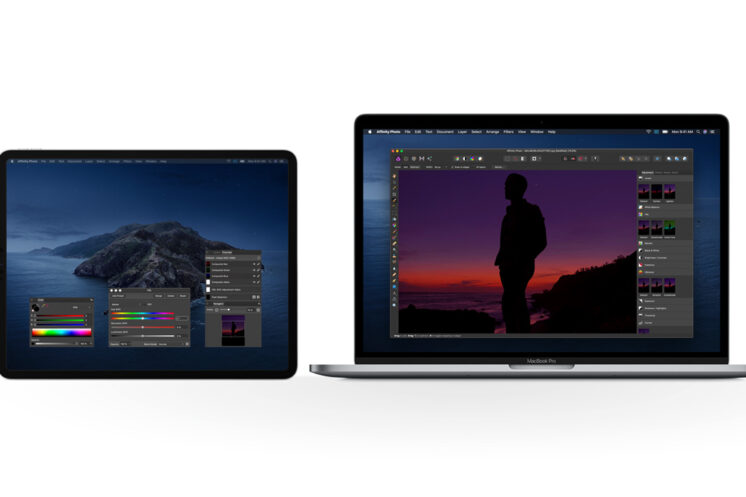
How To Use Sidecar In macOS Catalina With iPadOS On iPad

Paul Morris·October 4, 2019
Here's how to use macOS Catalina Sidecar feature with iPadOS, which allows you to use your iPad as a Mac secondary display.

Apple Seeds macOS 10.15 Catalina Beta 10 To Developers

Oliver Haslam·October 1, 2019
A new release from Apple brings macOS Catalina all the way to beta 10, giving developers another build to test their apps against before the update is made available to the public.

Ingenious: MacBook With Destroyed Display Turned Into iPad-Mac Hybrid

Oliver Haslam·September 8, 2019

Download: macOS Catalina 10.15, tvOS 13 Public Beta 2 Released

Paul Morris·July 4, 2019
Apple has announced the release of macOS 10.15 Catalina public beta 2 and tvOS 13 public beta 2. Both the second public betas are available to install right now for all compatible Mac and Apple TV hardware.

How To Install macOS 10.15 Catalina Public Beta

Oliver Haslam·June 26, 2019
Here's a step-by-step guide on how to install the macOS 10.15 Catalina public beta, from enrolling for Apple's Beta Software Program, to downloading and installing the update.


Download macOS Catalina Light, Dark, Dynamic Wallpaper From Here

Paul Morris·June 8, 2019
Load More

TRENDING NOW

Hypertension Notifications Have Been Approved For Australian Apple Watches

iOS 26.2 Battery Life Drain Performance Tested

Apple Released A New Open-Source 2D To 3D Photo Model

ChatGPT’s Apple Music Limited Integration Goes Live

Apple Reportedly Working On A New iMac Pro With An M5 Max Chip Inside

iOS 26.2 Features A New AirDrop Privacy Feature

New iOS 26.4 and iOS 27 Features Have Leaked Ahead Of Release

Kodi 21.3 Omega Final APK Android Download And iOS IPA, Along With Windows And Mac Version, Out Now

Download: iOS 26.3 Beta 1 Released Alongside iPadOS 26.3, macOS 26.3, tvOS 26.3, watchOS 26.3, visionOS 26.3

Apple Car Keys Support Is Coming To Some Toyota Vehicles

FOR YOU

Big New iPhone Redesigns Coming Each Year Through 2027, Report Claims

Fix iOS 26 WiFi: Not Working, Keeps Dropping, Disconnecting And Slow Issues

iOS 26 watchOS tvOS macOS visionOS iPadOS

iOS 26 Final Version Release Date Has Been Announced

How To Fix iOS 26 iMessage Activation Bug On Phone Number

iOS 26

Apple Adds New Battery Notification Toggle To iOS 26 Beta 7

iOS 26

Download: iOS 26 Beta 4 OTA Profile Update, IPSW Links Out Now [Updated]

Download: iOS 26.0.1 OTA Update And IPSW Links Released

iPhone 17 Pro Camera And Rear Design Leaked

  • About
  • Advertise
  • Privacy Policy
  • Tip Us
Copyright © 2008-2025 Redmond Pie. All Rights Reserved.
  • About
  • Advertise
  • Privacy Policy
  • Apple
  • Google
  • Microsoft
  • Tesla
  • Reviews
  • Deals
Start typing to see results or hit ESC to close
Apple iPhone deals iPad Android
See all results

SUBSCRIBE

Join 100k+ other tech lovers and get the latest news in your inbox
[mc4wp_form id="389"]