
Apple today has released iOS 4.0.1 in a bid to fix the reception issue which has been plaguing iPhone 4 users since its launch last month. This new update addresses the reception issue which is experienced when the phone is tightly griped in the left hand.
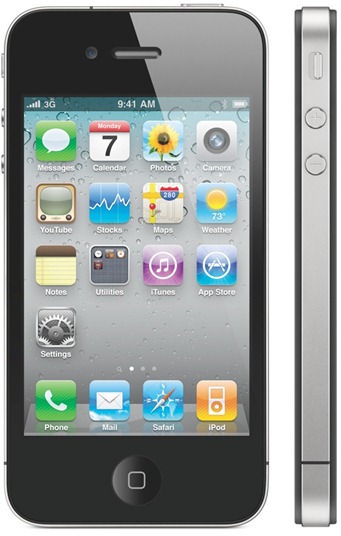
iOS 4.0.1 is fully supported on iPhone 4 and iPhone 3GS. iPhone 3G is also supported but the users are officially unable to do multitasking and wallpapers unless you know where to look for it. An iPad version of iOS 4 is also expected to be released by fall 2010.
To update to iOS 4.0.1 for iPhone, all you need to do is to connect your iPhone with your computer via USB and start iTunes. You should now see a message as shown below. Simply click on “Download and Install” button to get on to the new iOS 4.0.1 firmware.
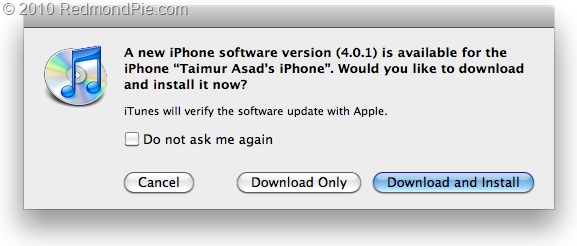
Note: Except for iPhone 4, all iPhone jailbreakers and unlockers are highly recommended to stay away from this release. This release may contain new baseband which might not work with ultrasn0w 0.93. If you rely on an unlock and update to this firmware now, you will lose your unlock for God knows how long. You have been warned!
Direct Download Links for iOS 4.0.1 (Official from Apple)
Download iTunes 9.2 for Windows and Mac
UPDATE 1: After thorough testing, it turned out that baseband and modem firmware for all iPhones hasn’t been updated in iOS 4.0.1 since iOS 4. What this basically means is that you can still unlock your iPhone on any baseband using ultrasn0w, guide for which can be found here. But since currently there is no jailbreak tool available for iPhone 4 and iPhone 3GS (new bootrom), and the current jailbreak tools for iPhone 3GS (old bootrom) are not compatible with iOS 4.0.1 yet, so the only device which can be currently be jailbroken and unlocked on iOS 4.0.1 is iPhone 3G, guide for which can be found here.
You may also like to check out:
- The iPhone 4 has been Unlocked ! [Video]
- Unlocked iPhone 4 Available in UK, France and Canada
- How to Jailbreak and Unlock iOS 4.1 on iPhone 3G and iPod touch 2G with Redsn0w [Downgrade]
- How to Unlock iOS 4 with Ultrasn0w and Blacksn0w on 05.13.04 Baseband [Guide]
- How to Jailbreak iOS 4.0 on iPhone 3GS, iPhone 3G and iPod touch 2G using Redsn0w, PwnageTool 4.0 (Windows)
You can follow me on twitter or join our facebook fanpage to keep yourself updated on all the latest from Microsoft, Google and Apple.


Windows 7
Windows Vista
Windows Server
Windows Live
Live Mesh
iPhone
iPad
Mac OS X


September 9th, 2010
119 Comments/Trackbacks on "Apple Releases iOS 4.0.1 for iPhone 4, iPhone 3GS, and iPhone 3G"
(#)
So does it fix the problem or is this just a BS fix?
Caliso
(#)
What about iOS 4.0 jailbreak for iPhone 3GS with new bootroom?
(#)
Let's Go Jailbreaks!!
(#)
Brother I Think Ur Mistaken As Per Comex He Says That
Quote:
Originally Posted by comex
Apparently there is no baseband update for some reason, so feel free to update to 4.0.1 if you're on 4.0
(#)
the dev team say that it doesnt have a new baseband????
(#)
This baseband is compatible… You said it in the other post.
(#)
Are you sure 4.0.1 is available for the iPod Touch
(#)
iPhone 3G S users be cautious! It has been reported that update iOS 4.0.1 causes massive signal drop for many iPhone 3G S phones. Not all users have experienced this problem, but it has been brought up a lot today! Update at your own risk!
(#)
I am not able to install it. Says “Unknown error occured”
(#)
It's just me or there is some change for iPhone 3g in iOS 4.0.1
Phone iOS 4 iOS 4.0.1
——- ——– ————
iPhone 4 579.2 MB 579.2 MB
iPhone 3gs 377.9 MB 378.0 MB
iPhone 3g 292.0 MB 305.4 MB
Anyone tested iOS 4.0.1 on iPhone 3g ? I'm still at work. Will be sometime before I can test on my iPhone 3g.
(#)
It fixed my antenna issue
(#)
Well, as predicted, the update only calculates the signal strength more accurately and that's it. It doesn't solve the antenna issue like they claim. Obviously, you can't change a hardware issue by fixing the software. Way to go Apple.
(#)
this is my dream phone!
wait until I complete my savings for this hehehe!
(#)
no.. its not. the next update for ipod touch would be 4.1 or 4.0.2 (if there are any bug fixes or anything)
As such ios 4.0.1 is very specific to the cellular network signal, so its NA for iPod
(#)
no.. its not. the next update for ipod touch would be 4.1 or 4.0.2 (if there are any bug fixes or anything)
As such ios 4.0.1 is very specific to the cellular network signal, so its NA for iPod
(#)
I am not a big fan of iPhone and apple, I like HTC more than it. iPhone in many aspects doesn't meet the class of HTC
(#)
Ok I dont know if my iphone 4.0 download is working because you can put backgrounds on the menu and lock screen but i can only put it on the lock screen… anyone help?
(#)
In case you didn't notice, the article is aimed at iphone users. We (iphone users) don't give a f**k if like HTC. We don't!
(#)
If you're using iPhone 3g and seeing this, then its expected. iPhone 3g on iOS 4 does not support home screen wallpapers.
If you're seeing this problem on iPhone 3gs or iPhone 4, then something went wrong while updating (although very unlikely)
(#)
i've upgraded my iphone 3g to 4.0 month ago but since then i noticed it so slow. so i downgraded to 3.1.3 version and it's much quicker than the 4.0. now, would this new version 4.0.1 more reliable and faster serving?
(#)
And i can only put on menu screen not lock screen
(#)
Please give me more information. I love it, Thanks again.
(#)
My phone stucks in 'restoring iphone software' I was waiting for 3 hours but it still shows ~70% and shows no signals.
Tried to restore for 3 times no results, anybody has a solution?
(#)
My iPhone 3G is slower with IOS 4.0.1 jailbreaked Redsnow unlocked ultrasn0w baseband 05.13.04
(#)
when I jailbreak my iphone 3G with 3.1.3, i was unable to unlock because of the botroom is later than 05.21.01. Could someone please advise if this new redsn0w version can jailbreak (and maybe unlock as well) 4.0.1?
Thanks a bunch!
(#)
btw, what does it mean by “pointing to the Final Version”? I've downloaded both 4.0.1 and 4.0 IPSW. I want to clarify the steps before starting to upgrade the firmware.
Thanks so much for all the help.
(#)
how do I find out the current botroom version of my iphone 3g? Please kindly advise. Thanks!
(#)
I've been very disappointed in how well iOS4 goes on my 3G. Last week, I was planning on just giveing my old iPhone to my wife, and I'd get an iPhone 4 when they release on 30 July here, but I've had to reboot my phone twice now to clear up issues with Safari just hanging, and no data getting through. (Opera worked OK, just Safari stuffed) It is just really slow doing the basic stuff. My wife is never going to wait 20 seconds to get to SMS messages, or be happy with iPod crashing out when launching.
Se wont need the multiple mailbox view like I do, and prabably wouldnt miss springboard folders. I just wand to back it down to iOS 3.1 for here an leave it there. iOS 4 on the 3G feels like Vista crammed into a 3 year old laptop. Slow and crashy.
(#)
only 3gs can change the back ground 3g can only do the lock screen also 3g doesnt have multi tasking
(#)
Do you have an iPhone 3G (that's the 2nd generation model)?
If so, that would explain why you can't use backgrounds.
(#)
how to downgrade? pls reply
(#)
q onda raza ps yo unicamente les voi a dejar mi correo x si tienen algun problema al acer cualquier movimiento o hackear el iphon ok bueno
mack_120689@hotmail.com
(#)
How do I use the new features on my 3gs? I.E camera zoon, video camera etc
(#)
Many people are having this problem. Restore a a “new phone”, not from a backup.
That should fix it
(#)
To zoom, while in the camera app, double tap and a small slider will come up.
(#)
hey i just updated my iphone, to the OS 4.0.1 this morning.. but i went to camera and it didnt have the video camera thing? i thought when u updated it, that it would have video camera?? how do i get that.
(#)
Ok i just used this download link to download to my 3G because the itunes one keeps crashing and not downloading.
Now what do i do with it!!??? I have the folder but nothing to do??
(#)
go on itunes plug ur device and go to summary press n hold shift ( windows ) options (mac) and click on update or restore then click on ur firmware that u downloaded on the window that will pop up
(#)
its normal
(#)
link for 4.01 on a 3gs does not work
(#)
GAME OVER !
(#)
3g
NO Network after Jailbreak 4.0.0
Firewear 4.0.1
(#)
Well i dont think jailbreaking is that special because if you think about it your iphone will be more vulerable so i dont think im going to jailbreak mines
(#)
if u want to unlock 4.0.1 firmware at 3gs iphone then conatct with me i will give u best trick coz i am use now 4.0.1
(#)
yeah could you please help because i don't know how to jailbreak my iphone on 4.0.1! Please and thank you!!!
(#)
Hi my name is Heather, ever since I updated my iPhone to the 4.0.1 I cannot get it unlocked/jail broke for the life of me please contact me my email is perfect702princess@yahoo.com. thank you sooooo much look forward to receiving an email from you.
thanks again
(#)
i'm strugling to unlock 4.0.1 firmware at 3gs can u help phone was bought in china ans i am in south africa
(#)
Hi there
I have an unlocked 3gs. Is it safe to update it to iOS4?
(#)
is this to jailbreak the iphone or is it just the normal apple update
(#)
is this to jailbreak the iphone or is it just the normal apple update
(#)
go to jailbreakme.com on your iphone browser while you are connected to any wi-fi network and slide to jailbreak.
(#)
or add me at yahoo messenger deb.papu@yahoo.co.in ok man
(#)
what do i need to do i am in korea and trying to unlock my 3gs with 4.0.1
(#)
hey i hav 4.0.1 how to i get the old 3gs or 4.0 software bak??
(#)
hi guys I got an iphone 4 on ios 4.0 I have jailbroken it and unloked, but I have no signal at all!! does anybody can help me? thanks
(#)
contact with me at yahoo messenger i will give u the best trciks my id is ;- deb.papu@yahoo.co.in
(#)
try resetting network setting and then reboot iphone. that should sort the problem out. hope it helps……
(#)
try resetting network setting and then reboot iphone. that should sort the problem out. hope it helps……
(#)
try resetting network setting and then reboot iphone. that should sort the problem out. hope it helps……
(#)
try resetting network setting and then reboot iphone. that should sort the problem out. hope it helps……
(#)
Could you tell me which is better on 3GS, firmware 4.0 or 4.0.1?
many thanks
(#)
after updating to ios 4.0.2 on iphone 3g – i get 1002 error.. any idea how to fix it??
(#)
i need to update my phone’s firmware from 3.1. but cannot use itunes because it wants to update it to 4.0.2, but i am trying to unlock it. has anyone actually updated their firmware using this download? I’m a bit skeptical. thanks
(#)
Has anyone done this downgrade on iPhone 4? I want to downgrade from 4.0.2 back to 4.0.1 but don’t know if this is safe. Thanks in advance.
(#)
Hi i have upgraded my iphone 3g to 4.0.2 but having problem with my internet, I have resetted the internet settings but stil having the same problem. I have looked up on the net for orange internet settings which I found but in th phone i cannot find celluar data network…this might be because my phone is factory unlocked….any one can help???
(#)
im stuck to an emergency call only, how will get to menu? PLEASE HELP ME…
(#)
this file safe
(#)
4.0.1
(#)
So I have downloaded the 4.0.1 firmware for the 3G, I do the restore and alt+shift, however when the box comes up to select the IPSW, I can see the folder, but nothing available to select to tell Itunes what to use…
Do I need to change the file extensions? Please help!
(#)
need to rename the zip to ipsw
(#)
hi papudeb,
pls give me the trick as my phone was lock and not able to do any call. It show only can do emergency call. pls reply me on my mail id uanand_79@redifmail.com
(#)
I got a “3197″ error message updating to 4.0.1. It happened when apple was verifying the update, right after the package finished extracting. According to the apple error support page and my suspicions, i think apple stopped supporting 4.0.1. I guess I’m too late for this downgrade, but tell me if it works for anyone else.
BTW, I’m using a new Iphone 4 that is… sadly… not jailbroken.
(#)
Anywhere I download the IOS 4.0 firmware it apears as a ziped folder. when i unzip it it just gives me a bunch of random unreadible shit and a folder called firmware. ive searched all the unziped content and ther is no .ispw anywhere. Someone plz help. every video and instructions ive loked as simple says to dowload the ipsw from thit link and every source ive tried i get the same ziped folder with no ipsw
(#)
i ve got the same problem
(#)
Does this say anything about jailbreaking?
(#)
The download link opens up itunes and then when I tried restoring it, it says it will update to 4.0.2… and I want 4.0.1…
???????????????????????????
(#)
change the file extion of the .zip to .ispw
(#)
they about sams
(#)
I’ve got exactly the same problem on mine. Keeps on verifying the iOS 4.0.1 that i’ve downloaded, and at the end it says it was unable to verify the software.
Any fixes for this??!
(#)
I’ve got exactly the same problem on mine. Keeps on verifying the iOS 4.0.1 that i’ve downloaded, and at the end it says it was unable to verify the software.
Any fixes for this??!
(#)
I’ve got exactly the same problem on mine. Keeps on verifying the iOS 4.0.1 that i’ve downloaded, and at the end it says it was unable to verify the software.
Any fixes for this??!
(#)
I’ve got exactly the same problem on mine. Keeps on verifying the iOS 4.0.1 that i’ve downloaded, and at the end it says it was unable to verify the software.
Any fixes for this??!
(#)
I’ve got exactly the same problem on mine. Keeps on verifying the iOS 4.0.1 that i’ve downloaded, and at the end it says it was unable to verify the software.
Any fixes for this??!
(#)
I’ve got exactly the same problem on mine. Keeps on verifying the iOS 4.0.1 that i’ve downloaded, and at the end it says it was unable to verify the software.
Any fixes for this??!
(#)
I’ve got exactly the same problem on mine. Keeps on verifying the iOS 4.0.1 that i’ve downloaded, and at the end it says it was unable to verify the software.
Any fixes for this??!
(#)
I’ve got exactly the same problem on mine. Keeps on verifying the iOS 4.0.1 that i’ve downloaded, and at the end it says it was unable to verify the software.
Any fixes for this??!
(#)
I’ve got exactly the same problem on mine. Keeps on verifying the iOS 4.0.1 that i’ve downloaded, and at the end it says it was unable to verify the software.
Any fixes for this??!
(#)
I’ve got exactly the same problem on mine. Keeps on verifying the iOS 4.0.1 that i’ve downloaded, and at the end it says it was unable to verify the software.
Any fixes for this??!
(#)
Thanx it works.i had a 3.1.3 jb before i do the 4.01 and then i did the 4.02.Now i went back and jb it.Thanks again.
(#)
are 3gs new bootrom ready jailbrake.?
which better os 4.0 or 4.0.1..?
(#)
are 3gs new bootrom ready jailbrake.?
which better os 4.0 or 4.0.1..?
(#)
are 3gs new bootrom ready jailbrake.?
which better os 4.0 or 4.0.1..?
(#)
are 3gs new bootrom ready jailbrake.?
which better os 4.0 or 4.0.1..?
(#)
yes sir.
(#)
you gotta save it then put your iDevice into DFU. Once iTunes detects its click press Shift and click Restore. Choose your firmware file and you done
(#)
you gotta save it then put your iDevice into DFU. Once iTunes detects its click press Shift and click Restore. Choose your firmware file and you done
(#)
it doesn’t works its only a fake………..
(#)
Use firefox instead.
(#)
3 days ago
(#)
3 days ago
(#)
Hey. If you go to folder options, and click on view, look for an option there “Hide extensions for known file types” and make sure the box is NOT ticked. This allows you to change the file extension of probably any file. So right click on you file and hit “rename” delete “.zip” and replace with “.ipsw” and there you have you iphone OS as it should be. Hope this helps
(#)
rename the file to .ipsw
(#)
when you download file it will ask you to save, on the end of file put a dot ipsw
(#)
Same problem here… anyone?
(#)
i have an iphone 3G and when other person calls me… the phone becomes freeze, neither the home or block button works, and i have to turn off and on again… can anybody help me??? Please…!
(#)
i have an iphone 3G and when other person calls me… the phone becomes freeze, neither the home or block button works, and i have to turn off and on again… can anybody help me??? Please…!
(#)
is your phone in a case …. if so … is there any magnets … i had exactly the same problem with the phone … take away the case because of the magnet and the phone worked solid again
(#)
download ios 4.0.1 separately …. then shift click restore and select your ios 4.0.1 which you downloaded …. http://www.jailbreakme.com follow the steps
(#)
how can i do that mate????
(#)
when can we jailbreak iphone 3gs ios 4.0.1? if cant when it released plzzz helppp
(#)
You can already jailbreak it. goto: Jailbreak.Me on your iPhone 3GS in safari and slide to jailbreak.
(#)
Im going to buy a new ipod touch will it come with 4.0.2? I will buy 8GB and i will buy the next model that is being released today (hopefully). Can i downgrade to 4.0.1
(#)
how about 2g version can i upgrade that too ?
(#)
how about 2g version can i upgrade that too ?
(#)
Simple, just change the extension from zip to ispw. It is so to avoid most antivirus softwares.
(#)
Simple, just change the extension from zip to ispw. It is so to avoid most antivirus softwares.
(#)
Simple, just change the extension from zip to ispw. It is so to avoid most antivirus softwares.
(#)
Simple, just change the extension from zip to ispw. It is so to avoid most antivirus softwares.
(#)
Just hold shift then press restore and it alows you to select which fw you want.
Comment Now!