• July 31, 2026
  • Apple
    Apple

    iOS 27 Beta 5 Download And Expected Release Date

    X Money Launches With Apple Pay Support

    Apple Is Now A $5 Trillion Company

  • Google
    Google

    Google Account Recovery Now Needs Your Face And Your Face Alone

    Google Meet Comes To Apple CarPlay, Still No Android Auto Support

    Google Maps Is Getting Gemini AI And 3D Immersive Navigation

  • Microsoft
    Microsoft

    Get Windows 11 For Just $14 And Microsoft Office From Less Than $19 With These Software Deals

    Grab Windows 10 From Just $9, Windows 11 From Just $12 With These Limited-Time Microsoft Software Deals

    Upgrade Your PC: Get Windows 11 Pro Keys For Just $26 at WhatsGameKey March Sale!

  • Tesla
    Tesla

    Tesla’s 10 Millionth EV Has Been Built

    Tesla Releases Summer 2026 Software Update, Here’s What Is New

    Tesla Model Y L Launches In US With Six Seats For $62,000

  • Reviews
    Reviews

    Stellar Repair For MS SQL – Corporate Edition [Review]

    VideoProc Converter AI Helps Restore Old Videos Up To 4K [Review]

    Why Choose CZUR StarryHub For Meeting Solution?

  • Deals
    Deals

    Where To Trade Game Skins Safely Online: The Ultimate Guide

    How To Download YouTube Videos On Mac, Windows, Linux: 4K Video Downloader Plus Review

    Anker’s 300W Power Bank And Charging Dock Combo Gets Massive 21% Discount

Latest
  • Latest
  • Oldest
  • Random
  • A to Z

iPad

How To Get 10X Zoom For Video In Stock iPhone Camera App [No Jailbreak Required]

Paul Morris·June 2, 2017
Here's how you can enable 10x zoom for video recording mode in the stock iPhone Camera app on iOS 10. No jailbreak is required for this to work.

This iOS 11 Concept Features Smarter Siri, Rich Notification Center, Dark Mode, More [Video]

Paul Morris·June 2, 2017
Check out this video of an iOS 11 concept, showcasing smarter Siri, a rich Notification Center, Dark Mode, and more.

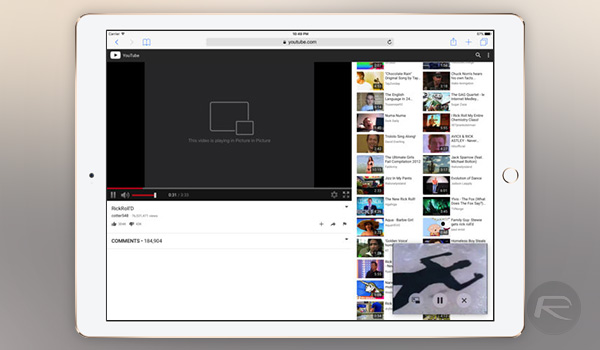
How To Watch Any HTML5 Video In PiP Mode On iPad

Oliver Haslam·June 2, 2017

Download: Phantom Lite For Snapchat 10.9.2.0 Released For Non-Jailbroken Devices

Paul Morris·June 1, 2017
Here's how to download and install Snapchat++ Phantom Lite 10.9.2.0 IPA on iOS 10. No jailbreak is required for this to work.

Plex Launches New ‘Live TV’ Feature, Here Are The Details

Oliver Haslam·June 1, 2017
Fans of the hugely popular media center software Plex today received a new live tv feature with which they can play with, although they will need to be a Plex Pass subscriber in order to take advantage of it. As of today, Plex now offers an option for streaming live television, with the feature unsurprisingly called Live TV.

iOS 10.3.3 Beta 2 Vs iOS 10.3.2 Comparison Gives Apple’s Latest Test Seed Slight Performance Edge

Paul Morris·June 1, 2017

How To Install Deezer++ On iOS 10 Without Jailbreak

Paul Morris·June 1, 2017
Here's how you can download and install Deezer++ IPA on an iPhone or iPad running iOS 10. No jailbreak is required for this to work.

Eurasian Filings Hint At Two New iPad Models, Magic Keyboard 2 For WWDC 2017 Debut

Oliver Haslam·June 1, 2017
Two new iPad models, updated MacBook Pro, and Magic Keyboard 2 might be announced next week at WWDC 2017. Here are the details.

How To Install Play! PS2 Emulator On iOS 10 Without Jailbreak

Paul Morris·May 31, 2017

Download: iOS 10.3.3 Public Beta 2, macOS 10.12.6 Public Beta 2 Out Now

Paul Morris·May 31, 2017
You can now download iOS 10.3.3 public beta 2 as well as macOS 10.12.6 public beta 2 on compatible iOS and Mac devices. Here are the details.

How To Add Guest Mode Feature To iOS 10

Oliver Haslam·May 31, 2017
The updated GuestMode 2 jailbreak tweak brings its privacy-centric guest mode features to iOS 10, allowing users to breathe easy while lending their devices to others.

Download: iOS 10.3.3 Beta 2, macOS 10.12.6, tvOS 10.2.2, watchOS 3.2.3 Released

Paul Morris·May 30, 2017

How To Enable Unlimited Zoom On iPhone In iOS Photos App [No Jailbreak Required]

Oliver Haslam·May 30, 2017
Here's how to enable unlimited zoom on iPhone for any photo in iOS Photos app. No jailbreak is required for this to work.

How To Install Twitch++ On iOS 10 Without Jailbreak

Paul Morris·May 30, 2017
Here's how to download and install Twitch++ IPA onto your iOS 10-powered iPhone or iPad. No jailbreak is required for this process to work, and it instantly gives you access to the modified Twitch experience without having to go through the process of liberating your device from Apple's walled garden.

How To Make Invisible iOS Folders To Hide All Secret Apps [No Jailbreak Required]

Paul Morris·May 29, 2017
Load More

TRENDING NOW

iOS 27 Beta 5 Download And Expected Release Date

X Money Launches With Apple Pay Support

Apple Is Now A $5 Trillion Company

Apple Replaces iPhone Upgrade Program With New Klarna-Powered Apple Upgrade

Jailbreak iOS 26.6: Everything You Need To Know

iOS 26

Download: iOS 26.6 Final IPSW Links, OTA Update Along With iPadOS 26.6, macOS 26.6 And More Released

Apple Releases Second Public Beta Of iOS 27 And iPadOS 27

Apple And Klarna Bringing “Apple Upgrade” Program To US Next Week

Apple Releases iOS 26.6 RC For iPhone, iPad

Download: iOS 27 Beta 4 IPSW Links, OTA Update Out Now For Developers

FOR YOU

iOS 27 Compatible iPhone Models Revealed?

iOS 27 Update Brings AI Reframing And More To iPhone Photos

Apple Highlights New Child Safety Features For iOS 27 And Beyond

iOS 27 Could Bring Siri Apple Intelligence Support To The iPhone’s Camera App

Apple’s iOS 27 Will Be About Improved Quality And Performance

New iOS 26.4 and iOS 27 Features Have Leaked Ahead Of Release

Apple Touts Big iOS 27 Speed Improvements Coming To iPhone

Download iPadOS 27 Beta 1 IPSW Links, OTA Update Now

  • About
  • Advertise
  • Privacy Policy
  • Tip Us
Copyright © 2008-2026 Redmond Pie. All Rights Reserved.
  • About
  • Advertise
  • Privacy Policy
  • Apple
  • Google
  • Microsoft
  • Tesla
  • Reviews
  • Deals
Start typing to see results or hit ESC to close
Apple iPhone deals iPad Android
See all results

SUBSCRIBE

Join 100k+ other tech lovers and get the latest news in your inbox
[mc4wp_form id="389"]