
• December 6, 2025
  • Apple
    Apple

    Mac Users Can Get Christmas-Ready Lights And Snow To Their Mac With This App

    Apple’s Hypertension, Sleep Apnea, And Hearing Health Features Come To New Countries

    How To Bypass iCloud Activation Lock iPhone & iPad Updated

  • Google
    Google

    Google’s Latest Pixel Ad Mocks Apple’s iPhone With A Wicked Twist

    Apple’s AirDrop Now (Sort Of) Works With Android Phones

    Apple’s Next Big Siri Upgrade Could Be Powered By Google

  • Microsoft
    Microsoft

    Apple Is Breaking Sales Records Thanks To The iPhone 17

    10 Best Black Friday Deals Still Available And Worth Checking Out

    Get 4 Outdoor Solar-Powered Smart Cameras For Nearly 50% Off With This Black Friday Deal

  • Tesla
    Tesla

    Tesla Might Add CarPlay, But Android Users Could Be Left Out

    Tesla Launches $36K Model 3, $39K Model Y

    Tesla Cybertruck Available To Order Now In UAE, Saudi Arabia, Qatar

  • Reviews
    Reviews

    VideoProc Converter AI Helps Restore Old Videos Up To 4K [Review]

    Why Choose CZUR StarryHub For Meeting Solution?

    Stellar Repair For MS SQL – Product Review

  • Deals
    Deals

    How To Bypass iCloud Activation Lock iPhone & iPad Updated

    Eat Healthy And Save $50 Off This Ninja Air Fryer Pro 4-In-1

    Save $450 On The Microsoft Surface Pro With Snapdragon Elite X, 16GB RAM, 256GB SSD

Reading
Pulse For Windows 7 Changes Your Login Screen Background And Desktop Wallpaper Periodically
ShareTweet
Goncalo Ribeiro·June 17, 2011

Pulse For Windows 7 Changes Your Login Screen Background And Desktop Wallpaper Periodically

Do you ever get tired of your desktop and login screen backgrounds? Ever wished you could display an ever-changing slideshow as your background, with wallpapers downloaded straight from the web in real time, based on a keywords you choose? Pulse let’s you do just that.
Windows 7 Theme

This program, which does not require an installation, will display an icon on the notifications tray as soon as it’s opened. Right-clicking that icon and selecting "Options" will bring up a window that lets you set up Pulse:
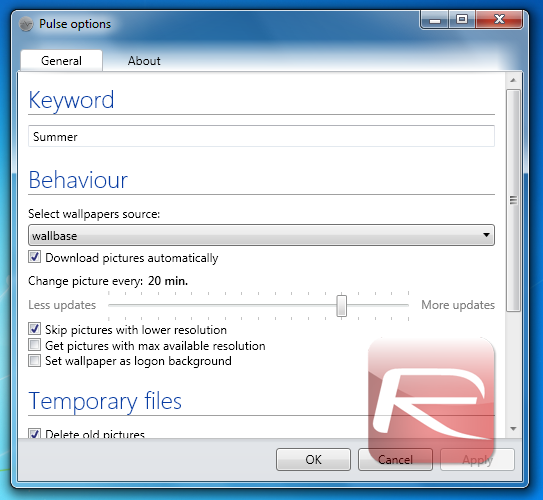
Pulse settings

Setting up Pulse is also easy. First, insert the keyword you wish all downloaded wallpapers to be related to, such as "Summer" or "donuts". You can also choose between two different wallpaper sites: Wallbase and reWalls.

You can also adjust different behavioral settings, such as keeping all wallpapers that were previously downloaded and choosing how often wallpapers should change. You can also choose not to change your Login Screen background by unchecking "Set wallpaper as logon background".

After you hit OK, Pulse will remain running in the background and start changing your wallpaper after the period of time you set (the default being 20 minutes). The result is what one would expect.

There is no clear way to set this program to run by default at startup, meaning users will have to run them manually, or move a shortcut to Pulse to the Start Menu’s startup folder. I also had trouble changing my login screen background, although others report to be able to do it just fine.

It’s important to point out that Windows 7 already has a basic slideshow feature that does most of what this program offers, including downloading wallpapers on the web through RSS feeds. It doesn’t, however, give users a clear way to do it, reserving it for specific themes only, such as Microsoft’s own Bing theme that pulls the newest images used on Bing.com from the web.

If you like changing your wallpaper often, this program can be a great way to discover new backgrounds without actually having to spend hours browsing through wallpaper sites. There are a few features missing, such as the ability to select more sources, but overall, this is a very solid program.

Pulse works on Windows 7 right out-of-the-box. If you’re running Windows Vista, make sure you have .NET Framework 3.5 or above installed (download version 4.0 from here).

Download Pulse here!

You can follow us on Twitter or join our Facebook fanpage to keep yourself updated on all the latest from Microsoft, Google and Apple.

Tags
login screenWindowsWindows 7 WallpaperWindows 7 wallpapers
ShareTweetSubmitShare
Goncalo Ribeiro
Previous Official Facebook App For iPad Reportedly Confirmed, Release Imminent
Next Get Multiple Docks In Mac OS X Using Dock-It
Show Comments (0)

TRENDING NOW

Mac Users Can Get Christmas-Ready Lights And Snow To Their Mac With This App

Apple’s Hypertension, Sleep Apnea, And Hearing Health Features Come To New Countries

How To Bypass iCloud Activation Lock iPhone & iPad Updated

Apple Announces Its 2025 App Store Awards Winners

Apple Is Breaking Sales Records Thanks To The iPhone 17

Apple Makes iOS 26.2 Release Candidate Available To Download

Your Apple Music Replay 2025 Is Now Available

Cyber Monday All-Time Low Price: Get 2025 M4 MacBook Air For Just $738 Today Only

Cyber Monday Deal: Buy $100 Apple Gift Card And Get Free $15 Amazon Credit

The Best Apple Black Friday 2025 Deals

FOR YOU

iOS 26.0.1 To Fix iPhone 17 WiFi And CarPlay Disconnecting Issue?

iOS 26 CarPlay Finally Adds Multi-Touch Support

New iPhone 17, 17 Pro And iPhone Air Parts And DIY Repair Kits Released

iPhone 17 Pro Max Gets Thicker, While iPhone 17 Air Goes Ultra-Thin

iOS 26 watchOS tvOS macOS visionOS iPadOS

iOS 26.1 RC Download Released Alongside macOS 26.1, iPadOS 26.1 And More

This Could Be The iPhone 17’s New Crossbody Strap Accessory

Download iOS 26 RC IPSW Links, OTA Update For iPhone Here

iOS 26

iOS 26 Battery Life On iPhone Gets Extended Thanks To New ‘Adaptive Power’ Feature

  • About
  • Advertise
  • Privacy Policy
  • Tip Us
Copyright © 2008-2025 Redmond Pie. All Rights Reserved.
  • About
  • Advertise
  • Privacy Policy
  • Apple
  • Google
  • Microsoft
  • Tesla
  • Reviews
  • Deals
Start typing to see results or hit ESC to close
Apple iPhone deals iPad Android
See all results

SUBSCRIBE

Join 100k+ other tech lovers and get the latest news in your inbox
[mc4wp_form id="389"]