
• May 5, 2026
  • Apple
    Apple

    Apple Releases RC Version Of iOS 26.5, iPadOS 26.5, macOS 26.5, tvOS 26.5, visionOS 26.5, watchOS 26.5

    Apple Unveils 2026 Pride Band, Watch Face, And iPhone Wallpaper

    Mac mini Price Increased To $799 As Apple Drops $599 Model Amid AI Demand

  • Google
    Google

    Google Meet Comes To Apple CarPlay, Still No Android Auto Support

    Google Maps Is Getting Gemini AI And 3D Immersive Navigation

    It’s Official: Google Gemini Will Power Future Apple Intelligence And Siri Upgrades

  • Microsoft
    Microsoft

    Grab Windows 10 From Just $9, Windows 11 From Just $12 With These Limited-Time Microsoft Software Deals

    Upgrade Your PC: Get Windows 11 Pro Keys For Just $26 at WhatsGameKey March Sale!

    How To Get Microsoft Genuine Product Keys For Cheap: Windows 10 From Only $9, Windows 11 From Just $12 With These Limited-Time Spring Deals

  • Tesla
    Tesla

    Tesla Gives Model S And Model X A Grand Farewell With Special Signature Edition

    Tesla’s Full Self-Driving Is Being Tested In The UAE

    Tesla Just Added A Cheaper Cybertruck And Slashed The Cyberbeast’s Price

  • Reviews
    Reviews

    Stellar Repair For MS SQL – Corporate Edition [Review]

    VideoProc Converter AI Helps Restore Old Videos Up To 4K [Review]

    Why Choose CZUR StarryHub For Meeting Solution?

  • Deals
    Deals

    FTMining Launches Free Mining Service For BTC, ETH, XRP And DOGE Holders, With Daily Earnings Of Up To $9,900?

    Clear Your Driveway And More With $40 Off This 980,000 RPM Cordless Leaf Blower

    Enjoy Big-Screen Movie Nights With $800 Off This Triple Laser Nebula X1 4K Projector

Reading
How To Enable Custom Animated Boot Logo On iOS 4.3.1 iPhone, iPad, iPod touch, Jailbroken with Redsn0w / Sn0wbreeze
ShareTweet
Taimur Asad·April 7, 2011

How To Enable Custom Animated Boot Logo On iOS 4.3.1 iPhone, iPad, iPod touch, Jailbroken with Redsn0w / Sn0wbreeze

The newly released Sn0wbreeze 2.5.1 adds in the ability to enable “Animate” (custom animated boot logos) on devices jailbroken on the latest iOS 4.3.1 firmware.

Custom animated boot logo option was first introduced with GreenPois0n RC5/6 untethered jailbreak for iOS 4.2.1.

Follow the instructions posted below to enable custom animated boot logo option on devices jailbroken on iOS 4.3.1.

Update: Redsn0w for Windows and Mac has also been updated with an option to enable custom animated boot logos. Instructions posted below have been updated to reflect the changes.

Step 1: Jailbreak your 4.3.1 iDevice using either Sn0wbreeze 2.5.1 or Redsn0w 0.9.6rc11, step by step guide for which can be found here (Sn0wbreeze) or here (Redsn0w).

While jailbreaking, in case of Sn0wbreeze, make sure you enable the option “Enable Animated Logo Capability” found under Expert Mode->General, as shown in the screenshot below.
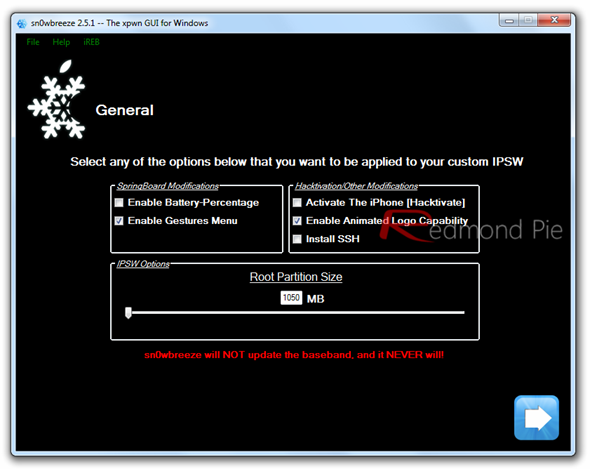
Animated Boot logos

And in case of Redsn0w, “Allow boot animation” option as shown in the screenshot below.
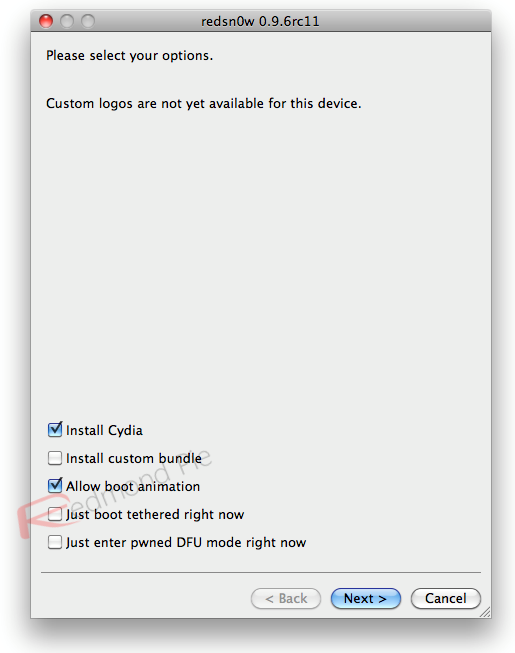
Redsn0w 0.9.6rc11

Note: Those of you who are already jailbroken on iOS 4.3.1 can simply rerun the jailbreak using the updated version of the same respective tool (Redsn0w or Sn0wbreeze) which you initially used to jailbreak your iOS device.

Step 2: Once your iPhone, iPad or iPod touch has been jailbroken, start Cydia and install “Apple Boot Logo” (aka Animate), and you’re well on your way to some animated goodness.
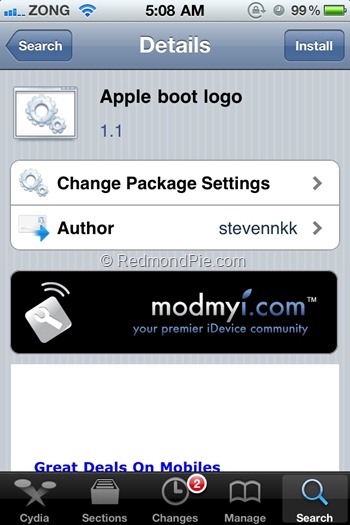
Photo Feb 10, 5 08 51 AM

Now you need some themes, which can be found by searching Cydia for ‘BootLogo’ and install whichever themes take your fancy.

Once all that is done it’s just a matter of firing up Settings.app and choosing which theme you want to use from the new BootLogo menu.

Here is a little video of it in action:

You can follow us on Twitter or join our Facebook fanpage to keep yourself updated on all the latest from Microsoft, Google and Apple.

Tags
animateboot logocustom boot logocydiaCydia tweaksiPadiPhoneiPod TouchJailbreak Tweakssn0wbreezesn0wbreeze 2.5.1
ShareTweetSubmitShare
Taimur Asad
Senior Reporter / Editor-in-Chief
Related

Apple Releases RC Version Of iOS 26.5, iPadOS 26.5, macOS 26.5, tvOS 26.5, visionOS 26.5, watchOS 26.5

Oliver Haslam·May 4, 2026

Apple Unveils 2026 Pride Band, Watch Face, And iPhone Wallpaper

Oliver Haslam·May 4, 2026
Previous Sn0wbreeze 2.5.1 For iOS 4.3.1 Untethered Jailbreak Brings Animated Boot Logos, Cydia 1.1.1 and More
Next Redsn0w 0.9.6rc11 4.3.1 Untethered Jailbreak Adds Custom Animated Boot Logo Option For iPhone, iPad, iPod touch
Show Comments (0)

TRENDING NOW

Apple Releases RC Version Of iOS 26.5, iPadOS 26.5, macOS 26.5, tvOS 26.5, visionOS 26.5, watchOS 26.5

Apple Unveils 2026 Pride Band, Watch Face, And iPhone Wallpaper

Mac mini Price Increased To $799 As Apple Drops $599 Model Amid AI Demand

Apple’s iPhone 17 Lineup Is Its Most Popular Ever

Apple And Porsche Show Off Retro-Themed Car Liveries At Laguna Seca

iPhone 17 Pro And iPhone Air Charging Issue Reported by Users

iOS 27 Could Bring Siri Apple Intelligence Support To The iPhone’s Camera App

iOS 27 Will Bring New Apple Intelligence Photo Editing Tools To iPhone

20th-Anniversary iPhone’s Display Will Go Bezel-Free

iOS 26.5 Beta 4 Released Alongside iPadOS 26.5 Beta 4

FOR YOU

How To Fix iOS 26 “No Service” Issue After Updating On iPhone

iOS 26 Beta 5 Changes, New Features, Release Notes

iOS 26

iOS 26 Recovery Assistant Lets You Restore Your iPhone Without Needing A Computer

iOS 26.2 Beta 1 New Features, Release Notes, Changelog

iPhone 17 Might Bring Back The Lanyard Trend, Here’s What We Know

Testing Shows iPhone 17’s N1 Chip Boosts Wi-Fi 7 Speeds

iOS 26

Apple Adds New Battery Notification Toggle To iOS 26 Beta 7

iOS 26 logo

iOS 26 Will Bring New Features To Messages, CarPlay, And More, Report Claims

  • About
  • Advertise
  • Privacy Policy
  • Tip Us
Copyright © 2008-2026 Redmond Pie. All Rights Reserved.
  • About
  • Advertise
  • Privacy Policy
  • Apple
  • Google
  • Microsoft
  • Tesla
  • Reviews
  • Deals
Start typing to see results or hit ESC to close
Apple iPhone deals iPad Android
See all results

SUBSCRIBE

Join 100k+ other tech lovers and get the latest news in your inbox
[mc4wp_form id="389"]