
• April 29, 2026
  • Apple
    Apple

    20th-Anniversary iPhone’s Display Will Go Bezel-Free

    iOS 26.5 Beta 4 Released Alongside iPadOS 26.5 Beta 4

    Apple Expected To Launch Its First MacBook Ultra With OLED Display And More

  • Google
    Google

    Google Meet Comes To Apple CarPlay, Still No Android Auto Support

    Google Maps Is Getting Gemini AI And 3D Immersive Navigation

    It’s Official: Google Gemini Will Power Future Apple Intelligence And Siri Upgrades

  • Microsoft
    Microsoft

    Grab Windows 10 From Just $9, Windows 11 From Just $12 With These Limited-Time Microsoft Software Deals

    Upgrade Your PC: Get Windows 11 Pro Keys For Just $26 at WhatsGameKey March Sale!

    How To Get Microsoft Genuine Product Keys For Cheap: Windows 10 From Only $9, Windows 11 From Just $12 With These Limited-Time Spring Deals

  • Tesla
    Tesla

    Tesla Gives Model S And Model X A Grand Farewell With Special Signature Edition

    Tesla’s Full Self-Driving Is Being Tested In The UAE

    Tesla Just Added A Cheaper Cybertruck And Slashed The Cyberbeast’s Price

  • Reviews
    Reviews

    VideoProc Converter AI Helps Restore Old Videos Up To 4K [Review]

    Why Choose CZUR StarryHub For Meeting Solution?

    Stellar Repair For MS SQL – Product Review

  • Deals
    Deals

    Labor Day Sale: Get Microsoft Genuine Product Keys For Less – Windows 11 From Just $12 And More

    This Intel Core i9-12900K 16-Core Gaming CPU Is Now Almost $60 Off

    This 145W Car Charger From UGREEN Comes With A Retractable Cable For Just $34.99 Today

Reading
Install Custom Animated Boot Logos On iPhone 4S, iPad 2, And A4 Devices With Animate Fix For iOS 5.0.x/iOS 4.x.x
ShareTweet
Ben Reid·January 31, 2012

Install Custom Animated Boot Logos On iPhone 4S, iPad 2, And A4 Devices With Animate Fix For iOS 5.0.x/iOS 4.x.x

The icing on the cake of any jailbroken device has to be a custom animated boot logo. Problem is, depending on which particular firmware/jailbreak solution you’re running, it may not actually work properly.

Having waited 2-3 months for an iOS 5 untether, we’re still in that honeymoon period of eternal gratefulness, thus may not be too concerned about such innocuous areas as the boot logo. However, as much as the productive tweaks make our lives a lot easier and improve iOS as a whole, there’s nothing wrong with a few aesthetic modifications to set our devices apart from the rest, now is there?

Whenever you reboot your iPhone, iPad or iPod touch, you’re always met with that icy-white Apple logo as your device initializes and prepares for another bout of morbid overuse. Modifying this logo allows you to add your own personal touch, plus we’re pretty sure the bank balance will corroborate your device’s status as an Apple product without the need for an incessant reminder.
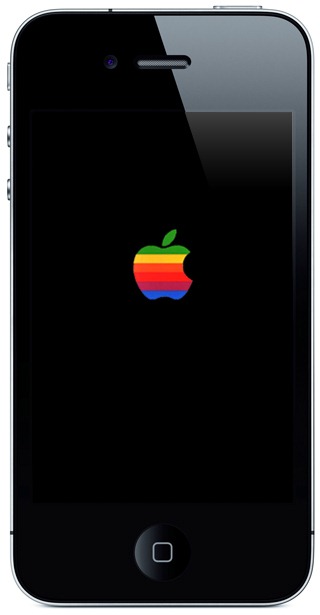
Apple custom bootlogo

There are many decent boot logos out there, with the PacMan, Angry Birds and MyGreatFest amongst my personal favorites. The animated ones tend to be better, and will surely keep you mildly entertained through the 5-10 second wait for any signs of life.

iH8sn0w has just released a solution for those unable to change their boot logo on iOS 5.x called ‘animate fix for iOS 4.x.x/5.0.x’ available through Cydia’s ModMyi repo – a default in your list of sources unless you’ve decided to delete it. Since it’s new, you may need to refresh before it shows up in search.
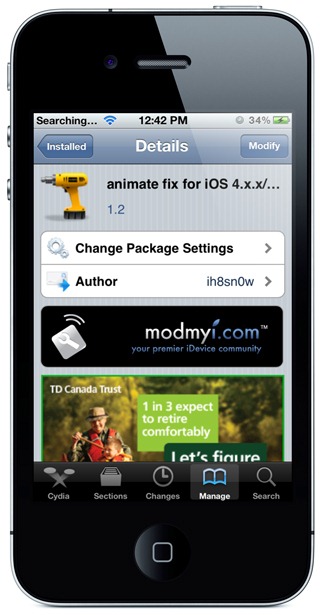
bootlogo fix ios

It important to note that this is just a fix for original Animate tweak which is already available on ModMyi repo for iOS 4.2.1. Installing this fix will automatically add Animate to queue for installing on your device, with the additional support for newer firmwares such as iOS 4.3.x and iOS 5.x. Also, since the jailbreak available for A5 based devices (iPhone 4S and iPad 2) is not based on a bootrom exploit, you will initially see the original Apple logo on boot first, followed by your own custom logo.

You will obviously need to jailbreak your device to install this tweak. For jailbreaking iPhone 4S and iPad 2, you can simply follow our step by step guide posted here to jailbreak iOS 5.0.1 using Absinthe on Windows or Mac. For those of you with iPhone 4, 3GS, iPad 1, and iPod touches can use Redsn0w or Sn0wbreeze to untether jailbreak on iOS 5.0.1.

You may also like to check out:

  • How To Enable Custom Animated Boot Logo On iOS 4.3.1 with Redsn0w / Sn0wbreeze
  • How To Enable or Disable Animated Boot Logo in GreenPois0n RC5

Be sure to check out our iPhone Apps Gallery and iPad Apps Gallery to explore more apps for your iPhone, iPad and iPod touch.

You can follow us on Twitter, add us to your circle on Google+ or like our Facebook page to keep yourself updated on all the latest from Microsoft, Google, Apple and the web.

Tags
boot logoBoot logo fixiPadiPad AppsiPhoneiPhone Appsjailbreak
ShareTweetSubmitShare
Ben Reid
Reporter.
Related

20th-Anniversary iPhone’s Display Will Go Bezel-Free

Oliver Haslam·April 28, 2026

iOS 26.5 Beta 4 Released Alongside iPadOS 26.5 Beta 4

Oliver Haslam·April 27, 2026
Previous Siri Gives Singing Another Shot, Sings A Song By The Flaming Lips
Next Samsung Announces Galaxy S Advance With Dual-Core Processor, Super AMOLED Display & More
Show Comments (0)

TRENDING NOW

20th-Anniversary iPhone’s Display Will Go Bezel-Free

iOS 26.5 Beta 4 Released Alongside iPadOS 26.5 Beta 4

Apple Expected To Launch Its First MacBook Ultra With OLED Display And More

iOS 26.4.2 Vs iOS 18.7.8 Battery Test: Performance And Battery Life Compared

Apple’s 20th-Anniversary iPhone Could Use A Samsung ‘Micro-Curved’ OLED Display

Miami F1 Grand Prix 3D Experience Comes To Apple Maps

New iPhone 18 Pro Max Dummies Show Thicker Camera Bump

Jailbreak iOS 26.4.2: Everything We Know

Download: iOS 26.4.2 IPSW Links, OTA Out Now

Big iPhone Camera Upgrades Are Coming, Starting With iPhone 18 Pro

FOR YOU

All New iPhone 17 And 17 Pro Colors ‘Confirmed’ In New Report

iPhone 17 Could Use Apple’s Own 5G And WiFi Chip With More Products To Follow

Here’s Why Cosmic Orange iPhone 17 Pro Max Can Turn Pink

Best iPhone 17 Screen Protectors You Must Buy [List]

Download Wallpaper Of iOS 26 Beta From Here

iOS 26 Beta 7 Download: When To Expect Release Date?

iOS 26

Download: iOS 26 Beta 3 OTA Profile, IPSW Links Out Now

Jailbreak iOS 26: What You Need To Know

  • About
  • Advertise
  • Privacy Policy
  • Tip Us
Copyright © 2008-2026 Redmond Pie. All Rights Reserved.
  • About
  • Advertise
  • Privacy Policy
  • Apple
  • Google
  • Microsoft
  • Tesla
  • Reviews
  • Deals
Start typing to see results or hit ESC to close
Apple iPhone deals iPad Android
See all results

SUBSCRIBE

Join 100k+ other tech lovers and get the latest news in your inbox
[mc4wp_form id="389"]