
• October 26, 2026
  • Apple
    Apple

    How To Play YouTube, Netflix Video In Apple CarPlay

    iPhone Duo Is Jailbreak Ready On Launch Day

    iPhone Duo 2 Could Be Bigger Than The One You Just Bought

  • Google
    Google

    Google Maps Brings Gemini To Apple CarPlay

    Google Account Recovery Now Needs Your Face And Your Face Alone

    Google Meet Comes To Apple CarPlay, Still No Android Auto Support

  • Microsoft
    Microsoft

    Stellar Repair For Outlook Detailed Review: Online Service Vs Desktop Tool What To Choose

    Get Windows 11 For Just $14 And Microsoft Office From Less Than $19 With These Software Deals

    Grab Windows 10 From Just $9, Windows 11 From Just $12 With These Limited-Time Microsoft Software Deals

  • Tesla
    Tesla

    Tesla Has Updated Its App, Adding iPhone Duo And iPad Support

    Tesla’s New Roadster Can Do 0-60mph In 0.81 Seconds, Production Starts 2028

    Support For Apple TV, HBO And More Come To Tesla’s In-Car Entertainment Screen

  • Reviews
    Reviews

    Stellar Repair For MS SQL – Corporate Edition [Review]

    VideoProc Converter AI Helps Restore Old Videos Up To 4K [Review]

    Why Choose CZUR StarryHub For Meeting Solution?

  • Deals
    Deals

    Get $50 Off This Logitech Keyboard Folio Case For Your 13-Inch iPad And Be Work-Ready

    Enjoy Whole Home Wi-Fi 6 Coverage And WPA3 Security For $99.99 With This Mesh System Discount

    Beat Cold Nights With $45 Off This Dual-Control Bedsure Heated Blanket

Reading
This Is The Tool Apple Uses To Engrave Their Logo On Gadgets [PHOTO]
ShareTweet
Awais Imran·July 29, 2011

This Is The Tool Apple Uses To Engrave Their Logo On Gadgets [PHOTO]

Have you ever wondered what kind of tool Apple uses to engrave their iconic logo on gadgets such as the iPhone, iPod and their MacBook laptops? Well, even if you haven’t, you’ll really want to see just how strange-looking the tool is; photos after the break!

logo

The discovery of the tool comes in the form of a patent application from Apple Inc. filed in the United States Patent & Trademark Office (USPTO) titled Aparathus and Method for Intricate Cuts. The application, in turn, was discovered by 9to5Mac.

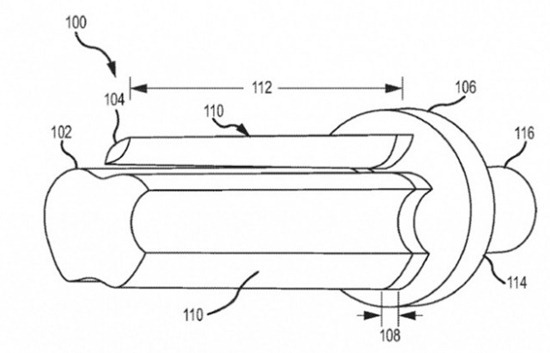
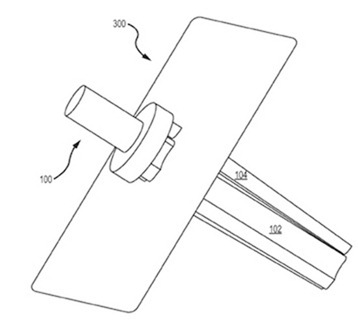
The tool has a base upon which an elongated member extends. The face of the elongated member looks like the Apple logo we are all quite familiar with which is then used to punch shapes into different metals from which different Apple product’s backs are made.

From USPTO:

The cutting apparatus includes a base member and an elongate member extending from the base member. The elongate member includes a tapered region having an abrasive surface. The tapered region defines at least one vertex defining an angle of a desired cutout shape. Additionally, the tapered region is toothless.

With the description clear, here are a couple of illustrations from Apple engineer and logo-engraving tool inventor Kevin M. Kenney of the tool:
apple-patent-20110183580-drawing-001-e1311861277409apple-patent-20110183580-drawing-002

So why did Apple go for a completely custom tool instead of opting for more traditional techniques like CNC milling, water jet cutting or laser cutting? The answer for that is how it is quite pricey to go with traditional tools for sharp/acutely-angled logos such as the one Apple has. Apple feels that the traditional tools “may not provide adequately sharp features at a reasonable cost” and that these may produce “rough edges with exposed fibers and a generally unacceptable appearance”.

Apple even goes ahead and describes the process in detail:

A tapered shaft having an abrasive surface is inserted into the aperture. The cross-section of the shaft is the shape of the desired intricate cut. The shaft gradually expands radially (i.e., gets bigger) along the length of the shaft. As the shaft increases in size, the cross-section shape stays the same. That is, the shape of the shaft remains the same along the length of the shaft as the cross-sectional size of the shaft increases due to the taper. The tapered shaft is toothless. That is, the tapered region does not include teeth, in contrast to conventional broach tools, for cutting through material.

What a crazy company. Their attention to detail is simply mind-blowing.

You can follow us on Twitter or join our Facebook fanpage to keep yourself updated on all the latest from Microsoft, Google and Apple.

Tags
AppleApple Logo
ShareTweetSubmitShare
Awais Imran
Passionate writer at Redmond Pie, casual photographer, sharer of amusing links and an amalgam of all things geeky. Follow me on Twitter: @waisybabu
Related

How To Play YouTube, Netflix Video In Apple CarPlay

Taimur Asad·October 25, 2026

iPhone Duo Is Jailbreak Ready On Launch Day

Oliver Haslam·October 24, 2026
Previous Microsoft Pokes Fun At Google With ‘Gmail Man’ Spoof Video
Next 1TapFaceTime Lets You Pin FaceTime Contacts As Icons On The iPhone Home Screen
Show Comments (0)

TRENDING NOW

How To Play YouTube, Netflix Video In Apple CarPlay

iPhone Duo Is Jailbreak Ready On Launch Day

iPhone Duo 2 Could Be Bigger Than The One You Just Bought

How To Enter And Exit Recovery Mode On iPhone Duo (2026)

The Best iPhone Duo Screen Protectors List

The Best iPhone Duo Case List To Keep It Protected

Apple Music Revamp Confirmed Following New Icon Release

iPhone Duo Uses Mac’s Edge Light Feature For Video Calls

Google Maps Brings Gemini To Apple CarPlay

iPhone Duo Walk-In Purchase On Launch Day At Apple Store, Here’s Where It Will Be Available

FOR YOU

PSA: This iOS 27 Bug Can Freeze Your iPhone

iOS 27 Will Allow iPhone Users To Choose Between Different AI Providers

How To Play YouTube, Netflix Video In Apple CarPlay

The iPhone 17’s 8GB RAM Means It Misses Out On Two iOS 27 Features

Apple Warns RAM Shortages Will See Prices Increase

iOS 27 Includes New ‘Create A Pass’ Feature For Creating Digital Tickets And Passes

[iOS 27 Updated] 7 Ways To Fix Unable To Check For Update Or Not Showing On iPhone/iPad

iOS 27 Brings Landscape Mode To More Apps As Foldable iPhone Rumors Continue

  • About
  • Advertise
  • Privacy Policy
  • Tip Us
Copyright © 2008-2026 Redmond Pie. All Rights Reserved.
  • About
  • Advertise
  • Privacy Policy
  • Apple
  • Google
  • Microsoft
  • Tesla
  • Reviews
  • Deals
Start typing to see results or hit ESC to close
Apple iPhone deals iPad Android
See all results

SUBSCRIBE

Join 100k+ other tech lovers and get the latest news in your inbox
[mc4wp_form id="389"]