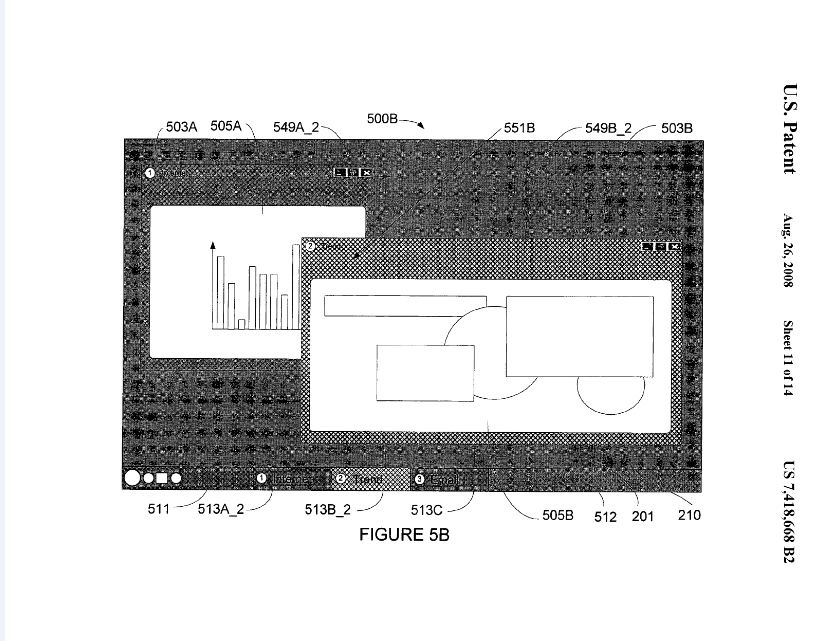
Microsoft might be introducing application specific glass renderings. The color of the glass frame around a window can be changed in Vista, but the change is global to the system. The color of any particular window glass frame can not be set by choice. But, how about being able to change the color/opacity level of a the glass frame of any application through defined events or commands? According to a Patent number 7418668
A method for changing a color value and/or level of opacity value of a glass appearance window frame for an application window is described. The method includes steps of determining a defined color value and a defined level of opacity value to apply to a glass appearance window frame and displaying the glass appearance window frame in accordance with the defined color value and the defined level of opacity value. A command may be received to apply the defined color value and the defined level of opacity value to the glass appearance window frame, thereby applying the defined color value and level of opacity value to the glass appearance window frame. Color values and/or level of opacity values may be changed automatically, be application specific, and/or be changed in response to receipt of an input from a user to change one or more portions of a default configuration.
Further more, the summary of this patent says:
Increasing a user experience in an operating environment and additional manners for identification of application windows, property sheets, and dialogs for the user are always under development. Creating real world environments during a user experience facilitates an easier understanding of use of an application window and other user interface elements displayed as part of an operating system. Aspects of the invention include a system for rendering colorization to a glass appearance window frame. Aspects are directed to methods for displaying and/or changing a glass appearance window frame’s visual appearance in the event of an action and/or based upon user-defined or system defined values.
Keeping in mind, that in Vista, the active window has a blurred glass frame while the inactive ones have an opaque one, the color stays the same, which is defined in the Windows Color and Appearance settings of the Operating System. Allowing the color of the glass frame to react to different events/actions could be very interesting. This could mean that the glass frame of an application demanding your attention could blink in a different color rather than the current method of an orange blinking taskbar button. Also, this method would not be just enabled on application windows but also property sheets, dialogue boxes and the sidebar. While it sounds very interactive, I can already hear people complaining about the annoyance.

Download Windows Live Toolbar and customize your Web experience!

Windows Vista
Windows Server 2008
Windows Home Server
Windows Live
Live Mesh


November 15th, 2008
23 Comments/Trackbacks on "Windows Application Specific Glass Colorization?"
(#)
Nice idea.
[Reply]
(#)
Isn’t it pretty useless?
[Reply]
(#)
I hope they fix Win7’s huge performance footprint so they can run respectively light on netbooks.
[Reply]
(#)
Oh my god! That feature is gonna totally blow Mac OS away. Out of the PARK!!
*cough cough* Pretty, useless…
[Reply]
Imran Hussain said:
September 8th, 2008 at 9:03 pm
I don’t happen to find any reference to Mac OS in this blog post. Care to explain your unsuccessful try at sarcasm??
[Reply]
Davey Yzermans said:
September 8th, 2008 at 9:27 pm
Aren’t they trying to top Mac OS with this, grapically? I don’t see how they are gonna beat Mac OS and/or Linux with this kind of useless GPU-waster.
[Reply]
Imran Hussain said:
September 8th, 2008 at 10:43 pm
I don’t think so Davey. Not every feature is intended to compete with others. Mac OS doesn’t have this. Linux has copied all of Windows eye candy in Vista, so don’t even mention that.
Taimur Asad said:
September 8th, 2008 at 10:48 pm
i have both.. a macbook and a Windows Vista notebook and personally i think aero glass is more visually stunning than the grey & dull aqua interface.
Davey Yzermans said:
September 8th, 2008 at 10:49 pm
Hahaha! “Linux has copied all of Windows eye candy in Vista”? Compiz Fusion existed long before Vista’s Aero.
By the way, why would you want this ‘feature’. What’s its purpose? Would you use it?
Davey Yzermans said:
September 8th, 2008 at 10:52 pm
@Taimur Asad: Maybe, but is Aero as smooth as Aqua. Don’t think so.
Imran Hussain said:
September 8th, 2008 at 10:53 pm
Compiz Fusion never existed before Vista’s Aero. Check your facts. Beryl and Compiz were merged in 2007 to create Compiz Fusion.
And Compiz was released in 2006. AFTER Windows Aero had been shown many times in Conferences. It’s sad, when people get the facts wrong.
And the possible uses of this feature are already mentioned in the post. It’s just a patent not implemented. So I can’t give an opinion on it until I use it.
Davey Yzermans said:
September 8th, 2008 at 10:58 pm
And you check your words: “And Compiz was released in 2006. AFTER Windows Aero had been shown many times in Conferences.” Shown in conferences is not the same as released.
Imran Hussain said:
September 8th, 2008 at 11:00 pm
But it still means they copied
No use arguing about it.
[Reply]
Davey Yzermans said:
September 8th, 2008 at 11:01 pm
So what? Microsoft should have release it earlier then.
[Reply]
(#)
@Davey Yzermans: Depends on what kind of hardware you have. On my notebook (http://microsoftwow.spaces.live.com/blog/cns!28962096F48747EA!1543.entry) its as smooth as silk
[Reply]
Davey Yzermans said:
September 8th, 2008 at 11:01 pm
And also on your budget
[Reply]
Trackbacks
Comment Now!