
Apple’s latest mice sensation – the multi-touch capable Magic Mouse introduced iPhone-style touch capabilities in the world of mice for users running OS X. This amazing product of engineering which is a multi-touch descendant of the iPhone soon became the heartthrob of Mac users. Since Magic Mouse is officially supported to work on Macs only, PC users running Windows were left out in the dark since there is currently no multi-touch capable mouse available for PC market.
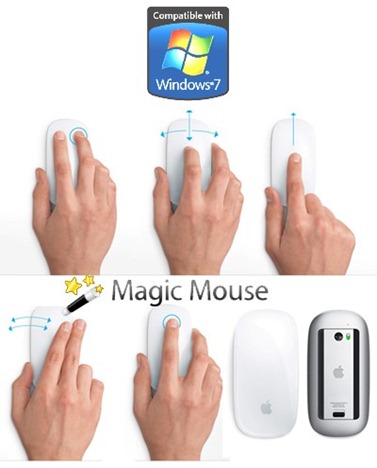
Good news is that the folks over at UneasySilence have managed to hack the driver to make it run on PCs running any version of Windows from XP to 7. Thanks to Apple for the Bluetooth driver update, and thanks to hackers for the hack which has enabled them to extract the two .exe files from the update so that Windows users can enjoy the taste of the first multi-touch capable mouse on their PCs.
Thanks to a little hackery from Apple’s Bluetooth Update (located here) the Magic Mouse driver was extracted via WinRar resulting in a 32bit version and a 64bit version that you can install on any ordinary Windows PC that will enable all the scrolling ‘magic’ of the Magic Mouse.
With the help of these modified drivers, you can use Apple Magic Mouse on both 32, and 64 bit editions of Windows XP, Vista and 7.
Download Apple Magic Mouse Driver for Windows (32 Bit)
Download Apple Magic Mouse Driver for Windows (64 Bit)


Windows 7
Windows Vista
Windows Server
Windows Live
Live Mesh
iPhone
iPad
Mac OS X


September 6th, 2010
45 Comments/Trackbacks on "Apple Magic Mouse Works on Windows 7"
(#)
haha woowww!!! that is great .. now I have to save in order to buy a 100-dollar mouse -_-
(#)
works for me
thanks
(#)
All right–what's your secret? I'm running 7 on a MacBook Air and when I try to run the Apple Bluetooth update, it says it's not intended for this computer.
(#)
Don't run the Apple bluetooth update, run the one from UneasySilence (either the 32 or 64 bit version). Apparently installing the Apple update (which doesn't work for Windows 7) is not a prerequisite for installing the UneasySilence driver. Worked for me.
(#)
I've a Mac running win7. This update didn't work right away for me. I had to go to device manager, remove any Apple Moultitouch Mouse device under the Human interface devices, install the mouse witht he default Win7 drivers (which saw it as a normal wireless mouse) and then install the patch.
You can tell that things don't go right when you try to add the mouse a new bluetooth device, win7 sees it but doesn't progress beyond that.
Anyway, it works. Great hack!
(#)
i couldnt find that driver in device manager, where else could i find it?
(#)
I got the Magic Mouse to work in Win7 and I'm looking now at my device manager > Human Interface Devices and the mouse shows only as Apple wireless mouse. I recall when I turned it on and let Win7 recognize it without installing anything it showed as Apple Multitouch, but the bluetooth recognition process couldn't finish. So I uninstalled it, installed the patch, then went thru the bluetooth process again and finally it worked. I've to say that it was a hit or miss for a few times, so I hope it'll work for you.
(#)
How do I uninstall that “driver”?
After installing it, the driver seems unable to keep up with mouse movement. If I move mouse quickly, the pointer lags and keeps on jumping for about 10 sec. after the mouse stopped moving. Very annoying.
Thanks,
Mietek
(#)
To uninstall a driver in Windows you need to right click on My Computer > Manage > Device Manager. Then find the driver you want to uninstall, right click on it and Uninstall. You might be asked if you want to remove the software entirely. I played with various options, removed completely, rebooted, reinstalled the hack. Again, I got it to work after lots of attempts.
The Magic Mouse with the hacked driver is not perfect. It has severe random latency that is annoying, but nothing like the 10 secs delay. More likely 2 secs here and there without specific reason. I look forward to the official driver by Apple.
(#)
does anybody know if the multi-touch would work in Windows 7, or does the hack just enable the magic mouse to be used like a normal mouse (i.e. just left/right click and vertical scrolling)?
(#)
i do not have scrolling.
(#)
I downloaded the 64 bit version, it doesn't appear to update the driver as it still shows as Microsoft HID mouse with a 2006 driver. The update is so fast you cannot see the name of the driver so you can do an update via properties. Windows 7 says you are using the Microsoft driver 2006!!!!!
(#)
so did it work for you in the end or not?
(#)
so did it work for you in the end or not?
(#)
I am running Windows 7 64 bit and the mouse worked like a charm. Only thing, i cant see the preference like in Mac. But scrolling works. Browser go back and forward doesnt work. I installed the apple wireless driver from above and then connected the mouse.
(#)
nice review
(#)
It worked ok for me on my PC… I just installed the 32bit on my vista machine and setup a bluetooth dongle. Paired ok. Vertical scroll fine but no left or right swipe working.
(#)
Yeah whats the deal? I got it working to on a 2.0 old usb bluetooth, Up and Down works well, no side to side, I was wondering if the driver from the guys only goes up and down or if it is a software program issue, but i tried the side to side in itunes, and it doesnt work, so It makes me think that windows 7 thus far is up and down only , still better than my super crazy hp mouse
(#)
I have the same problem… Where you able to solve it?
(#)
My Magic mouse finally works…
Here is how to set it up Step by Step…
1- Determine if your operating system is either 32 bits or 64 bits.
2- Download the corresponding(refer to above) Apple “hacked” driver for the Magic Mouse.
3-Download the Sidewinder X8 Driver from Microsoft (link: http://www.microsoft.com/hardware/download/down...)
3.5- The above Driver will allow you to do the Vertical, Horizontal and 360° Scrolling as well as the Zoom Feature with the Control Key.
4- Install the Mouse Drivers Downloaded in Steps 2 and 3.
5- *If you had to buy a USB Bluetooth Adapter please plug it and let Windows install the Driver for the Adapter.*
6- Right click the Bluetooth icon on the Notification Area and click on Open Settings.
7- Check the option “Allow Bluetooth devices to find this computer” and click Apply or Ok.
7.5- Believe me that if you don't do the above step the computer will never detect your Magic Mouse.
8- Right click the Bluetooth icon on Notification Area and click “Add a Device”.
8.5- Turn on your Magic Mouse.
9- Just after the computer detects your mouse, right click the mouse icon and go to properties.
10- Go to the Bluetooth Tap and check the option listed.
10.5- Wait until Windows finish installing drivers for mouse.
11- After Windows finishes downloading drivers click Apply or Ok.
12- *Add Device or if the Device disappeared then the Device was automatically added.*
13- Moments later, a pop up should appear saying that a device is trying to connect.
13.5- Password is 0000 by default.
14- I believe that should be it but if you have problems then click the Magic Mouse 3 times. That should definitely activate it…
14.5- Every time you start your computer you'll need to click the mouse 3 times or every time you turn it off and then turn it back on.
15- With the Mouse Driver from Microsoft you should be able to configure the Magic Mouse…
Enjoy…
if you have any problems or questions just reply…
(#)
By installing Both Drivers I mean installing both the Sidewinder X8 and the apple magic mouse driver… it really doesn't matter the order…
-Pablo Pitty
(#)
Hi, I have followed these instructions and it works except when the mouse goes into sleep mode it will “awake” again. I wonder if it has to do with the sidewinder driver? Any idea how I can uninstall this? If I uninstall the mouse device, when I re-install it just comes back to having the Sidewinder drive re-installed. Or if there is a bluetooth fix if that is the problem. I was never asked to enter the 0000 password. I feel I am so close! I love the mouse and so want it to work, but it's no good if it dies on sleep mode of course.
(#)
My mouse works with Windows XP SP3, but the scrolling does not work I have installed sidewinder… Also to let you know I have the Bluetooth stack for Windows by Toshiba (v6.01.03d) installed. Do I need the windows drivers to make the scroll work ??
I have the “Hacked” magic mouse drivers installed as well ..
Please help,
Thank you
AB
(#)
Finally got my mouse today. I have left-click, right-click, and vertical scrolling only. Your post gave me the impression that I could teach it zoom, and forward and back swipes as well. This is somehow my fault, but did I misread you, or am I misunderstanding how to set it up. To be perfectly honest, I'm not sure why I downloaded the Sidewinder software, so I'm sure I'm missing an integral part there.
(#)
Hi Pablo,
Thank you for your explanation about Apple Magic Mouse. I wish you to ask something about that mouse. I have bought an Apple Magic Mouse for my Dell XPS M1330 laptop. I have read in somewhere as I could use that mouse on my computer with all specifications by making some special application. I have read your mail and I would like to ask you, if I apply your steps, could I use my mouse with full function on my Dell laptop.
Please could you reply me to my mail as mahiraysu@gmail.com.
if yes, please help me to find the drivers and any others with link.
regards,
Mahir
(#)
Thank you Pablo Pitty. Have been on the phone to Apple Tech for hours and they had reformatting windows 7 and all sorts. Did what you said and got the sidewinder driver and it worked! fn amazing bro. good stuff.George
(#)
Thank you so much for your detailed instruction. THIS REALLY HELPED. I have spent HOURS and became VERY FRUSTRATED when trying to connect the beautiful Apple Magic Mouse to my sons Apple Mac Book running Snow Leopard, BootCamp 3.1, Windows7. I really have tried a lot, but your recepie finally solved all my problems. Thank you so much.
(#)
does the Apple Magic Mouse works on Windows Vista Home Basic PC not Bootcamp? please reply ASAP i need ANSWERS.
(#)
Thanks a lot to Pablo Pitty. I got my mouse scrolling vertically but not horizontally in Excel. Does anyone have any suggestion to get it working? Thanks in advance.
(#)
Hi,
Did you get to use the zoom without pressing the Control key ? (by using multitouch)
Thanks,
Effy.
(#)
It does not work for long. in fact following these exact directions do not render a mouse that is usable as when you're moving it around it stops and studders. Not sure what's going on, but even using the sidewinder x8 addition does not solve the problem. Now of course this is on a Mac Mini under Windows 7 64bit (bootcamp does NOT support this install), so it's just done by a lot of patience and driver installation. Everything else works just fine.
(#)
I had spent all day trying to figure out how to use my magic mouse on windows 7/mac os x 10.6.3 dual-boot…tried most of the above advice but the only way I could make it work was thus:
In Windows 7, right-click the start button, control panel, hardware and sound, devices and printers. Turn your mouse off and on to reset it. Click 'add a device.' A box will show up and hopefully find your mouse. Right-click it and select 'properties.' Click on the 'services' tab. There should be a box titled 'Drivers for keyboard, mice, etc.' Make sure it is checked with a tick. press 'ok' and see what happens with the Magic Mouse. Windows 7 automatically began to install a device driver and seconds later, the Magic Mouse began to work. I quickly rebooted and went back into Windows 7. After rebooting, for some reason the mouse has to be clicked a few times before it will work. Don't know why; heard other people mention this. As previously mentioned I tried many other things before discovering this…I hope it solves this problem for others.
Cheers!
(#)
I managed to install Magic Mouse to Windows7 on my HP laptop. I encountered few of the problems already described by other users. One thing that really bothers me is that the mouse has a really bad responsiveness, particularly when moving your mouse really fast around the screen.
I'm gonna test it now for one week and see if it's a good candidate for a purchase.
(#)
My story… windows xp sp3.
No problem installing Bluetooth. Other windows product are harder to install.
Then the UnEasySilence drive. But windows do not allow me to use the modified aple drive…
Now I have installed the sidwinder drives… but still not able to scroll….
(#)
In exel, you have to turn scroll lock off to scroll, try that. Works good for me although i'm on a Toshiba vista 32-bit home premium laptop.
(#)
same story here. Win XP Pro SP3…everything works on the Magic Mouse except up and down scrolling. Installed the Sidewinder driver and still no dice. Any ideas?
(#)
Im having same problems… at first, mouse lost the connection.. after update my bluetooth drivers, scrolling stop to work, but connection is perfect!!
(#)
i've just have buy this excellent mouse, please send me a link for a driver in windows 7. uneasy silence web site is not giving this file anymore.
(#)
I should be happy if someone could send me this driver! as it is not available anymore on the web. Please send it to: elfir@xs4all.nl Thank you!
Trackbacks
Comment Now!