• December 17, 2025
  • Apple
    Apple

    iOS 26.2 Features A New AirDrop Privacy Feature

    New iOS 26.4 and iOS 27 Features Have Leaked Ahead Of Release

    Kodi 21.3 Omega Final APK Android Download And iOS IPA, Along With Windows And Mac Version, Out Now

  • Google
    Google

    Google’s First AI Smart Glasses Will Debut In 2026

    Google’s Latest Pixel Ad Mocks Apple’s iPhone With A Wicked Twist

    Apple’s AirDrop Now (Sort Of) Works With Android Phones

  • Microsoft
    Microsoft

    iOS 26.2 Features A New AirDrop Privacy Feature

    Get Microsoft Windows 11 And More For Just $14 With These Christmas Microsoft Software Deals

    Apple Is Breaking Sales Records Thanks To The iPhone 17

  • Tesla
    Tesla

    Tesla’s 2025 Holiday Software Update Is Now Rolling Out

    Tesla Might Add CarPlay, But Android Users Could Be Left Out

    Tesla Launches $36K Model 3, $39K Model Y

  • Reviews
    Reviews

    VideoProc Converter AI Helps Restore Old Videos Up To 4K [Review]

    Why Choose CZUR StarryHub For Meeting Solution?

    Stellar Repair For MS SQL – Product Review

  • Deals
    Deals

    What Really Helps Fix iPhone Stuck In Recovery Mode [6 Ways]

    Save $20 And Pick Up This Fujiflm Instax Bundle Before It’s Too Late

    Game In Style On This 32-Inch ASUS ROG 4K OLED Monitor While It’s $400 Off

Reading
How to enable Administrator account in Windows 7
ShareTweet
Anum Lodhi·August 16, 2009

How to enable Administrator account in Windows 7

Remember the Administrator account that was present in good old Windows XP days? The master Administrator account is not visible by default in Windows 7 or Vista.

However there is a simple way to enable it..

This account has complete access and permissions on the computer. It may be useful when you are in need of some serious troubleshooting.

The simple steps to enable and disable the master Administrator account in Windows 7 are as follows:

Enable the Administrator account:

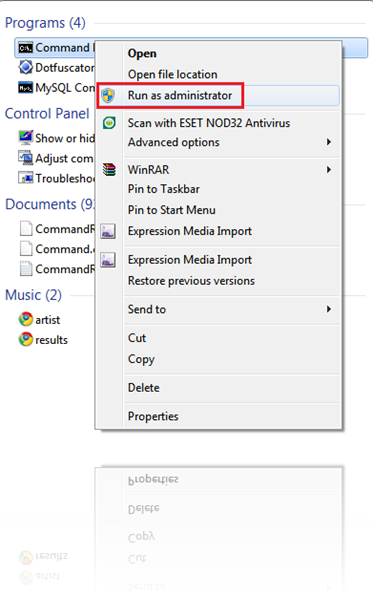
Step 1: Open the command prompt in administrator mode

  • Type ‘cmd’ in the start menu search box:
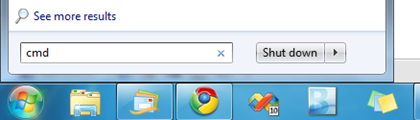
  • Right click on the Program ‘cmd’
  • Select “Run as administrator”:

Step 2: In Command Prompt:

  • Type in the command ‘net user administrator /active:yes’
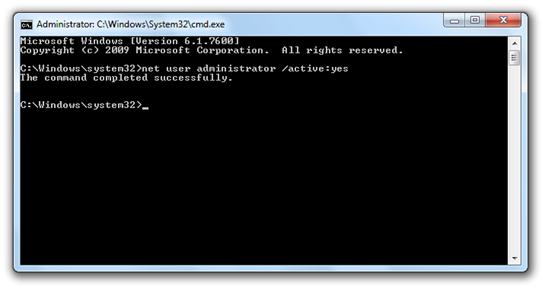
 Windows 7 Cmd

And you are done ! 😀

Logoff and login again and you will now see an option for Administrator login!
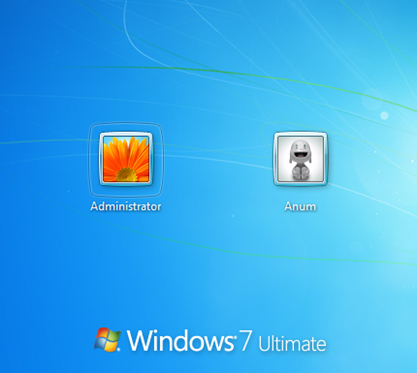
Administrator Account in Windows 7 Ultimate

Note: It is advisable to create a strong password for this account.

Disable the Administrator account:

  • Login with your current user account.
  • Open the command prompt in the administrator mode as in Step 1.
  • Type in the command ‘net user administrator /active:no’
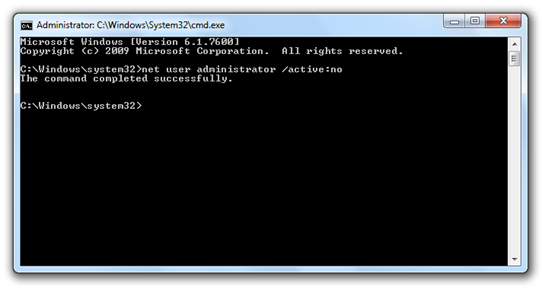
Windows 7 Cmd

And you are done!

Tags
Administrator account in Windows 7Windows 7Windows 7 CenterWindows 7 RTM
ShareTweetSubmitShare
Anum Lodhi
Anum is a student of Software Engineering.
Related

Kodi 21.3 Omega Final APK Android Download And iOS IPA, Along With Windows And Mac Version, Out Now

Oliver Haslam·December 15, 2025
Previous Cover Flow in Windows 7 Media Center
Next Windows 7 DVD Covers
Show Comments (4)

TRENDING NOW

iOS 26.2 Features A New AirDrop Privacy Feature

New iOS 26.4 and iOS 27 Features Have Leaked Ahead Of Release

Kodi 21.3 Omega Final APK Android Download And iOS IPA, Along With Windows And Mac Version, Out Now

Download: iOS 26.3 Beta 1 Released Alongside iPadOS 26.3, macOS 26.3, tvOS 26.3, watchOS 26.3, visionOS 26.3

Apple Car Keys Support Is Coming To Some Toyota Vehicles

Apple’s iPhone Fold Will Offer A Huge Boost To Foldable Display Makers

F1: The Movie Is Now Streaming To Apple TV Subscribers

Jailbreak iOS 26.2: Everything We Know So Far

iPadOS 26

Download: Apple Releases Final Versions Of iPadOS 26.2, macOS 26.2, tvOS 26.2, watchOS 26.2, visionOS 26.2

Download: iOS 26.2 Final OTA Update And IPSW Links Out Now

FOR YOU

This Is Our Best Look At The iPhone 17 Yet, Including A New Orange Color

The iPhone 17 Has Helped Apple Take Top Spot In The Smartphone Market

iOS 26 logo

iOS 26 Will Bring New Features To Messages, CarPlay, And More, Report Claims

This Could Be The iPhone 17’s New Crossbody Strap Accessory

iPhone 17 Tipped For 12GB RAM Upgrade Over iPhone 16’s 8GB

The iPhone 17 Pro Might Finally Get A Charging Feature That’s Been Rumored For Years

iOS 26

iOS 26 Finally Makes It Easier To Set Custom Ringtones On iPhone

iOS 26

Apple Releases Beta 4 Of iOS 26.1, iPadOS 26.1 And More With Liquid Glass Transparency Control Toggle

  • About
  • Advertise
  • Privacy Policy
  • Tip Us
Copyright © 2008-2025 Redmond Pie. All Rights Reserved.
  • About
  • Advertise
  • Privacy Policy
  • Apple
  • Google
  • Microsoft
  • Tesla
  • Reviews
  • Deals
Start typing to see results or hit ESC to close
Apple iPhone deals iPad Android
See all results

SUBSCRIBE

Join 100k+ other tech lovers and get the latest news in your inbox
[mc4wp_form id="389"]