
• December 5, 2025
  • Apple
    Apple

    Apple Announces Its 2025 App Store Awards Winners

    Apple Is Breaking Sales Records Thanks To The iPhone 17

    Apple Makes iOS 26.2 Release Candidate Available To Download

  • Google
    Google

    Google’s Latest Pixel Ad Mocks Apple’s iPhone With A Wicked Twist

    Apple’s AirDrop Now (Sort Of) Works With Android Phones

    Apple’s Next Big Siri Upgrade Could Be Powered By Google

  • Microsoft
    Microsoft

    Apple Is Breaking Sales Records Thanks To The iPhone 17

    10 Best Black Friday Deals Still Available And Worth Checking Out

    Get 4 Outdoor Solar-Powered Smart Cameras For Nearly 50% Off With This Black Friday Deal

  • Tesla
    Tesla

    Tesla Might Add CarPlay, But Android Users Could Be Left Out

    Tesla Launches $36K Model 3, $39K Model Y

    Tesla Cybertruck Available To Order Now In UAE, Saudi Arabia, Qatar

  • Reviews
    Reviews

    VideoProc Converter AI Helps Restore Old Videos Up To 4K [Review]

    Why Choose CZUR StarryHub For Meeting Solution?

    Stellar Repair For MS SQL – Product Review

  • Deals
    Deals

    Samsung’s Galaxy Watch 8 Smartwatch Is Now $120 Off, But Only For Today

    Ditch Your Old Phone And Upgrade To Google’s Pixel 10 Pro for Just $699 Today

    This No-Heat Dyson Airstrait Straightener Is Now A Massive $150 Off

Reading
How To Add Glowing Backlit Apple Logo To iPhone 6 / 6s Or 6 Plus / 6s Plus
ShareTweet
Oliver Haslam·February 21, 2016

How To Add Glowing Backlit Apple Logo To iPhone 6 / 6s Or 6 Plus / 6s Plus

Apple released the original iPhone a good few years ago, many were disappointed that the iconic glowing Apple logo wasn’t part of the design. Sure, there was an Apple logo on the back of the iPhone as you might expect, but there was no glowing to be done and that was a damned shame. Apple has made notebook computers with glowing Apple logos since 1999, and we have found ourselves hoping that each new iPhone announced would feature a similar logo design.

Alas, so far at least, Apple has declined to give us the nostalgia hit we all crave.
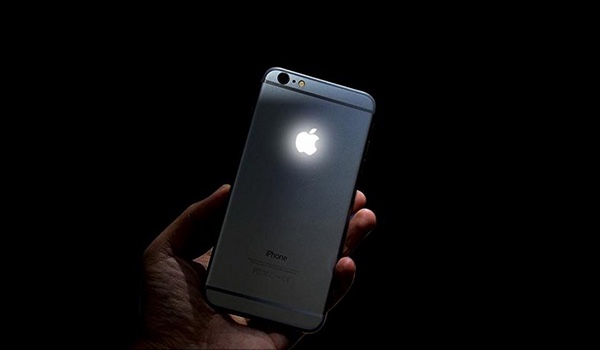
apple logo iPhone

But all is not lost, because if you are using an iPhone 6/6s or an iPhone 6 Plus/6s Plus you can now get your very own glowing Apple logo on your iPhone.

The process of making the logo on the back of an iPhone glow isn’t one for the faint of heart, but the results do speak for themselves. At least in the looks department. The way it works is that you need to basically connect the new backlit logo to the display’s power, so that it is lit based on the brightness of the iPhone’s display. When the display is off, the logo turns off, when the display is on, the logo turns on. This way it hardly has any negative effect on the battery of the iPhone.

The process of installation, which even when outlined via a YouTube video that has been sped up, still manages to run for seven minutes. That means this will need some time and a plan of action before you even begin to get started.

If you do follow this through though, in exchange for your $17 you will get all the kit needed to make an iPhone’s Apple logo glow. Apart from the nerves of steel. You’ll have to provide those yourself unfortunately.
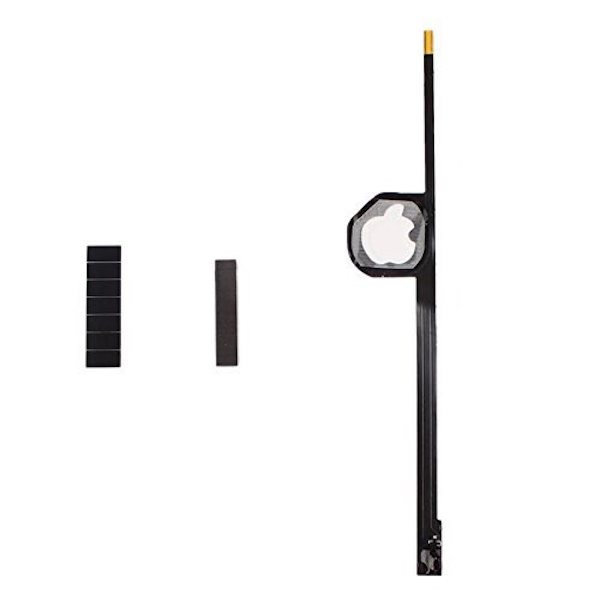
3139Dc5qwuL

Ideally, we would recommend you find a pro with all the right tools and knowhow of the ins and outs of the iPhone to install this thing for you, but if you do decide to forge ahead then it’s important to remember that we cannot be held responsible for any damage to the device as a result of improper dis-assembly and/or installation of this kit. That being said, if you know what you’re doing then good luck to you. We’re jealous already.

Buy: Universal Buying Apple Logo LED Light for iPhone 6 (4.7-inch) from Amazon: $16.99

Buy: Universal Buying Apple Logo LED Light for iPhone 6 Plus (5.5-inch) from Amazon: $18.99

You may also like to check out:

  • Best Low-Cost Alternatives To Apple’s Smart Battery Case For iPhone 6s / 6
  • The Best iPhone 6s / iPhone 6s Plus Cases [List]
  • Add Wireless Charging To iPhone 6s Or iPhone 6s Plus Right Now, Here’s How

You can follow us on Twitter, add us to your circle on Google+ or like our Facebook page to keep yourself updated on all the latest from Microsoft, Google, Apple and the Web.

Tags
AppleApple LogoiPhoneiPhone accessories
ShareTweetSubmitShare
Oliver Haslam
Oliver Haslam has written about technology for over a decade. His work has been published in print at Macworld and online pretty much everywhere else. If it plugs in or has a battery, it's fair game.
Related

Apple Announces Its 2025 App Store Awards Winners

Oliver Haslam·December 4, 2025

Apple Is Breaking Sales Records Thanks To The iPhone 17

Oliver Haslam·December 3, 2025
Previous iPhone 7 Rumor: 3.5mm Headphone Jack To Be Replaced By Dual Stereo Speakers
Next Apple: We Tried To Help But Someone Reset Apple ID Password On San Bernardino iPhone
Show Comments (19)

TRENDING NOW

Apple Announces Its 2025 App Store Awards Winners

Apple Is Breaking Sales Records Thanks To The iPhone 17

Apple Makes iOS 26.2 Release Candidate Available To Download

Your Apple Music Replay 2025 Is Now Available

Cyber Monday All-Time Low Price: Get 2025 M4 MacBook Air For Just $738 Today Only

Cyber Monday Deal: Buy $100 Apple Gift Card And Get Free $15 Amazon Credit

The Best Apple Black Friday 2025 Deals

The iPhone 17 Has Helped Apple Take Top Spot In The Smartphone Market

The First Foldable iPhone Could Cost A Whopping $2,400

Apple’s iOS 27 Will Be About Improved Quality And Performance

FOR YOU

The iPhone 17 Could Be Harder To Scratch Thanks To A New AR Coating

Apple Reportedly Working On Two New iPhone Designs For 2026

Fix iOS 26 ‘Could Not Activate iPhone Activation Error’ After Update On iPhone

How To Disable iPhone Lock Screen Camera Swipe Starting From iOS 26.1

Apple Is Breaking Sales Records Thanks To The iPhone 17

Apple’s iPhone 17 And iPhone 17 Pro Max Are The Strong Sellers, According To A New Report

iOS 26 Compatibility For iPhone Models

iOS 26.0.1 Battery Life Drain Test And Performance Video

  • About
  • Advertise
  • Privacy Policy
  • Tip Us
Copyright © 2008-2025 Redmond Pie. All Rights Reserved.
  • About
  • Advertise
  • Privacy Policy
  • Apple
  • Google
  • Microsoft
  • Tesla
  • Reviews
  • Deals
Start typing to see results or hit ESC to close
Apple iPhone deals iPad Android
See all results

SUBSCRIBE

Join 100k+ other tech lovers and get the latest news in your inbox
[mc4wp_form id="389"]