If you do not have the opportunity to walk around and explore the outdoors for a couple of days, you may wonder how to play Pokémon GO without moving in 2026.
The goal of Pokémon GO is to get you out of the home and outside, and discovering new areas to find Pokémon in. That’s all it is about! But, unfortunately in the real world things don’t always work that way.
A rainy day, a too full of events agenda, or a distance of miles to the nearest PokéStop can make an easy foray into a burden. It’s part and parcel of life. Perhaps, like many others, you wish to enjoy a particular video game but you don’t want to be physically active at all. You can pick the one that fits your lifestyle and comfort; there are a few to choose from, from built-in features like Incense and Remote Raid Passes, to GPS location-changing features for the iPhone.
Can You Play Pokémon GO Without Moving?
It’s a game that utilizes GPS technology available in the phone. The game will display the location you are in, and add PokéStops, Gyms and Routes around you on the map. While walking the map is used to find a location. Sure not the same if you just remain on the couch. The system is very basic and impacts on nearly all aspects of your life.
It’s for this reason that many activities rely on movements. You can find new spawns, spin PokéStops, join in Gym battles, follow Routes and complete distance-challenges; all these require that you be moving. That’s quite an expectation on a hectic weekday. That would be a tough chore for most gamers, if it was happening every day — from not having enough time to having bad weather to a nearly deserted neighborhood.
Events can be a source of stress as well. According to the official Pokémon GO announcement, Community Day is on 12–13 December 2026, Community Day Classic is on 2 January 2027 and Raid Day is on 13 February 2027. It is frustrating not to be able to attend them due to the location. Enter location spoofing: Set the GPS location that your phone thinks it is in, and the game will believe that you are somewhere else!
Common Ways to Play Pokémon GO Without Walking
There are a number of ways to reduce walking. There are trade-offs with each, so here’s a brief overview of them.
1. Using Incense and Lure Modules
Incense will cause Pokémon to show up at any location and Lure Modules will attract them to the PokéStop. They are in-game and not software based. The only drawback is that they only apply to the current location. They’ll not steer you into a new direction. At lunch time, light it and a few should continually appear without you having to move.
2. Using Remote Raid Passes
To take part in a Raid Battle at a different place from the gym, the Remote Raid Pass is a pass available for those who are eligible to participate in a Raid Battle and would like to participate in a Raid Battle without attending the Gym. This is helpful in case raiding can be a long haul or if you are indoors. It’s not that useful for general exploratory but more useful for raiding. One pass for 1 raid will still be needed however if you raid often then it will be more.
3. Using a GPS Location Changer
These can take your virtual location and put it on your iPhone so that you can go other places, but not outside your own home. This one, unlike the first two, just might take you to another city! One of the alternatives for iOS devices is MocPOGO (detailed below).
How to Play Pokémon GO Without Moving Using MocPOGO iOS App
1. What Is MocPOGO iOS App?
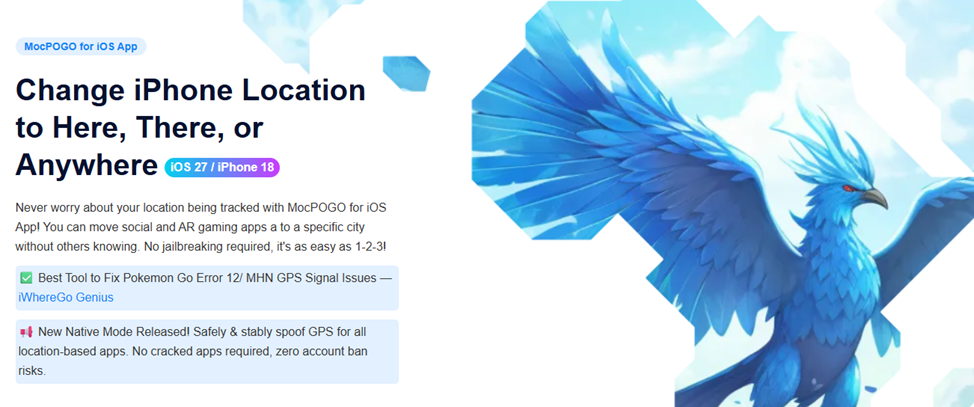
MocPOGO is an iOS GPS location changer. It also allows you to set a virtual GPS location, for people to check out spawns, PokéStops, Gyms etc. in other cities without leaving the house! It is tailored for those who prefer to be flexible, whether that means visiting a Community Day location on a different block or discovering more PokéStops than it’s possible to find on their own block.
2. Key Features of MocPOGO
Here is a list of the current features, followed by a description of what each of these features is good for:
- Teleport Mode: Can jump to a specified point on the map. Best to quickly move to a new area, such as an event that is far away.
- Joystick Mode: Steer a virtual joystick to walk to direction and simulate walking around a spot. It is helpful when making small changes when you get to your destination.
- Route Mode: Will generate or follow a route at a selected speed, and will appear to move smoothly. Great for slowly covering distance.
- Go Catcher: Works like a virtual Pokémon GO Plus, and will automatically catch Pokémon for you so you don’t have to tap through each one.
- POGO Assistant: Additional tools such as IV Preview, Enhanced Throw, Auto-Raid, Quick Raid, Auto Max Battle, Enhanced Radius, Quick Spin, Skip Animations and Auto Hatch Eggs. Great for frequent players.
3. How to Change Your Location Using MocPOGO
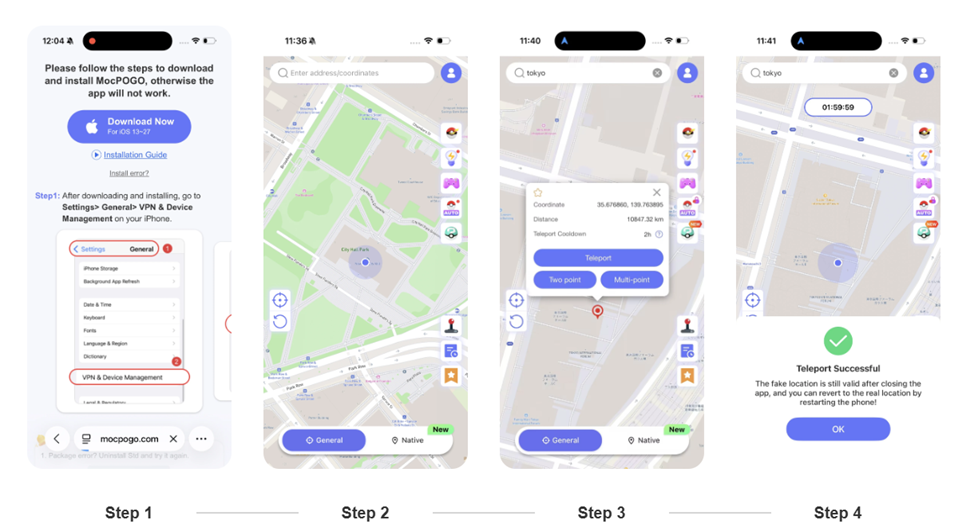
It’s quick, and all you require is your iPhone. Here’s how it goes:
- Install MocPOGO on your iPhone.
- Open the app and complete the device connection and setup that it prompts you to complete.
- Use the map to select a destination and/or enter specific coordinates and confirm.
- Open the Pokémon GO app, and make sure that your virtual location has changed.
The following screen shots demonstrate the same process: installation to successful location change.
Tips for Using a Pokémon GO Spoofer on iOS
A couple of things to keep in mind before attempting any of the spoofers.
1. Learn the Pokémon GO Cooldown Rules.
Certain actions in Pokémon GO have cool down periods, such as catching and spinning directly after a big move. Never rely on a cooldown chart to ensure that your account is safe to use; they can’t. It’s simply common sense to wait an appropriate amount of time before taking a new job in a new location.
2. Do not change locations too often.
The speed at which the player can move from place to place (not far away) causes unnatural patterns of gameplay. It’s the healthier option to do so in a moderate and sensible way. If a trainer is showing up in three countries on one afternoon, he can get some unwanted attention.
3. Check iOS Compatibility
Make sure to verify if it is compatible with your iOS version and iPhone model, and proceed with the official setup procedures. What works may change depending on the changes of the iOS or changes of the game, so please check periodically.
4. Understand the Risks
Third party location tools can be in breach of Pokémon GO’s terms, and could be a cause of anti-cheat measures. No tool can provide any guarantee that you will not get any warnings, suspensions or bans, so use with caution.
Final Thoughts: What’s the Best Way to Play Pokémon GO Without Moving?
There are no winners or losers. Every way is ideal for another need. There’s only one way to change the location here, via a GPS location changer, which has the same potential dangers as mentioned. If it’s only raids you’re looking for then a Remote Raid Pass could be all you need. Incense will supply you with a few more spawns for your home.
For those using an iPhone who need greater control of virtual location, try MocPOGO. Teleport will take you to a new destination in a flash, while Joystick and Route will handle that, Go Catcher will catch you at where you want and POGO Assistant has everything you need for raids, hatching and more!
Regardless, make sure to use the products responsibly and be aware of the potential hazards. Find out if it’s suitable for you by exploring the MocPOGO iOS App and trying it out! Choose what is suited to your style of play.
You may also like to check out:
- Download: iOS 27.2.1 IPSW Links, OTA Update And iPadOS 27.2.1 Released
- Jailbreak iOS 27.2.1: Everything You Need To Know
- How To Fix Bad iOS 27 Battery Life Drain On Your iPhone
You can follow us on X, or Instagram, subscribe to our YouTube channel and even like our Facebook page to keep yourself updated on all the latest from Microsoft, Google, Apple, and the Web.