
• December 3, 2025
  • Apple
    Apple

    Your Apple Music Replay 2025 Is Now Available

    Cyber Monday All-Time Low Price: Get 2025 M4 MacBook Air For Just $738 Today Only

    Cyber Monday Deal: Buy $100 Apple Gift Card And Get Free $15 Amazon Credit

  • Google
    Google

    Google’s Latest Pixel Ad Mocks Apple’s iPhone With A Wicked Twist

    Apple’s AirDrop Now (Sort Of) Works With Android Phones

    Apple’s Next Big Siri Upgrade Could Be Powered By Google

  • Microsoft
    Microsoft

    10 Best Black Friday Deals Still Available And Worth Checking Out

    Get 4 Outdoor Solar-Powered Smart Cameras For Nearly 50% Off With This Black Friday Deal

    Black Friday Deal: Get This Solar-Powered Cellular Trail Camera For Just $29

  • Tesla
    Tesla

    Tesla Might Add CarPlay, But Android Users Could Be Left Out

    Tesla Launches $36K Model 3, $39K Model Y

    Tesla Cybertruck Available To Order Now In UAE, Saudi Arabia, Qatar

  • Reviews
    Reviews

    VideoProc Converter AI Helps Restore Old Videos Up To 4K [Review]

    Why Choose CZUR StarryHub For Meeting Solution?

    Stellar Repair For MS SQL – Product Review

  • Deals
    Deals

    This Room-Filling 85-Inch Mini LED TV From Hisense Is Heavily Discounted To Just $797.96

    This Huge 57-Inch Samsung Odyssey Neo G9 Mini LED Monitor Is $850 Off

    100+ Best Cyber Monday 2025 Deals [List]

Reading
Redsn0w 0.9.6rc11 4.3.1 Untethered Jailbreak Adds Custom Animated Boot Logo Option For iPhone, iPad, iPod touch
ShareTweet
Taimur Asad·April 7, 2011

Redsn0w 0.9.6rc11 4.3.1 Untethered Jailbreak Adds Custom Animated Boot Logo Option For iPhone, iPad, iPod touch

Redsn0w for iOS 4.3.1 untethered jailbreak has just been updated to version 0.9.6rc11. Just like Sn0wbreeze 2.5.1 for Windows, the new Redsn0w 0.9.6rc11 adds a new option to enable custom animated boot logos for iPhone, iPad and iPod touch.
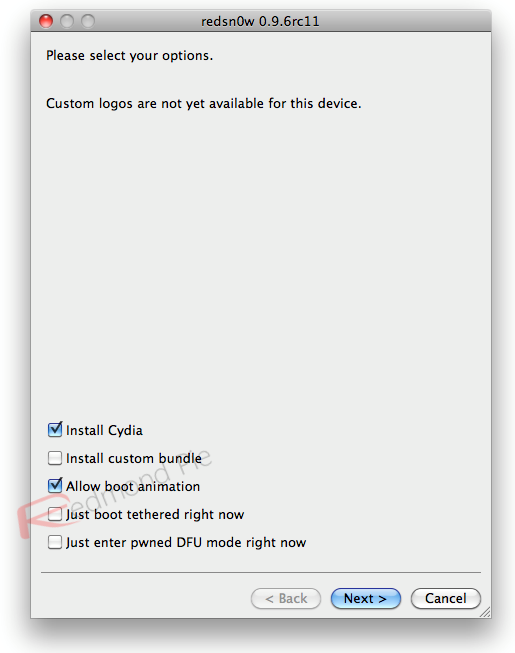
Redsn0w 0.9.6rc11

Those running redsn0w may have noticed we enabled too many Settings options in some versions of the jailbreak (for instance, what you want your side switch to do, even if you have no side switch because you’re not using an iPad).   Release rc10 of redsn0w corrects that (you can just run it over your existing jailbreak…be sure to de-select Cydia to avoid package conflicts).

Along the way, we’ve also added the option to enable boot animations…these animations can be installed via Cydia, but be sure to select which animation to use via the Settings->Bootlogo setting after you’ve downloaded an animation (and again, you can just run rc10 over your existing jailbreak…be sure to de-select Cydia to avoid package conflicts).

(The boot animation we tested against was “Android Boot Logo”.  It correctly installs all the dependencies needed to run the animation at each boot).

Instructions for jailbreaking iOS 4.3.1 untethered using this new version of Redsn0w are exactly similar to the last release. Simply download Redsn0w 0.9.6rc11 for Windows or Mac from the links given below, and then follow our detailed step by step guide posted here to jailbreak iPhone 4, 3GS, iPod touch 4G / 3G, and iPad running the latest iOS 4.3.1 firmware.

Those of you who are already jailbroken on iOS 4.3.1 using Redsn0w 0.9.6rc9 can simply rerun Redsn0w 0.9.6rc11 over the existing jailbreak by selecting “Allow boot animation” option as shown in the screenshot above, but make sure you uncheck “Install Cydia” option to avoid package conflict with the existing jailbreak.

Once done, simply follow the Step 2 onwards in the guide posted here to install “Apple Boot Logo” (aka Animate), and you’re well on your way to some animated goodness.

NOTE: Those of you who rely on a carrier unlock MUST STAY AWAY from Redsn0w and stock iOS 4.3.1 firmware.

Download iOS 4.3.1 for iPhone 4, 3GS, 3G, iPad, iPod touch
Download Redsn0w 0.9.6rc11 for Windows
Download Redsn0w 0.9.6rc11 for Mac
Download iTunes 10.2.1 for Windows or Mac

You can follow me on Twitter or join our Facebook fanpage to keep yourself updated on all the latest iPhone jailbreaking and unlocking releases.

Tags
animateboot logoiOS 4.3.1jailbreak ios 4.3.1Redsn0wredsn0w 0.9.6untethered jailbreak
ShareTweetSubmitShare
Taimur Asad
Editor-in-Chief / CEO / Founder Redmond Pie.
Related

Your Apple Music Replay 2025 Is Now Available

Oliver Haslam·December 2, 2025

Cyber Monday All-Time Low Price: Get 2025 M4 MacBook Air For Just $738 Today Only

Taimur Asad·December 1, 2025
Previous How To Enable Custom Animated Boot Logo On iOS 4.3.1 iPhone, iPad, iPod touch, Jailbroken with Redsn0w / Sn0wbreeze
Next Atari Brings 100 Arcade And Classic 2600 Games To iPhone, iPad, iPod touch
Show Comments (0)

TRENDING NOW

Your Apple Music Replay 2025 Is Now Available

Cyber Monday All-Time Low Price: Get 2025 M4 MacBook Air For Just $738 Today Only

Cyber Monday Deal: Buy $100 Apple Gift Card And Get Free $15 Amazon Credit

The Best Apple Black Friday 2025 Deals

The iPhone 17 Has Helped Apple Take Top Spot In The Smartphone Market

The First Foldable iPhone Could Cost A Whopping $2,400

Apple’s iOS 27 Will Be About Improved Quality And Performance

Google’s Latest Pixel Ad Mocks Apple’s iPhone With A Wicked Twist

Apple’s New Hikawa Phone Grip And Stand Is A $70 Limited Time Accessory

Apple’s AirDrop Now (Sort Of) Works With Android Phones

FOR YOU

iOS 26

iOS 26 Battery Life On iPhone Gets Extended Thanks To New ‘Adaptive Power’ Feature

CarPlay

iOS 26 CarPlay Adds AirPlay Video Playback Support

iPhone Air, iPhone 17, iPhone 17 Pro Max Available To Pre-Order Now

iOS 26

These 8 iOS 26 Features Will Work On iPhone 15 Pro And Newer Only

iOS 26

iOS 26 Adds eSIM Transfer Support From Android To iPhone And Vice Versa

iOS 26

iOS 26 Public Beta: How To Install The Update On iPhone

HomeKit In iOS 26 Is Adding New EnergyKit Framework

Big New iPhone Redesigns Coming Each Year Through 2027, Report Claims

  • About
  • Advertise
  • Privacy Policy
  • Tip Us
Copyright © 2008-2025 Redmond Pie. All Rights Reserved.
  • About
  • Advertise
  • Privacy Policy
  • Apple
  • Google
  • Microsoft
  • Tesla
  • Reviews
  • Deals
Start typing to see results or hit ESC to close
Apple iPhone deals iPad Android
See all results

SUBSCRIBE

Join 100k+ other tech lovers and get the latest news in your inbox
[mc4wp_form id="389"]