
• December 13, 2025
  • Apple
    Apple

    Apple’s iPhone Fold Will Offer A Huge Boost To Foldable Display Makers

    F1: The Movie Is Now Streaming To Apple TV Subscribers

    Jailbreak iOS 26.2: Everything We Know So Far

  • Google
    Google

    Google’s First AI Smart Glasses Will Debut In 2026

    Google’s Latest Pixel Ad Mocks Apple’s iPhone With A Wicked Twist

    Apple’s AirDrop Now (Sort Of) Works With Android Phones

  • Microsoft
    Microsoft

    Get Microsoft Windows 11 And More For Just $14 With These Christmas Microsoft Software Deals

    Apple Is Breaking Sales Records Thanks To The iPhone 17

    10 Best Black Friday Deals Still Available And Worth Checking Out

  • Tesla
    Tesla

    Tesla’s 2025 Holiday Software Update Is Now Rolling Out

    Tesla Might Add CarPlay, But Android Users Could Be Left Out

    Tesla Launches $36K Model 3, $39K Model Y

  • Reviews
    Reviews

    VideoProc Converter AI Helps Restore Old Videos Up To 4K [Review]

    Why Choose CZUR StarryHub For Meeting Solution?

    Stellar Repair For MS SQL – Product Review

  • Deals
    Deals

    Enjoy VR Gaming With $100 Off This PlayStation VR2 Headset Today

    The Fan-Favorite Dyson Airwrap Hair Multi-Styler Is 26% Off, Now $479 Only

    Save 30% Off This 2.5L LEVOIT Top Fill Bedroom Humidifier For Limited Time

Reading
How To Enable Two-Step Verification For Microsoft Account (Outlook / Hotmail, Skype, Xbox Live)
ShareTweet
Ben Reid·April 18, 2013

How To Enable Two-Step Verification For Microsoft Account (Outlook / Hotmail, Skype, Xbox Live)

Two-step verification procedure for owners of Microsoft Accounts has been officially announced by the Redmond-based software company. The new system, which is entirely optional, will help bolster the security of users’ accounts by including an additional verification process featuring codes. And we have a complete guide on how to enable two-step verification on your Microsoft Account right after the jump!

The protection of these kinds of accounts, which naturally include much sensitive data, is of paramount importance to any company offering them, and Microsoft has long since been said to be looking for a more robust solution to ensure account holders feel they can fully rely on the software maker’s services.

1172.good

If you are indeed a Microsoft Account holder, you’ll be more than aware of the fact that many segments of your account, like editing credit card information, have for a good while supported a two-pronged authentication system. But this new update will see the screws tightened across the board, so no matter what type of data you’re accessing, full protection will be a certainty. Whereas before, for example, you might have been able to access your mailbox with just one step of verification, you can now ensure your emails are kept locked away from potentially prying eyes.

Two-step verification will protect your Microsoft account wherever you may be using it, including but not limited to, Windows 8, Xbox, desktop or mobile Web browsers, Microsoft apps and services on iOS and Android devices.

Note: On devices such as the Xbox 360, iPhone, iPad, or Android phones/tabs which does not directly support two-step verification for Microsoft Accounts, Microsoft will allow you to generate a unique password to access your MS Accounts using the web interface.

If you have an app or device that doesn’t directly support two-step verification (like your Xbox, or setting up email on your smartphone), you can still use two-step verification. For these devices, we’ll help you set up an app password unique to each application or device.

How to enabled two-step verification on your Microsoft Account

Step 1: Head over to account.live.com/proofs/Manage and sign in with your Microsoft Account. Sign in with your credentials.
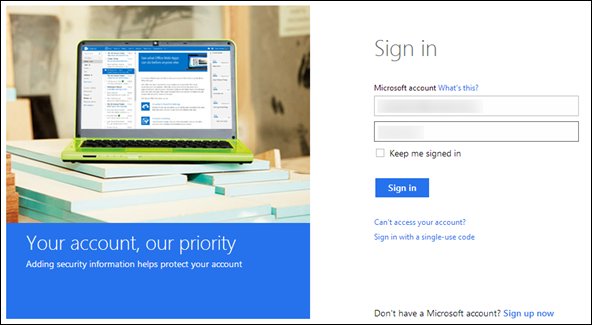
Step 1

Step 2: Under Overview –> Security info, Enter your phone number and alternate email address. This is where a verification code would be sent to you.
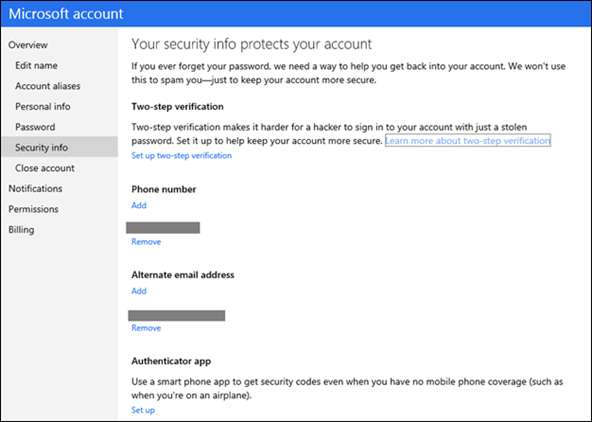
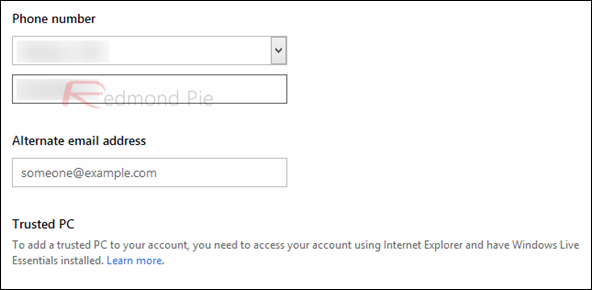
MicrosoftAccountTwoStep

2

Step 3: Hit Save.

Step 4: You will now be taken to a new screen where you’ll be asked to enter the verification code which has been sent to you via SMS or email. Enter the code and hit enter.

Step 5: That’s it, you’re all set and now have two-step verification enabled on your Microsoft Account.

Accompanying the new authentication feature is an app for Windows Phone named Authenticator which offers standard protocol for two-factor verification codes to be used offline.

Authenticator

While there’s no sign of a similar offering from Microsoft for Android or iOS yet, Microsoft notes that most authenticator apps on other platforms are compatible with Microsoft’s two-step verification.
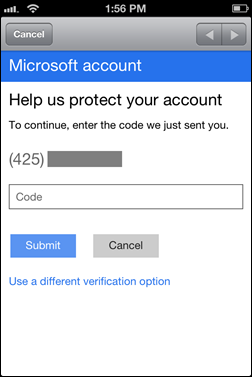
MSTwoStepiPhone

You can follow us on Twitter, add us to your circle on Google+ or like our Facebook page to keep yourself updated on all the latest from Microsoft, Google, Apple and the web.

Tags
MicrosoftMicrosoft AccountTwo Step Verification
ShareTweetSubmitShare
Ben Reid
Reporter.
Related

Get Microsoft Windows 11 And More For Just $14 With These Christmas Microsoft Software Deals

Oliver Haslam·December 10, 2025

Apple Is Breaking Sales Records Thanks To The iPhone 17

Oliver Haslam·December 3, 2025
Previous Alleged Photo Of Low-End iPhone’s Plastic Rear Shell Leaks Onto The Web [IMAGE]
Next iPad 5 To Be 15% Thinner, 25% Lighter Than iPad 4 [Report]
Show Comments (1)

TRENDING NOW

Apple’s iPhone Fold Will Offer A Huge Boost To Foldable Display Makers

F1: The Movie Is Now Streaming To Apple TV Subscribers

Jailbreak iOS 26.2: Everything We Know So Far

iPadOS 26

Download: Apple Releases Final Versions Of iPadOS 26.2, macOS 26.2, tvOS 26.2, watchOS 26.2, visionOS 26.2

Download: iOS 26.2 Final OTA Update And IPSW Links Out Now

2026 Porsche Cayenne And Macan Support For Apple Digital Keys Nears

Apple Releases Second RC Of iOS 26.2 To Testers

Apple’s New F1 Streaming Deal Previewed As 2025 Season Draws To A Close

Mac Users Can Get Christmas-Ready Lights And Snow To Their Mac With This App

Apple’s Hypertension, Sleep Apnea, And Hearing Health Features Come To New Countries

FOR YOU

iOS 26 Beta 6 New Changes, Release Notes And Features

Apple’s Launching iPhone 17 Pro In September, Here’s What to Expect

The iPhone 17 Could Be Harder To Scratch Thanks To A New AR Coating

AirPods Pro 3 Owners Will Need An iPhone Air Or iPhone 17 For This New Feature

All iPhone 17 Models To Reportedly Feature ProMotion Displays

Jailbreak iOS 26: What You Need To Know

iPhone 17 Pro To Keep Triangular Camera Layout But Aluminum Camera Bump Expected

Download iOS 26 RC IPSW Links, OTA Update For iPhone Here

  • About
  • Advertise
  • Privacy Policy
  • Tip Us
Copyright © 2008-2025 Redmond Pie. All Rights Reserved.
  • About
  • Advertise
  • Privacy Policy
  • Apple
  • Google
  • Microsoft
  • Tesla
  • Reviews
  • Deals
Start typing to see results or hit ESC to close
Apple iPhone deals iPad Android
See all results

SUBSCRIBE

Join 100k+ other tech lovers and get the latest news in your inbox
[mc4wp_form id="389"]